
การแนะนำ
Thank you for choosing the Casio G-Shock GW-M5600A-7ER. This watch combines robust G-Shock durability with advanced radio-controlled timekeeping and solar power technology. This manual provides essential information for proper setup, operation, and maintenance of your watch. Please read it carefully to ensure optimal performance and longevity.
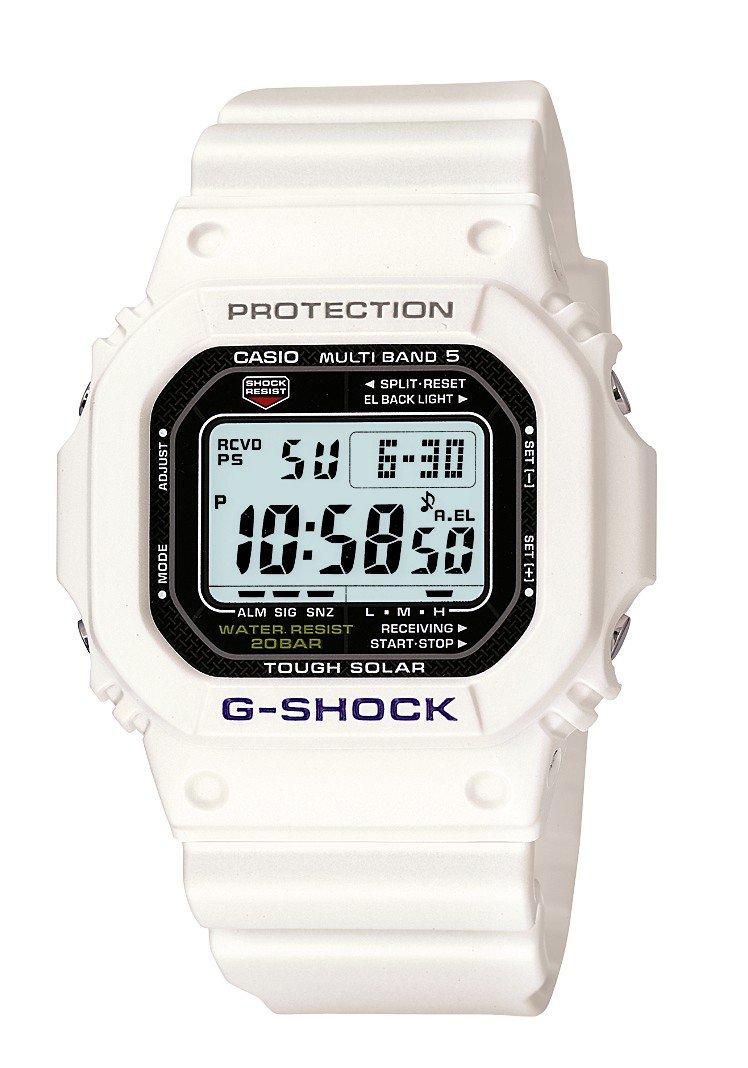
ภาพ: ด้านหน้า view of the Casio G-Shock GW-M5600A-7ER watch, showcasing its digital display and resin strap.
คุณสมบัติหลัก
- ระบบจับเวลาด้วยคลื่นวิทยุ: Automatically receives time calibration signals for accurate timekeeping.
- พลังงานแสงอาทิตย์: Equipped with a solar panel that converts light into electrical power, eliminating the need for battery replacement.
- กันน้ำได้ลึก 200 เมตร: Suitable for swimming, snorkeling, and diving (excluding saturation diving).
- ความต้านทานแรงกระแทก: ออกแบบมาเพื่อทนต่อแรงกระแทกและการสั่นสะเทือน
- จอแสดงผลดิจิตอล: Clear and easy-to-read digital time and function display.
- ฟังก์ชั่นนาฬิกาจับเวลา: Measures elapsed time, split time, and 1st-2nd place times.
- ฟังก์ชั่นปลุก: Multiple daily alarms and an hourlสัญญาณเวลา y
- เวลาโลก: แสดงเวลาปัจจุบันในเมืองใหญ่และพื้นที่เฉพาะต่างๆ ทั่วโลก
- กระจกมิเนรัล: Protective, scratch-resistant hard mineral lens.
- โครงสร้างเรซินทนทาน: High-performance and durable resin case and strap.
การตั้งค่า
1. การชาร์จครั้งแรก
Your watch is powered by a solar cell. Before initial use, expose the watch face to bright light for several hours to ensure it is sufficiently charged. The watch may arrive with a low charge, indicated by a flashing 'CHG' or 'LOW' indicator on the display. Avoid prolonged storage in dark places.
2. การเลือกเมืองที่อยู่อาศัยของคุณ
The Home City setting is crucial for correct time calibration and World Time functionality. Refer to the detailed instructions in the full manual for specific button operations to set your Home City. This setting determines which time calibration signal the watch attempts to receive.
3. Time Calibration Signal Reception
The watch automatically attempts to receive a time calibration signal up to six times a day (or five times a day for the Chinese calibration signal). For optimal reception, place the watch near a window at night, away from metal objects and electronic devices. Manual reception can also be initiated:
- In Timekeeping Mode, hold down the 'A' button (top left) for several seconds until the current time calibration status appears.
- Press the 'D' button (bottom right) to initiate manual reception.
- The watch will display 'RCVD' upon successful reception.
คำแนะนำการใช้งาน
โหมดการนำทาง
Press the 'C' button (bottom left) to cycle through the different modes:
- โหมดบอกเวลาปกติ: แสดงเวลาและวันที่ปัจจุบัน
- โหมดเวลาโลก: แสดงเวลาปัจจุบันในเขตเวลาต่างๆ
- โหมดปลุก: ตั้งค่าและเปิดใช้งานนาฬิกาปลุกรายวัน
- โหมดนาฬิกาจับเวลา: วัดเวลาที่ผ่านไป
- โหมดจับเวลาถอยหลัง: Set a countdown from a specified time.
การใช้นาฬิกาจับเวลา
- Navigate to Stopwatch Mode using the 'C' button.
- Press the 'D' button (bottom right) to start/stop the stopwatch.
- Press the 'B' button (top right) to record split times or reset the stopwatch when stopped.
การตั้งค่าสัญญาณเตือน
- Navigate to Alarm Mode using the 'C' button.
- Hold down the 'A' button (top left) until the alarm time starts flashing.
- Use the 'B' and 'D' buttons to adjust the hour and minute settings.
- Press 'A' to confirm and exit the setting screen.
- Press 'D' to toggle the alarm ON/OFF.
การส่องสว่าง
Press the 'B' button (top right) to illuminate the display for easy viewing in low light conditions. The duration of illumination can be adjusted in the watch settings.
การซ่อมบำรุง
การชาร์จนาฬิกา
To maintain optimal performance, ensure your watch is regularly exposed to light. The power indicator on the display shows the current charge level. If the charge level is low, expose the watch to direct sunlight or strong artificial light. Avoid covering the watch face when charging.
การทำความสะอาด
เช็ดนาฬิกาด้วยผ้าแห้งนุ่มๆ เพื่อขจัดสิ่งสกปรกและความชื้น สำหรับคราบสกปรกที่ติดแน่น ให้ใช้ผ้านุ่มๆ เช็ดอีกครั้งampล้างออกด้วยน้ำและผงซักฟอกอ่อนๆ ที่เป็นกลาง แล้วเช็ดให้แห้ง หลีกเลี่ยงการใช้สารระเหย เช่น ทินเนอร์หรือเบนซิน เพราะอาจทำให้ส่วนประกอบของเรซินเสียหายได้
ข้อควรระวังในการกันน้ำ
While your watch is water-resistant to 200 meters, it is important to observe the following:
- ห้ามกดปุ่มขณะที่นาฬิกาเปียกหรือจมอยู่ใต้น้ำ
- Avoid exposing the watch to hot water or steam (e.g., in showers, saunas) as this can compromise seals.
- After exposure to saltwater, rinse the watch thoroughly with fresh water and wipe dry.
การแก้ไขปัญหา
Time Not Syncing
- ตรวจสอบการตั้งค่าเมืองหลัก: Ensure your Home City is correctly set to a region that receives time calibration signals.
- Reception Environment: Move the watch to a location with better signal reception, ideally near a window, away from electronic interference.
- การรับสัญญาณด้วยตนเอง: Attempt a manual time calibration signal reception (refer to Setup section).
- ระดับการชาร์จ: Ensure the watch has sufficient charge. Low power can affect signal reception.
หน้าจอว่างเปล่าหรือมืดสนิท
- ระดับการชาร์จ: The watch may be in power-saving mode or have a very low charge. Expose it to bright light for an extended period.
- ประหยัดพลังงาน: The watch enters power-saving mode when left in the dark for a certain period. Press any button or expose it to light to reactivate the display.
ปุ่มไม่ตอบสนอง
- รีเซ็ต: In rare cases, a full reset might be necessary. Consult the full Casio manual for your specific module number (usually found on the watch's case back) for detailed reset procedures.
- น้ำ: Ensure the watch is completely dry if it has been exposed to water.
ข้อมูลจำเพาะ
| หมายเลขรุ่น | GW-M5600A-7ER |
| ผู้ผลิต | จี-ช็อค |
| ประเภทจอภาพ | ดิจิตอล |
| ความเคลื่อนไหว | ควอตซ์ |
| แหล่งพลังงาน | พลังงานแสงอาทิตย์ |
| ความลึกของการต้านทานน้ำ | 200 เมตร |
| ประเภทวัสดุตัวเรือน | เรซิน |
| ประเภทวัสดุของสาย | เรซิน |
| ประเภทวัสดุหน้าปัดหน้าต่าง | แร่ธาตุ |
| เส้นผ่านศูนย์กลางตัวเรือน | 49 มม. |
| ความหนาของเคส | 17 มม. |
| ความกว้างของแถบ | 25 มม. |
| ประเภทตัวล็อค | หัวเข็มขัดทรงถัง |
| รูปร่างรายการ | สี่เหลี่ยม |
| สีแถบ | สีขาว |
| สีหน้าปัด | สีเทา |
การรับประกันและการสนับสนุน
Your Casio G-Shock GW-M5600A-7ER watch comes with a การรับประกันจากผู้ผลิต 2 ปีการรับประกันนี้ครอบคลุมข้อบกพร่องด้านวัสดุและฝีมือการผลิตภายใต้การใช้งานปกติ โปรดเก็บหลักฐานการซื้อไว้เพื่อขอรับสิทธิ์การรับประกัน
For detailed warranty terms, service, or technical support, please refer to the official Casio website or contact your local authorized Casio service center. Contact information can typically be found in the full product manual or on the manufacturer's webเว็บไซต์.