
cellularline BTCLIPARDP
Cellularline Roller Clip Bluetooth Headset User Manual
Model: BTCLIPARDP
การแนะนำ
The Cellularline Roller Clip Bluetooth Headset is designed for convenient, hands-free communication. Featuring a retractable cable and a wireless Bluetooth clip, this headset offers flexibility and ease of use. It supports simultaneous connection to two mobile phones, automatically activating when a call is received or made on either device. Its automatic cable winder ensures a tidy experience, making it ideal for users who prefer to wear the headset only during calls.
สินค้าเกินview
Familiarize yourself with the components and features of your Cellularline Roller Clip Bluetooth Headset.

รูปที่ 1: ด้านหน้า view of the Cellularline Roller Clip Bluetooth Headset, showing the main unit with the retractable earbud.
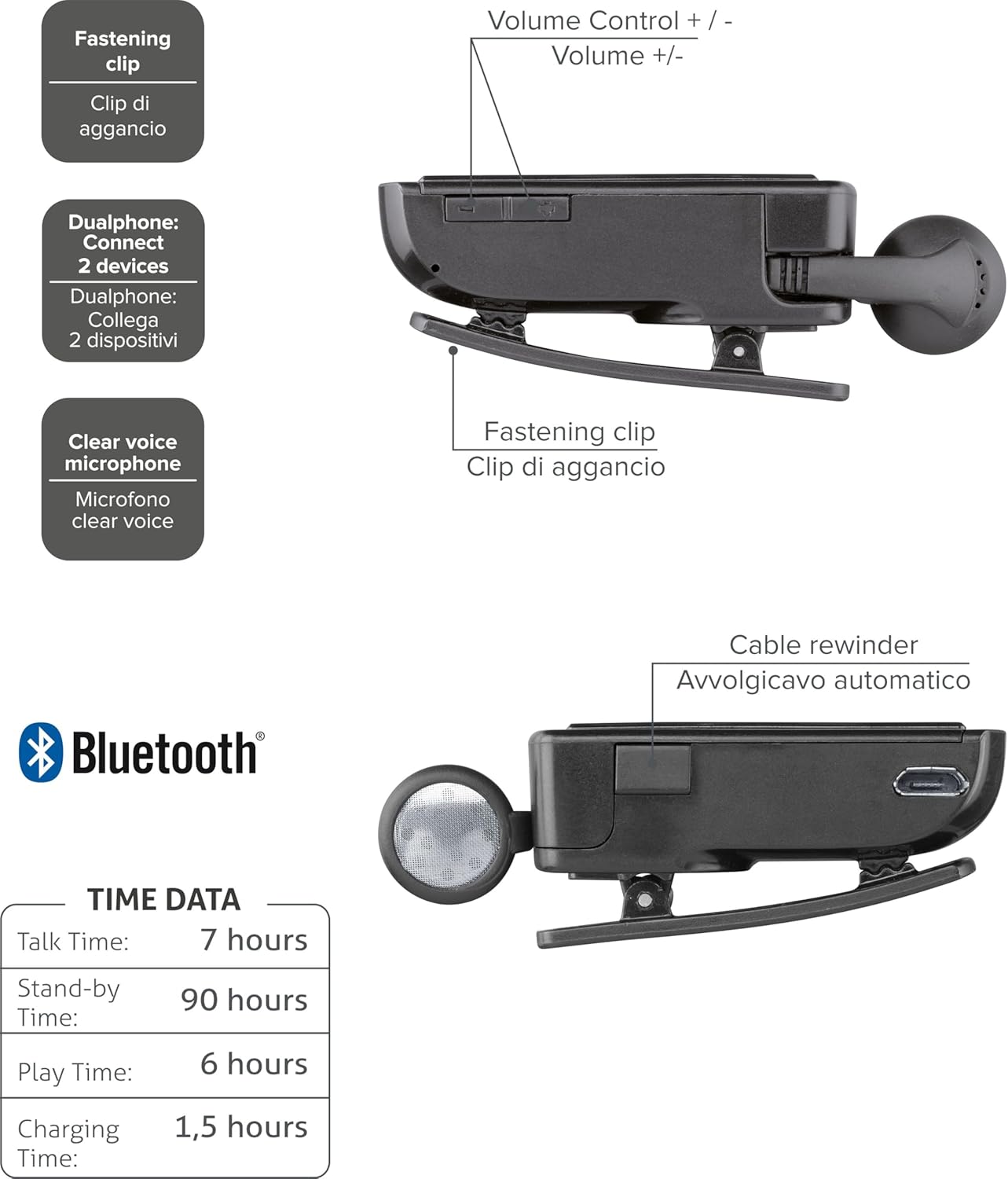
รูปที่ 2: Diagram illustrating key features including the fastening clip, volume controls, dualphone connectivity, clear voice microphone, and cable rewinder.
- Retractable Earbud: The earbud cable automatically retracts into the main unit for compact storage.
- Bluetooth Clip: The main unit features a clip for attaching to clothing.
- การควบคุมระดับเสียง: Buttons located on the side for adjusting audio volume.
- การเชื่อมต่อหลายจุด: สามารถเชื่อมต่อกับโทรศัพท์มือถือสองเครื่องพร้อมกันได้
- Clear Voice Microphone: Ensures clear audio transmission during calls.
- พอร์ตไมโครยูเอสบี: สำหรับการชาร์จอุปกรณ์
การตั้งค่า
1. การชาร์จชุดหูฟัง
Before first use, fully charge the headset. Use the provided Micro-USB cable to connect the headset to a USB power source (e.g., computer USB port or wall adapter).
- ไฟแสดงสถานะการชาร์จจะสว่างขึ้นขณะทำการชาร์จ
- โดยทั่วไปการชาร์จเต็มจะใช้เวลาประมาณ 1.5 ชั่วโมง
- ไฟแสดงสถานะจะเปลี่ยนสีหรือดับลงเมื่อการชาร์จเสร็จสมบูรณ์

รูปที่ 3: ด้านข้าง view of the headset showing the Micro-USB charging port.
2. การจับคู่กับอุปกรณ์เคลื่อนที่
To use the headset, it must be paired with your Bluetooth-enabled mobile phone or device.
- ตรวจสอบให้แน่ใจว่าชุดหูฟังปิดอยู่
- Press and hold the Multi-function button (usually the main power button) until the indicator light flashes blue and red alternately, indicating pairing mode.
- บนอุปกรณ์เคลื่อนที่ของคุณ เปิดใช้งานบลูทูธและค้นหาอุปกรณ์ใหม่
- Select "Cellularline Roller Clip" or a similar name from the list of available devices.
- หากระบบขอให้ป้อนรหัสผ่าน ให้ป้อน "0000" (เลขศูนย์สี่ตัว)
- เมื่อจับคู่เสร็จแล้ว ไฟแสดงสถานะจะกะพริบเป็นสีน้ำเงินช้าๆ และคุณอาจได้ยินเสียงยืนยัน
3. Connecting to Two Devices (Multi-point)
The headset can be connected to two mobile phones simultaneously.
- Pair the headset with the first mobile device as described above.
- ปิดใช้งานบลูทูธบนอุปกรณ์ตัวแรก
- Put the headset back into pairing mode and pair it with the second mobile device.
- Once paired with the second device, re-enable Bluetooth on the first device.
- The headset should now be connected to both devices. It will automatically switch to the active call on either phone.
คำแนะนำการใช้งาน
เปิด/ปิดเครื่อง
- เปิดเครื่อง: Press and hold the Multi-function button for approximately 3 seconds until the blue indicator light flashes.
- หมดแรง: Press and hold the Multi-function button for approximately 3 seconds until the red indicator light flashes and then turns off.
การโทรออกและรับสาย
- รับสาย: กดปุ่มมัลติฟังก์ชั่นหนึ่งครั้งเมื่อมีสายเรียกเข้า
- วางสาย: กดปุ่มมัลติฟังก์ชันหนึ่งครั้งในระหว่างการโทร
- ปฏิเสธสาย: กดปุ่มมัลติฟังก์ชั่นค้างไว้ประมาณ 2 วินาทีเมื่อมีสายเรียกเข้า
- โทรซ้ำหมายเลขล่าสุด: Double-press the Multi-function button when the headset is idle.
- การโทรออกด้วยเสียง (หากโทรศัพท์รองรับ): Press and hold the Multi-function button for approximately 1 second when the headset is idle.
การควบคุมระดับเสียง
Adjust the call or media volume using the dedicated volume buttons on the side of the headset.

รูปที่ 4: ด้านข้าง view of the headset showing the volume control buttons.
- ปรับระดับเสียงขึ้น: กดปุ่ม '+'
- ลดเสียงลง: กดปุ่ม '-'
สายพับเก็บได้
To extend the earbud, gently pull it out. To retract, press the cable winder button (if present) or gently pull the cable slightly further and release to activate the retraction mechanism.
การซ่อมบำรุง
- การทำความสะอาด: เช็ดหูฟังด้วยผ้าแห้งนุ่มๆ ห้ามใช้สารทำความสะอาดที่มีฤทธิ์กัดกร่อนหรือตัวทำละลาย
- พื้นที่จัดเก็บ: เก็บหูฟังไว้ในที่แห้งและเย็น หลีกเลี่ยงแสงแดดโดยตรงและอุณหภูมิที่สูงหรือต่ำเกินไป
- การดูแลแบตเตอรี่ เพื่อยืดอายุการใช้งานแบตเตอรี่ ควรหลีกเลี่ยงการใช้แบตเตอรี่จนหมดบ่อยๆ ชาร์จหูฟังเป็นประจำ แม้จะไม่ได้ใช้งานเป็นเวลานานก็ตาม
- การดูแลสายเคเบิล: Avoid forcefully pulling the retractable cable. Allow the automatic winder to retract the cable smoothly.
การแก้ไขปัญหา
| ปัญหา | สาเหตุที่เป็นไปได้ | สารละลาย |
|---|---|---|
| หูฟังไม่สามารถเปิดเครื่องได้ | แบตเตอรี่อ่อน | ชาร์จหูฟังให้เต็ม |
| ไม่สามารถเชื่อมต่อชุดหูฟังได้ | ชุดหูฟังไม่ได้อยู่ในโหมดจับคู่; บลูทูธถูกปิดใช้งานบนอุปกรณ์; อุปกรณ์อยู่ไกลเกินไป | Ensure headset is in pairing mode (flashing red/blue). Enable Bluetooth on your device. Move headset closer to the device. |
| ไม่มีเสียงหรือคุณภาพเสียงไม่ดี | ระดับเสียงเบาเกินไป; ไม่ได้เชื่อมต่อหูฟัง; มีสัญญาณรบกวน | Increase volume on both headset and phone. Reconnect the headset. Move away from other electronic devices. |
| สายเคเบิลแบบยืดหดได้ทำงานไม่ราบรื่น | กลไกการอุดตันหรือเสียหาย | Ensure no debris is obstructing the cable. Avoid forceful pulling. If damaged, contact support. |
| Cannot connect to two devices. | ลำดับการจับคู่ไม่ถูกต้อง | Follow the multi-point pairing instructions carefully (pair first, disable Bluetooth, pair second, re-enable first). |
ข้อมูลจำเพาะ
| คุณสมบัติ | รายละเอียด |
|---|---|
| หมายเลขรุ่น | BTCLIPARDP |
| ยี่ห้อ | เซลลูล่าร์ไลน์ |
| สี | Black/Grey (Schwarz) |
| การวางตำแหน่งหู | ในหู |
| ฟอร์มแฟกเตอร์ | ในหู |
| อิมพีแดนซ์ | 32 โอห์ม |
| ขนาดสินค้า | 9 x 2.4 x 11 ซม.; 50 กรัม |
| ประเภทแบตเตอรี่ | แบตเตอรี่ลิเธียมไอออน 1 ก้อน |
| เวลาสนทนา | นานถึง 7 ชั่วโมง |
| เวลาสแตนด์บาย | นานถึง 90 ชั่วโมง |
| เวลาเล่น | นานถึง 6 ชั่วโมง |
| เวลาในการชาร์จ | ประมาณ 1.5 ชั่วโมง |
การรับประกันและการสนับสนุน
For warranty information and technical support, please refer to the official Cellularline webหรือติดต่อฝ่ายบริการลูกค้าโดยตรง โปรดเก็บหลักฐานการซื้อไว้เพื่อใช้ในการเคลมประกัน
หากต้องการความช่วยเหลือเพิ่มเติม คุณสามารถเยี่ยมชม product page on Amazon.ae.
Ask a question about this manual
Ask about setup, troubleshooting, compatibility, parts, safety, or missing instructions. Manuals+ will review the question and use this page’s manual context to help answer it.