
การแนะนำ
The GIGABYTE GM-M7600 is a wireless precision optical mouse designed for comfortable and reliable use. This manual provides instructions for setting up, operating, maintaining, and troubleshooting your device.
เนื้อหาแพ็คเกจ
กรุณาตรวจสอบเนื้อหาในแพ็คเกจเพื่อให้แน่ใจว่ามีสินค้าครบทั้งหมด:
- GIGABYTE GM-M7600 Wireless Optical Mouse
- Portable Nano USB Receiver
- แบตเตอรี่ AAA 2 ก้อน
การตั้งค่า
1. การติดตั้งแบตเตอรี่
The GM-M7600 mouse requires two AAA batteries for operation. The batteries are included in the package.
- ค้นหาฝาปิดช่องใส่แบตเตอรี่ที่ด้านล่างของเมาส์
- เลื่อนหรือยกฝาขึ้นเบาๆ เพื่อเปิดช่อง
- ใส่แบตเตอรี่ AAA สองก้อน โดยตรวจสอบให้แน่ใจว่าขั้วบวก (+) และขั้วลบ (-) ตรงกับเครื่องหมายภายในช่องใส่แบตเตอรี่อย่างถูกต้อง
- ปิดฝาช่องใส่แบตเตอรี่ให้แน่น
2. การเชื่อมต่อตัวรับสัญญาณ USB
The mouse connects to your computer via a portable Nano USB receiver.
- Locate the Nano USB receiver. It may be stored inside the mouse's battery compartment or packaged separately.
- Plug the Nano USB receiver into an available USB port on your computer (Laptop or Personal Computer).
- Your operating system (e.g., Windows XP, Linux) should automatically detect and install the necessary drivers. This process may take a few moments.
- เมื่อติดตั้งไดรเวอร์เสร็จแล้ว เมาส์ก็พร้อมใช้งานได้ทันที
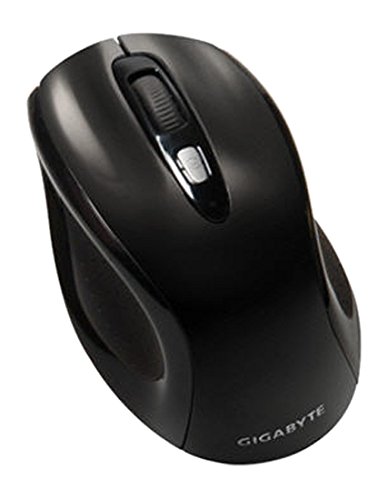
รูปที่ 1: GIGABYTE GM-M7600 Wireless Optical Mouse. This image displays the ergonomic design of the mouse, highlighting its form factor and the location of its buttons. The Nano USB receiver is typically stored within the mouse or connected to a computer's USB port.
คำแนะนำการใช้งาน
1. การเปิด/ปิดเครื่อง
The mouse typically has a power switch on its underside. Slide the switch to the 'ON' position to activate the mouse. Slide it to 'OFF' when not in use to conserve battery life.
2. การปรับ DPI (ความไว)
The GM-M7600 features an adjustable DPI switch, allowing you to change the mouse sensitivity between 800 DPI and 1600 DPI. This switch is usually located near the scroll wheel. Press the DPI button to toggle between the two sensitivity settings.
3. ฟังก์ชันพื้นฐานของเมาส์
- คลิกซ้าย: ปุ่มหลักสำหรับเลือกรายการ เปิด fileและปฏิสัมพันธ์กับซอฟต์แวร์
- คลิกขวา: ปุ่มรองสำหรับเข้าถึงเมนูบริบทและตัวเลือกเพิ่มเติม
- ล้อเลื่อน: ใช้สำหรับเลื่อนดูเอกสารและ web หน้าต่างๆ นอกจากนี้ยังสามารถใช้งานเป็นปุ่มคลิกกลางได้อีกด้วย
การซ่อมบำรุง
1. การทำความสะอาด
เพื่อรักษาประสิทธิภาพและรูปลักษณ์ที่เหมาะสมที่สุด:
- Disconnect the mouse from your computer and turn off the power switch.
- ใช้ผ้านุ่มไม่เป็นขุยเช็ดเล็กน้อยampชุบน้ำหรือน้ำยาทำความสะอาดอ่อนๆ เพื่อเช็ดพื้นผิวของเมาส์
- หลีกเลี่ยงการใช้สารเคมีรุนแรง น้ำยาทำความสะอาดที่มีฤทธิ์กัดกร่อน หรือการฉีดของเหลวลงบนเมาส์โดยตรง
- Clean the optical sensor area on the underside of the mouse with a dry cotton swab to remove any dust or debris.
2. การเปลี่ยนแบตเตอรี่
When the mouse performance degrades or it stops responding, it may be time to replace the batteries.
- ปิดเมาส์โดยใช้สวิตช์เปิด/ปิด
- Open the battery compartment as described in the 'Installing Batteries' section.
- ถอดแบตเตอรี่ AAA เก่าออก
- Insert two new AAA batteries, observing the correct polarity (+/-).
- ปิดช่องใส่แบตเตอรี่แล้วเปิดเมาส์อีกครั้ง
การแก้ไขปัญหา
If you encounter issues with your GIGABYTE GM-M7600 mouse, try the following solutions:
- เมาส์ไม่ตอบสนอง:
- ตรวจสอบให้แน่ใจว่าเมาส์เปิดอยู่
- ตรวจสอบว่าติดตั้งแบตเตอรี่อย่างถูกต้องและมีประจุเพียงพอ เปลี่ยนแบตเตอรี่หากจำเป็น
- Ensure the Nano USB receiver is securely plugged into a working USB port on your computer. Try a different USB port.
- รีสตาร์ทเครื่องคอมพิวเตอร์ของคุณ
- การเคลื่อนไหวของเคอร์เซอร์ที่ไม่แน่นอน:
- ทำความสะอาดเซ็นเซอร์ออปติคัลที่อยู่ใต้เมาส์
- ตรวจสอบให้แน่ใจว่าคุณใช้เมาส์บนพื้นผิวที่เหมาะสม หลีกเลี่ยงพื้นผิวที่สะท้อนแสงหรือโปร่งใส
- Check for any wireless interference. Move the mouse closer to the receiver or away from other wireless devices.
- DPI switch not working:
- ตรวจสอบให้แน่ใจว่าเมาส์เปิดอยู่และเชื่อมต่ออยู่
- กดปุ่ม DPI ให้แน่น
ข้อมูลจำเพาะ
| ชื่อรุ่น | GM-M7600 |
| ยี่ห้อ | กิกะไบต์ |
| เทคโนโลยีการเชื่อมต่อ | 2.4GHz Radio Frequency Wireless |
| การตรวจจับการเคลื่อนไหว | ออฟติคอล |
| DPI ที่ปรับได้ | 800/1600 จุดต่อนิ้ว |
| จำนวนปุ่ม | 3 (ซ้าย, ขวา, ล้อเลื่อน/คลิกกลาง) |
| แหล่งพลังงาน | แบตเตอรี่ AAA 2 ก้อน (รวมอยู่ด้วย) |
| ประเภทตัวรับ | Portable Nano USB Receiver |
| อุปกรณ์ที่รองรับ | แล็ปท็อป, คอมพิวเตอร์ส่วนบุคคล |
| การรองรับระบบปฏิบัติการ | ลินุกซ์, วินโดวส์ เอ็กซ์พี |
| วัสดุของตู้หุ้ม | Plastic with Rubberized Finish |
| สี | สีดำ |
การรับประกันและการสนับสนุน
สำหรับข้อมูลการรับประกันและการสนับสนุนทางเทคนิค โปรดดูบัตรรับประกันที่รวมอยู่ในผลิตภัณฑ์ของคุณหรือเยี่ยมชม GIGABYTE อย่างเป็นทางการ webไซต์นี้ โปรดเก็บใบเสร็จรับเงินที่ซื้อไว้เพื่อใช้เรียกร้องการรับประกัน