
การแนะนำ
The Mackie HD1221 is a 12-inch 2-way compact high-definition powered loudspeaker designed for professional audio applications. It features 1200W of Class-D Fast Recovery amplification, high-definition audio processing, and custom-designed transducers by EAW. This manual provides essential information for the safe and effective use of your HD1221 loudspeaker, including setup, operation, maintenance, and troubleshooting.
ข้อมูลด้านความปลอดภัย
Before operating the Mackie HD1221 loudspeaker, please read and understand all safety instructions. Failure to do so may result in electric shock, fire, or other injuries. Keep these instructions for future reference.
- แหล่งพลังงาน: เชื่อมต่อเครื่องเข้ากับแหล่งจ่ายไฟประเภทที่ระบุไว้ในคู่มือการใช้งานหรือที่ระบุไว้บนตัวเครื่องเท่านั้น
- การต่อลงดิน: Ensure the loudspeaker is properly grounded to prevent electric shock.
- การระบายอากาศ : อย่าปิดกั้นช่องระบายอากาศใดๆ ติดตั้งตามคำแนะนำของผู้ผลิต
- น้ำและความชื้น: ห้ามใช้เครื่องมือนี้ใกล้น้ำ หรือวางไว้ในบริเวณที่มีน้ำหยดหรือกระเด็นใส่
- การทำความสะอาด: ทำความสะอาดด้วยผ้าแห้งเท่านั้น
- การบริการ: แจ้งบริการทั้งหมดให้ช่างที่ผ่านการรับรองทราบ จำเป็นต้องให้บริการเมื่ออุปกรณ์ได้รับความเสียหายในลักษณะใดก็ตาม เช่น สายไฟหรือปลั๊กชำรุด ของเหลวหกหรือมีวัตถุตกลงไปในอุปกรณ์ อุปกรณ์โดนฝนหรือความชื้น ไม่สามารถทำงานได้ตามปกติ หรือตกหล่น
- การติดตั้ง: ใช้ได้เฉพาะกับรถเข็น ขาตั้ง ขาตั้งกล้อง ขายึด หรือโต๊ะที่ผู้ผลิตกำหนด หรือจำหน่ายพร้อมกับอุปกรณ์เท่านั้น เมื่อใช้รถเข็น ควรใช้ความระมัดระวังในการเคลื่อนย้ายรถเข็น/อุปกรณ์รวมกันเพื่อหลีกเลี่ยงการบาดเจ็บจากการล้ม
เนื้อหาแพ็คเกจ
Verify that the following items are included in your Mackie HD1221 package:
- Mackie HD1221 Powered Loudspeaker
- สายไฟ
- คู่มือเริ่มต้นใช้งานฉบับย่อ (ถ้ามี)
- ข้อมูลการรับประกัน
หากมีรายการใดสูญหายหรือเสียหาย โปรดติดต่อตัวแทนจำหน่ายของคุณทันที
สินค้าเกินview
The Mackie HD1221 is a versatile loudspeaker designed for various applications, including main PA, stage monitor, and flown installations. It features a robust construction and advanced audio processing.
ด้านหน้าและด้านข้าง Views
รูปที่ 1: ด้านหน้าและด้านข้าง view of the HD1221 loudspeaker, highlighting the durable grille and integrated handles for portability.

รูปที่ 2 : ด้านซ้าย view of the HD1221 loudspeaker.
การควบคุมและการเชื่อมต่อที่แผงด้านหลัง

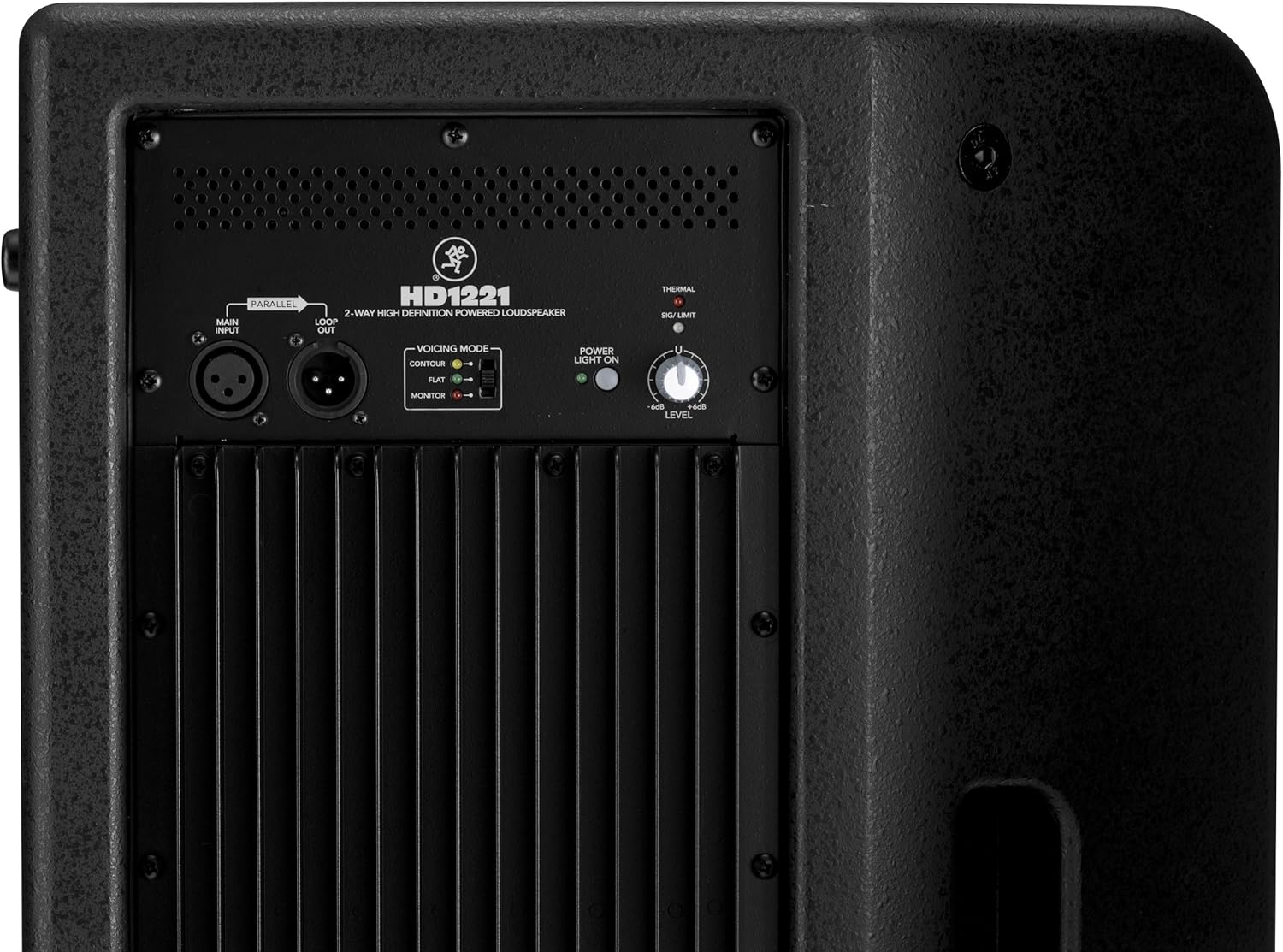
Figure 3: Rear panel of the HD1221, detailing the input/output section, voicing mode switch, power indicator, and level control knob.
- Main Input (XLR): Connect your audio source here.
- Loop Out (XLR): Provides a parallel output of the main input signal for connecting to additional loudspeakers or other audio equipment.
- Voicing Mode Switch: Selects between Contour, Flat, and Monitor modes to optimize the loudspeaker's frequency response for different applications.
- ไฟแสดงสถานะพลังงานเปิดอยู่: ระบุสถานะพลังงานของเครื่อง
- Thermal/Sig/Limit Indicators: Provide visual feedback on the loudspeaker's operational status, including thermal protection, signal presence, and limiting.
- การควบคุมระดับ: ปรับระดับเสียงโดยรวมของลำโพง
- อินพุตไฟ AC: เชื่อมต่อสายไฟเข้ากับแหล่งจ่ายไฟหลัก
ส่วนประกอบภายใน
รูปที่ 4: ภายใน view of the HD1221, showcasing the 12-inch neodymium woofer and 1.75-inch titanium compression driver, designed by EAW.
การตั้งค่า
Proper setup ensures optimal performance and safety. Follow these steps for initial setup:
การเชื่อมต่อไฟฟ้า
- Ensure the Level control on the rear panel is set to its minimum position.
- Connect the supplied AC power cable to the AC Power Input on the rear panel of the HD1221.
- เสียบปลายสายไฟอีกด้านหนึ่งเข้ากับเต้ารับไฟฟ้าที่มีสายดิน
การเชื่อมต่อเสียง
- Connect your audio source (e.g., mixer, instrument) to the Main Input (XLR) on the rear panel.
- If connecting multiple loudspeakers, use the Loop Out (XLR) to send the signal to the next loudspeaker.
ตัวเลือกการติดตั้ง
The HD1221 offers several mounting options for flexibility:
การติดตั้งเสา

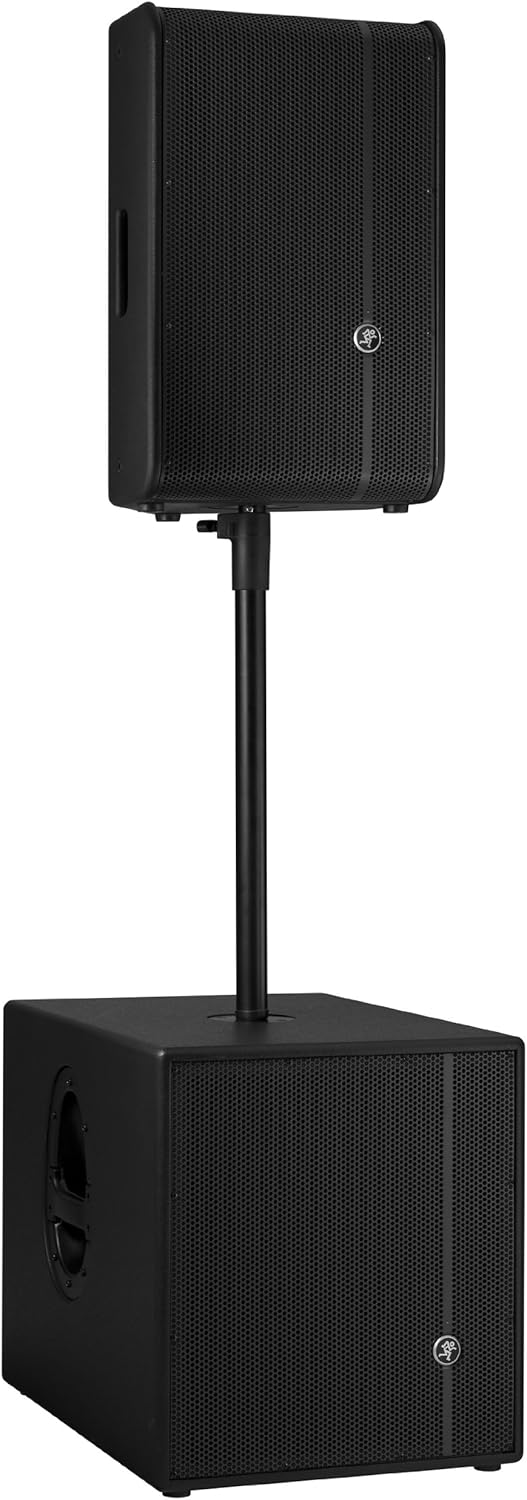
Figure 5: The HD1221 mounted on a pole, typically above a subwoofer like the HD1501 for a full-range PA system.
The HD1221 can be mounted on a standard speaker pole stand. Ensure the stand is stable and rated for the weight of the loudspeaker (approximately 58 lbs).
Stage Monitor Placement
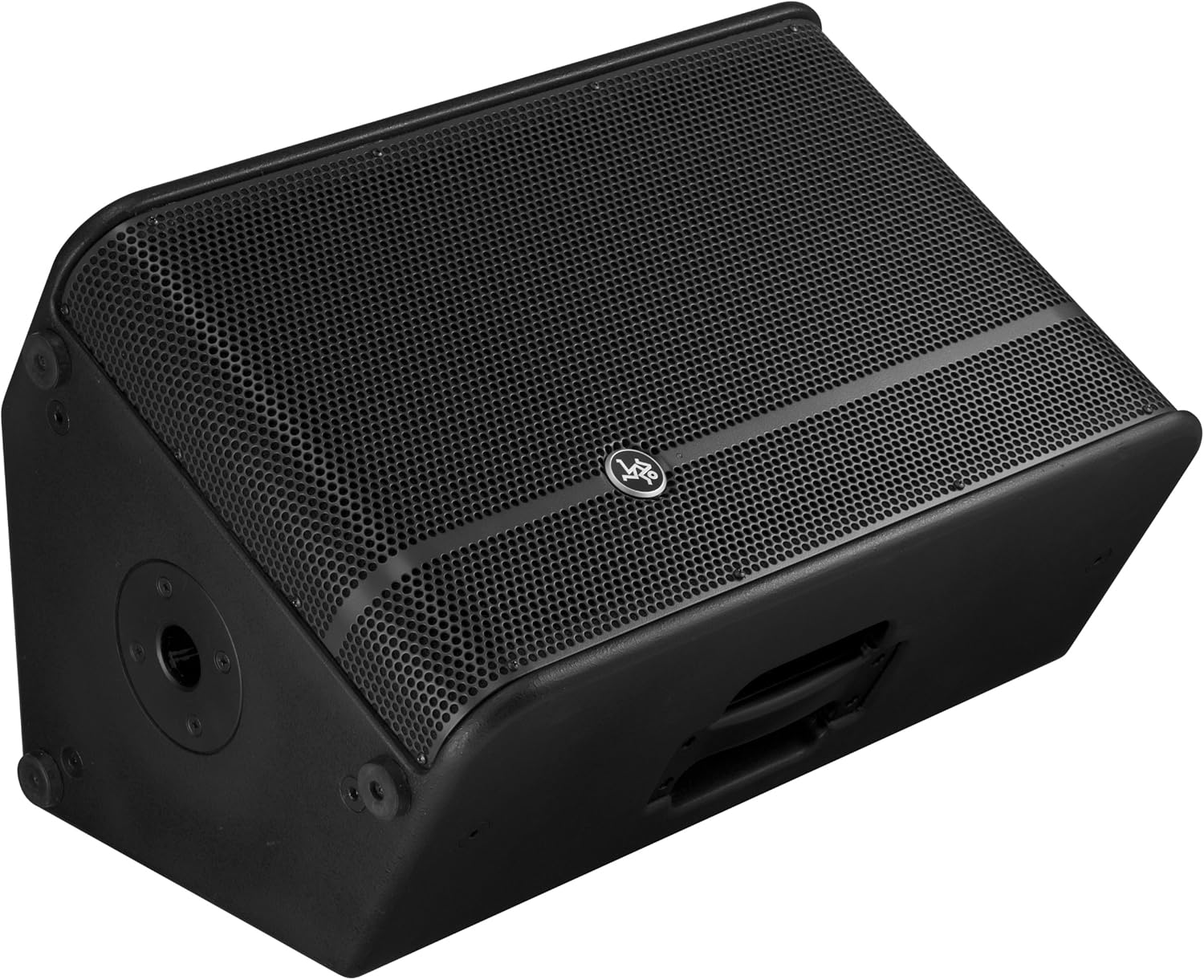
Figure 6: The HD1221 configured as a stage monitor, utilizing its 60-degree angle for optimal sound projection towards the performer.
การออกแบบตู้ช่วยให้สามารถใช้งานได้เหมือนtage monitor with a 60-degree angle. Place the loudspeaker directly on the stage floor, angled towards the performer.
Flying/Suspension

Figure 7: The HD1221 suspended vertically using appropriate rigging hardware.

Figure 8: The HD1221 suspended horizontally using appropriate rigging hardware.
The HD1221 can be flown both vertically and horizontally. Always use certified rigging hardware and consult with a qualified professional for safe installation. The user-rotatable horn allows for precise sound placement in either orientation.
คำแนะนำการใช้งาน
Once the loudspeaker is set up, follow these steps for operation:
- เปิดเครื่อง: Turn on your audio source (mixer, etc.) first, then turn on the HD1221 loudspeaker. The 'Power Light On' indicator should illuminate.
- Set Voicing Mode: Use the Voicing Mode switch on the rear panel to select the appropriate setting for your application:
- รูปร่าง: Provides a sculpted frequency response, often suitable for music playback.
- แบน: Offers a neutral frequency response, ideal for critical listening or when external EQ is used.
- เฝ้าสังเกต: Optimizes the frequency response for use as a stage monitor, reducing low-end rumble and enhancing clarity.
- Adjust Level: Slowly increase the Level control on the rear panel to achieve the desired volume. Monitor the 'Sig/Limit' indicator; if it flashes frequently or stays lit, reduce the input level from your source or the HD1221's level to prevent distortion and potential damage.
- หมดแรง: When finished, turn off the HD1221 loudspeaker first, then turn off your audio source.
วิดีโอผลิตภัณฑ์อย่างเป็นทางการ
วิดีโอ 1: จบแล้วview of the Mackie HD1221 12-inch 2-Way High-Definition Powered Loudspeaker, demonstrating its features and applications.
การซ่อมบำรุง
Regular maintenance helps prolong the life and performance of your HD1221 loudspeaker.
- การทำความสะอาด: Use a dry, lint-free cloth to clean the exterior of the loudspeaker. Do not use liquid cleaners or solvents.
- ตะแกรง: Periodically check the steel grille for any damage or debris. Clean gently if necessary.
- การเชื่อมต่อ: ตรวจสอบให้แน่ใจว่าสายเคเบิลทั้งหมดเชื่อมต่อแน่นหนาและไม่มีความเสียหาย
- พื้นที่จัดเก็บ: When not in use, store the loudspeaker in a dry, temperate environment, protected from dust and extreme temperatures.
การแก้ไขปัญหา
If you encounter issues with your HD1221, refer to the following common problems and solutions:
| ปัญหา | สาเหตุที่เป็นไปได้ | สารละลาย |
|---|---|---|
| ไม่มีเสียงออก | No power; incorrect connections; low level setting; faulty cable. | Check power cable and outlet. Verify audio cable connections. Increase Level control. Test with a different cable. |
| เสียงเพี้ยน | Input level too high; faulty cable; damaged speaker component. | Reduce input level from source or HD1221. Check 'Sig/Limit' indicator. Test with a different cable. If distortion persists, contact support. |
| ไฟไม่เข้า | No power; power switch off; internal fuse blown. | Ensure power cable is connected and outlet is active. Check power switch. If still no light, contact support. |
| Overheating (Thermal indicator lit) | Insufficient ventilation; prolonged high-volume operation. | Ensure adequate airflow around the unit. Reduce volume. Allow unit to cool down. |
ข้อมูลจำเพาะ
Detailed technical specifications for the Mackie HD1221 powered loudspeaker:
- กำลังขับ: สูงสุด 1200 วัตต์
- ประเภทลำโพง: 2-Way High-Definition Powered Loudspeaker
- วูฟเฟอร์: 12-inch Neodymium Woofer
- ไดรเวอร์บีบอัด: ไดร์เวอร์บีบอัดไทเทเนียมขนาด 1.75 นิ้ว
- แตร: ฮอร์นหมุนได้ 90° x 50° โดยผู้ใช้
- วัสดุของตู้: ไม้อัดเบิร์ช 15 มม.
- ตะแกรง: เหล็กกล้ารีดเย็น
- มุมจอภาพ: 60 องศา
- Voicing Modes: Contour, Flat, Monitor
- Ampการทำให้บริสุทธิ์: Class-D Fast Recovery
- อิมพีแดนซ์: 8 โอห์ม
- น้ำหนักสินค้า: 58 ปอนด์
- โปรโตคอลการเชื่อมต่อ: Wi-Fi (Note: This specification might refer to internal processing or future features, as direct Wi-Fi audio input is not typical for this type of speaker.)
- หมายเลขรุ่น: เอชดี1221
- ยูพีซี: 663961030495
การรับประกัน
The Mackie HD1221 loudspeaker comes with a comprehensive warranty:
- อิเล็กทรอนิกส์: รับประกัน 3 ปี
- ไดรเวอร์: รับประกัน 2 ปี
Please retain your proof of purchase for warranty claims. For full terms and conditions, refer to the warranty card included with your product or visit the official Mackie webเว็บไซต์.
สนับสนุน
For additional assistance, technical support, or service inquiries, please contact Mackie Customer Support. You can find contact information and frequently asked questions on the official Mackie webเว็บไซต์.
แหล่งข้อมูลออนไลน์: เยี่ยมชม Mackie Store on Amazon สำหรับข้อมูลผลิตภัณฑ์และการอัพเดท