
1. บทนำ
The D-Link DES-1008E is an 8-Port Fast Ethernet Desktop Switch designed to expand your network connectivity. This unmanaged switch provides eight 10/100 Mbps Ethernet ports, allowing you to connect multiple devices such as computers, printers, and network-attached storage (NAS) to your network. It supports full-duplex mode, delivering up to 200 Mbps throughput per port for efficient data transfer. The plug-and-play design ensures easy installation without the need for software configuration.
2. เนื้อหาบรรจุภัณฑ์
โปรดตรวจสอบว่าแพ็คเกจของคุณมีรายการต่อไปนี้:
- D-Link DES-1008E 8-Port Fast Ethernet Desktop Switch
- อะแดปเตอร์แปลงไฟ
- คู่มือการติดตั้งแบบด่วน
If any items are missing or damaged, please contact your local D-Link reseller for assistance.
3. การตั้งค่า
Follow these steps to set up your D-Link DES-1008E switch:
- ตำแหน่งสวิตช์: Place the switch on a flat, stable surface or mount it to a wall using appropriate hardware (not included). Ensure adequate ventilation around the device.
- เชื่อมต่ออะแดปเตอร์ไฟฟ้า: Plug the provided power adapter into the power port on the back of the DES-1008E switch. Connect the other end of the power adapter to a standard electrical outlet. The power LED on the front of the switch should illuminate.
- เชื่อมต่ออุปกรณ์เครือข่าย: Connect your network devices (e.g., computers, routers, game consoles) to any of the eight Ethernet ports on the switch using standard Ethernet cables. The corresponding port LED on the front of the switch will illuminate when a connection is established.
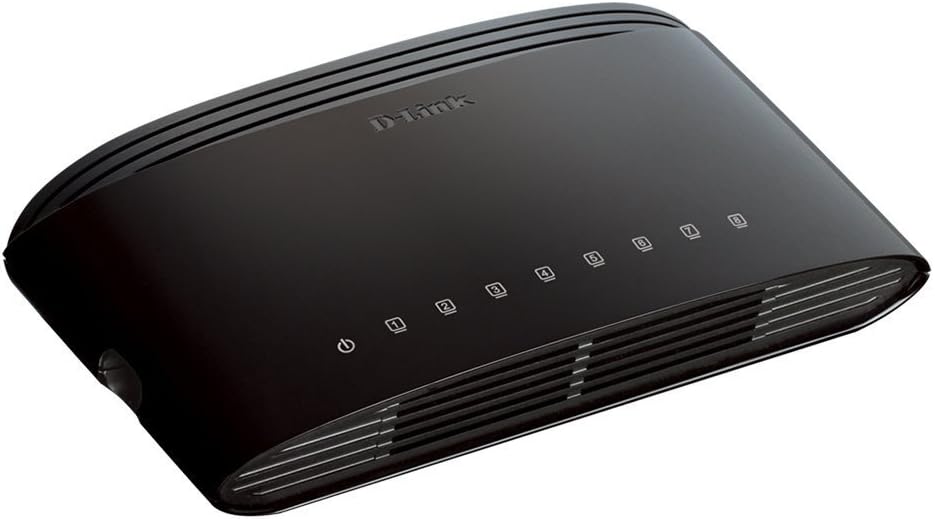
รูปที่ 1 : ด้านหน้า view of the D-Link DES-1008E switch, showing the power indicator and eight port status LEDs.

รูปที่ 2: ด้านหลัง view of the D-Link DES-1008E switch, illustrating the eight Ethernet ports for device connections.
The D-Link DES-1008E is a plug-and-play device, requiring no software installation or configuration. Once connected, your devices should automatically detect the network connection.
4. การใช้งานสวิตช์
The DES-1008E operates automatically once powered on and connected. It functions as an unmanaged switch, meaning it requires no user intervention for basic network traffic management.
ไฟ LED แสดงสถานะ:
- กำลังไฟ LED: Illuminates green when the switch is receiving power.
- พอร์ต LED (1-8): Each port has an associated LED. This LED illuminates green when a device is connected to the port and flashes to indicate network activity (data transmission).
5. การบำรุงรักษา
To ensure optimal performance and longevity of your D-Link DES-1008E switch, consider the following maintenance guidelines:
- การทำความสะอาด: Gently wipe the exterior of the switch with a soft, dry cloth. Avoid using liquid or aerosol cleaners directly on the device.
- การระบายอากาศ : Ensure that the ventilation slots on the switch are not blocked. Proper airflow prevents overheating.
- สิ่งแวดล้อม: ควรใช้งานสวิตช์ภายในช่วงอุณหภูมิและความชื้นที่กำหนดไว้ หลีกเลี่ยงการวางไว้ในที่ที่มีแสงแดดส่องโดยตรง ความร้อนสูง หรือความชื้นมากเกินไป
- วงจรไฟฟ้า: If the switch experiences issues, a simple power cycle (unplugging and replugging the power adapter) can often resolve minor problems.
6 การแก้ไขปัญหา
If you encounter issues with your D-Link DES-1008E switch, refer to the following troubleshooting tips:
- ไม่มีไฟฟ้า:
- ตรวจสอบให้แน่ใจว่าได้เสียบอะแดปเตอร์แปลงไฟเข้ากับสวิตช์และเต้ารับไฟฟ้าที่ใช้งานได้สนิทแล้ว
- ตรวจสอบว่าปลั๊กไฟใช้งานได้หรือไม่ โดยลองเสียบอุปกรณ์อื่นเข้าไป
- ตรวจสอบอะแดปเตอร์ไฟฟ้าเพื่อดูว่ามีร่องรอยความเสียหายที่มองเห็นได้หรือไม่
- ไม่มีลิงค์/กิจกรรมบนพอร์ต:
- ตรวจสอบให้แน่ใจว่าเสียบสายอีเธอร์เน็ตเข้ากับพอร์ตของสวิตช์และอุปกรณ์ที่เชื่อมต่ออย่างแน่นหนาแล้ว
- ลองใช้สายเคเบิลอีเทอร์เน็ตอื่นเพื่อตัดสายเคเบิลที่ผิดปกติออกไป
- Connect a different device to the same port to check if the port is functional.
- Ensure the connected device is powered on and its network adapter is enabled.
- ประสิทธิภาพเครือข่ายช้า:
- ตรวจสอบให้แน่ใจว่าอุปกรณ์ที่เชื่อมต่อทั้งหมดทำงานด้วยความเร็วตามที่คาดไว้
- ตรวจสอบปริมาณการรับส่งข้อมูลเครือข่ายที่มากเกินไป หรือแอปพลิเคชันที่ใช้แบนด์วิธสูงบนอุปกรณ์ที่เชื่อมต่ออยู่
- Ensure your internet service provider (ISP) is delivering the expected speeds to your router.
- High-Pitched Sound from Power Adapter:
- Some users have reported a high-pitched sound from the included power adapter. If this occurs, consider using an alternative 5V power supply with compatible specifications. Ensure the replacement power supply meets the voltage and current requirements of the switch to avoid damage.
7. ข้อมูลจำเพาะ
| หมายเลขรุ่น | DES-1008อี |
| จำนวนพอร์ต | 8 |
| มาตรฐานอีเธอร์เน็ต | 10/100 Mbps Fast Ethernet |
| อัตราการถ่ายโอนข้อมูล | Up to 200 Mbps (full-duplex) |
| ความสามารถในการสลับ | 1.6 กิกะบิตต่อวินาที |
| ขนาดตารางที่อยู่ MAC | 1K รายการ |
| กำลังไฟเข้า | กระแสตรง 5 โวลต์ |
| น้ำหนักสินค้า | 9.44 ออนซ์ |
| สี | สีดำ |
8. การรับประกันและการสนับสนุน
The D-Link DES-1008E 8-Port Fast Ethernet Desktop Switch comes with a การรับประกันแบบจำกัดตลอดอายุการใช้งาน. For detailed warranty terms and conditions, please refer to the warranty information provided with your product or visit the official D-Link webเว็บไซต์.
For technical support, product registration, or to download the latest firmware and documentation, please visit the D-Link support website or contact D-Link customer service in your region. Support contact information can typically be found on the D-Link official webเว็บไซต์.