
1. บทนำ
The BUFFALO Giga Switching Hub LSW3-GT-24NSR is a 24-port Gigabit Ethernet switch designed for high-speed network environments. It is ideal for small to medium-sized offices and workplaces requiring robust and reliable network connectivity. This device supports full Gigabit speeds across all ports, ensuring efficient data transfer.
Key features include a fanless design for silent operation and enhanced reliability, as well as a loop detection function to prevent network disruptions caused by accidental network loops.
2. ข้อมูลด้านความปลอดภัย
Please read and understand the following safety precautions before using the device to prevent injury or damage.
- แหล่งจ่ายไฟ: ใช้เฉพาะอะแดปเตอร์แปลงไฟที่ให้มาเท่านั้น ตรวจสอบให้แน่ใจว่าเต้ารับไฟฟ้ามีแรงดันไฟฟ้าตามที่กำหนดtagข้อกำหนดอี
- การระบายอากาศ : อย่าปิดกั้นช่องระบายอากาศ ตรวจสอบให้แน่ใจว่ามีอากาศถ่ายเทเพียงพอรอบอุปกรณ์เพื่อป้องกันความร้อนสูงเกินไป
- สิ่งแวดล้อม: Avoid exposing the device to water, high humidity, extreme temperatures, or direct sunlight.
- การจัดการ: Do not drop or subject the device to strong impacts. Do not attempt to open or repair the device yourself. Refer all servicing to qualified personnel.
- สาย: Ensure all network cables are properly connected and secured.
3. เนื้อหาบรรจุภัณฑ์
ตรวจสอบว่ามีรายการทั้งหมดอยู่ในแพ็คเกจ:
- BUFFALO Giga Switching Hub LSW3-GT-24NSR Unit
- สายไฟ
- Rack Mount Brackets (if included with your model)
- ขารองยาง (สำหรับวางบนโต๊ะ)
4. การตั้งค่า
4.1 การติดตั้งทางกายภาพ
The LSW3-GT-24NSR can be installed on a desktop or mounted in a 19-inch equipment rack.
ตำแหน่งเดสก์ท็อป:
- Attach the included rubber feet to the bottom of the unit to prevent slipping and provide stability.
- Place the unit on a flat, stable surface with adequate ventilation.
การติดตั้งแร็ค:
- Attach the rack mount brackets to the sides of the unit using the provided screws.
- Secure the unit into a standard 19-inch equipment rack using appropriate rack screws (not included).
4.2 การเชื่อมต่อสายเคเบิลเครือข่าย
Connect your network devices (computers, servers, other switches) to any of the 24 RJ-45 ports on the front panel using standard Ethernet cables (Category 5e or higher recommended for Gigabit speeds).

รูปที่ 1: แผงด้านหน้าด้านบนview with 24 Ethernet Ports and Status LEDs.
4.3 การต่อสายไฟ
- Connect the power cable to the AC IN port on the rear of the device.
- เสียบปลายอีกด้านหนึ่งของสายไฟเข้ากับเต้ารับไฟฟ้าที่เหมาะสม
- The device will power on automatically. The POWER LED on the front panel should illuminate.

รูปที่ 2: แผงด้านหลังด้านบนview with AC IN Power Port.
5. คู่มือการใช้งาน
5.1 ไฟแสดงสถานะ LED
The front panel features several LED indicators to monitor the status of the switch and its ports.
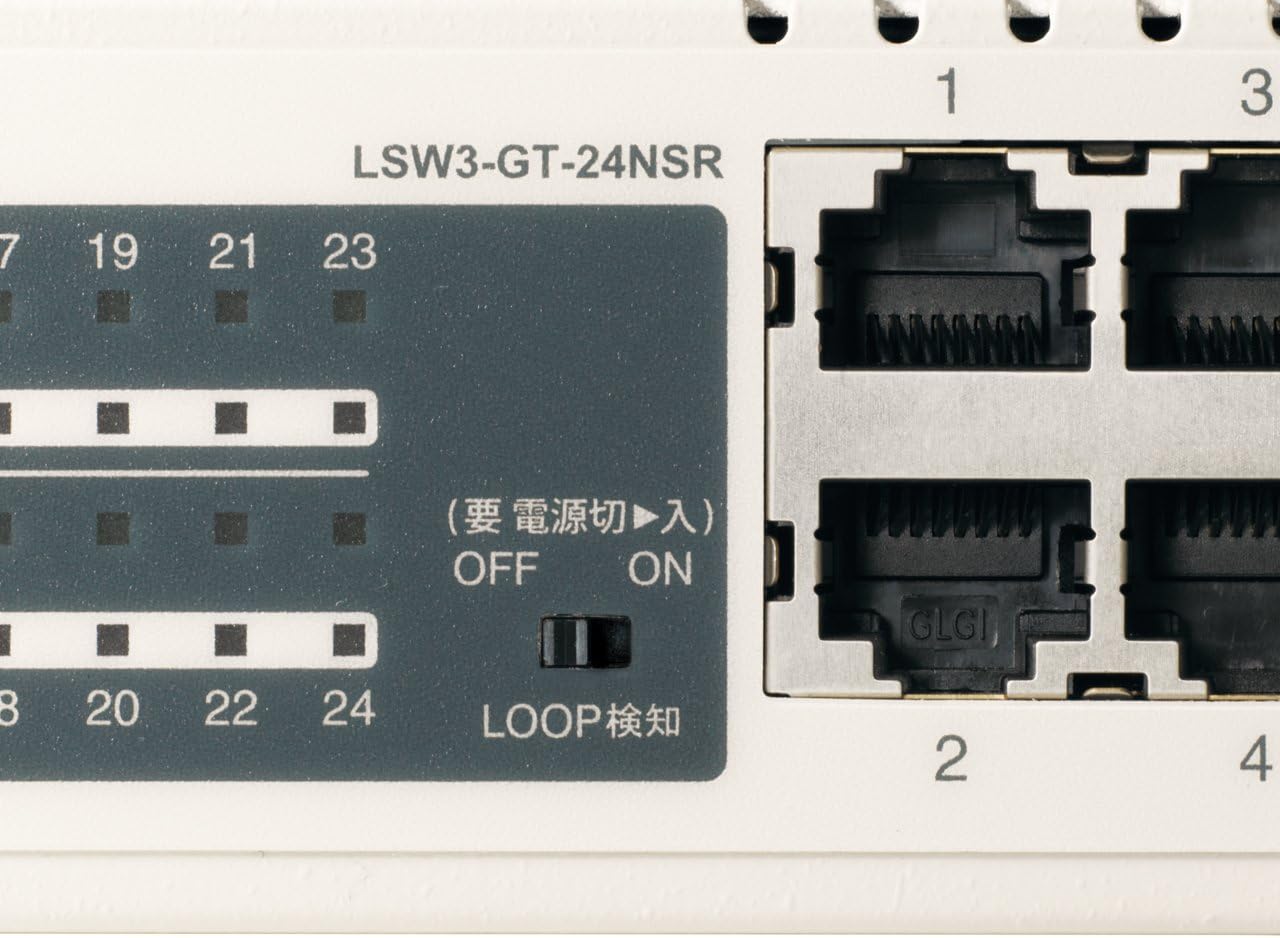
รูปที่ 3: รายละเอียด view of LED Indicators and Loop Detection Switch.
| ชื่อ LED | สถานะ | คำอธิบาย |
|---|---|---|
| พลัง | On | อุปกรณ์เปิดอยู่ |
| ลิงค์/ACT (ต่อพอร์ต) | On | A network device is connected and a link is established. |
| การกระพริบ | ข้อมูลกำลังถูกส่งหรือรับผ่านทางพอร์ต | |
| 1000/100/10ม. (ต่อพอร์ต) | สีเขียว | Port is operating at 1000 Mbps (Gigabit Ethernet). |
| ส้ม | Port is operating at 100 Mbps (Fast Ethernet). | |
| ปิด | Port is operating at 10 Mbps (Ethernet). | |
| LOOP DETECT | On | A network loop has been detected. |
5.2 Loop Detection Function
The LSW3-GT-24NSR features a hardware switch for enabling or disabling the loop detection function. This function helps prevent network instability caused by accidental network loops.
Figure 4: Loop Detection Switch (ON/OFF).
- บน: Loop detection is active. If a loop is detected, the corresponding port will be automatically shut down to prevent network broadcast storms, and the LOOP DETECT LED will illuminate.
- ปิด: Loop detection is disabled.
It is recommended to keep the loop detection function ON for network stability.
6. การบำรุงรักษา
6.1 การทำความสะอาดเครื่อง
เพื่อให้ใช้งานได้อย่างมีประสิทธิภาพสูงสุด ควรทำความสะอาดภายนอกของสวิตช์เป็นระยะ
- ถอดสายไฟออกก่อนทำความสะอาด
- ใช้ผ้านุ่มแห้งเช็ดพื้นผิว
- Do not use liquid cleaners, aerosols, or solvents, as these may damage the casing หรือส่วนประกอบภายใน
6.2 ข้อพิจารณาด้านสิ่งแวดล้อม
Ensure the device is operated within its specified environmental conditions:
- อุณหภูมิ: 0°C ถึง 40°C (32°F ถึง 104°F)
- ความชื้น: 10% ถึง 85% (ไม่ควบแน่น)
7 การแก้ไขปัญหา
If you encounter issues with your BUFFALO Giga Switching Hub, refer to the following common problems and solutions.
7.1 ไม่มีไฟฟ้า
- อาการ: ไฟ LED POWER ดับอยู่
- สารละลาย: Check if the power cable is securely connected to both the device and the power outlet. Ensure the power outlet is functional.
7.2 No Link or Slow Speed on a Port
- อาการ: The LINK/ACT LED for a connected port is off, or the 1000/100/10M LED indicates a lower speed than expected (e.g., 100M instead of 1000M).
- สารละลาย:
- ตรวจสอบให้แน่ใจว่าสายอีเธอร์เน็ตเชื่อมต่อแน่นสนิททั้งสองด้านแล้ว
- Try a different Ethernet cable. Ensure it is a Category 5e or higher cable for Gigabit speeds.
- เชื่อมต่ออุปกรณ์เข้ากับพอร์ตอื่นบนสวิตช์
- Check the network adapter settings on the connected device (computer, server) to ensure it is configured for auto-negotiation or the correct speed.
7.3 Network Instability / LOOP DETECT LED is On
- อาการ: The LOOP DETECT LED is illuminated, and network performance is degraded or unstable.
- สารละลาย:
- A network loop has been detected. This typically occurs when two ports on the same switch (or different switches) are connected to each other, creating an infinite data path.
- Carefully inspect your network cabling to identify and remove any redundant connections that form a loop.
- If the loop detection switch is ON, the affected port will be automatically shut down. Once the loop is resolved, the port should resume normal operation.
8. ข้อมูลจำเพาะ
| คุณสมบัติ | คำอธิบาย |
|---|---|
| ยี่ห้อ | ควาย |
| หมายเลขรุ่น | LSW3-GT-24NSR |
| จำนวนพอร์ต | พอร์ต RJ-24 ขนาด 10 x 100/1000/45BASE-T |
| ความสามารถในการสลับ | 48 Gbps (แบบไม่ปิดกั้น) |
| อัตราการส่งต่อ | 35.7 ไมล์/วินาที |
| ขนาดตารางที่อยู่ MAC | 8K รายการ |
| รองรับ Jumbo Frame | สูงสุด 9KB |
| คุณสมบัติ | Auto-MDI/MDIX, Auto-Negotiation, Loop Detection Function, Fanless Design |
| แหล่งจ่ายไฟ | แหล่งจ่ายไฟ AC ภายใน |
| ขนาด (กว้าง x ลึก x สูง) | (Specific dimensions not provided in source, typical for 1U rackmount) |
| น้ำหนัก | (Specific weight not provided in source) |
| อุณหภูมิในการทำงาน | 0°C ถึง 40°C |
| ความชื้นในการทำงาน | 10% ถึง 85% (ไม่ควบแน่น) |
9. การรับประกันและการสนับสนุน
This BUFFALO product is covered by a manufacturer's warranty. Please refer to the warranty card included with your product or visit the official BUFFALO webเว็บไซต์สำหรับข้อกำหนดและเงื่อนไขการรับประกันโดยละเอียด
For technical support, product registration, or further assistance, please visit the official BUFFALO support webหรือติดต่อฝ่ายบริการลูกค้า โดยทั่วไปข้อมูลการติดต่อจะอยู่ในเว็บไซต์ของผู้ผลิต webเว็บไซต์หรือในบรรจุภัณฑ์ของผลิตภัณฑ์


