
1. บทนำ
This manual provides detailed instructions for the installation, setup, operation, and maintenance of the Intermatic FM1D20A-24 Electronic 24-Hour/7-Day Timer Module. Please read this manual thoroughly before attempting to install or operate the device to ensure proper function and safety.
2. ข้อมูลด้านความปลอดภัย
คำเตือน: Risk of electric shock. Installation and servicing of this device should be performed by qualified personnel only. Disconnect power at the circuit breaker or fuse before installing or servicing. Follow all national and local electrical codes.
- ตรวจสอบให้แน่ใจว่าแหล่งจ่ายไฟตรงกับแรงดันไฟฟ้าของอุปกรณ์tagพิกัด e (24V)
- ห้ามใช้กระแสไฟฟ้าเกินพิกัดสูงสุด 16A
- ควรเก็บอุปกรณ์ให้ห่างจากความชื้นและอุณหภูมิที่สูงหรือต่ำเกินไป
- อย่าพยายามเปิดหรือซ่อมแซมอุปกรณ์ด้วยตนเอง โปรดติดต่อเจ้าหน้าที่บริการที่มีคุณสมบัติเหมาะสม
3. เนื้อหาบรรจุภัณฑ์
ตรวจสอบว่ามีส่วนประกอบทั้งหมดอยู่ครบเมื่อแกะกล่อง:
- 1 x Intermatic FM1D20A-24 Electronic 24-Hour/7-Day Timer Module
4. สินค้าหมดview
The Intermatic FM1D20A-24 is an electronic timer module designed for precise 24-hour and 7-day scheduling. It features a digital display and intuitive controls for programming up to 20 ON/OFF operations.
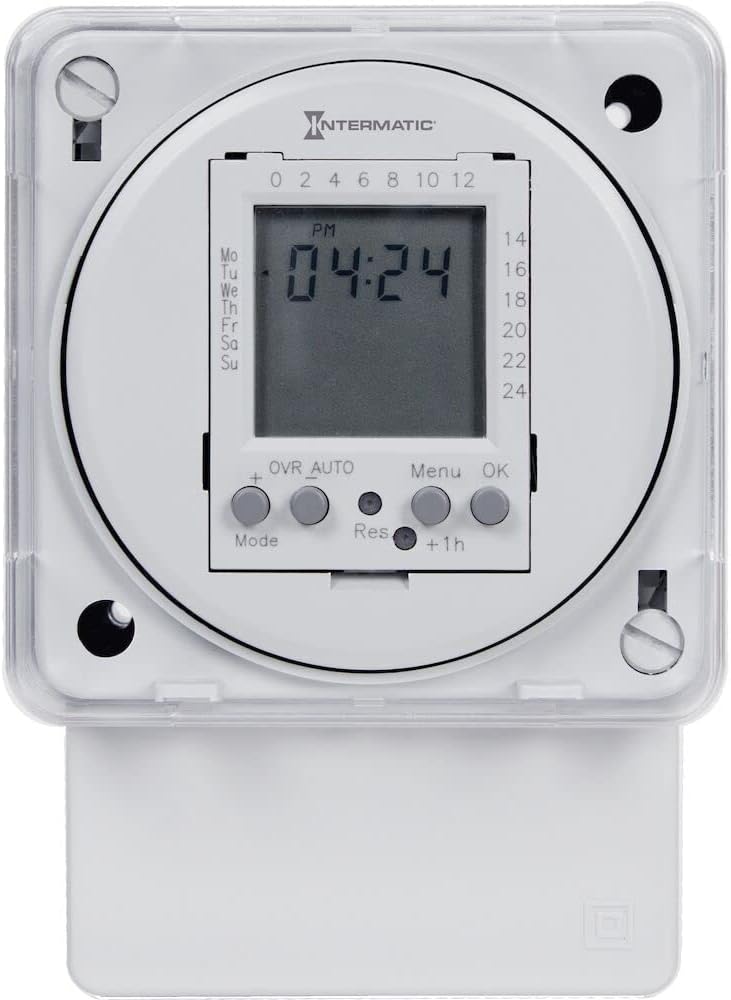
รูปที่ 1: ด้านหน้า view of the Intermatic FM1D20A-24 Timer Module, showing the digital display and control buttons.

รูปที่ 2: ภาพระยะใกล้ view of the timer module's display, indicating current time and day, along with the 'Mode', '+', 'OVR AUTO', 'Res', 'Menu', 'OK', and '+1h' buttons.

รูปที่ 3: ด้านข้าง view of the timer module, illustrating its compact design and potential mounting points for surface or DIN rail installation.
5. การติดตั้ง
The FM1D20A-24 timer module supports both surface and DIN rail mounting.
5.1 การติดตั้ง
- พื้นผิวติด: Secure the module to a flat surface using appropriate screws through the designated mounting holes.
- การติดตั้งราง DIN: Attach the module to a standard DIN rail by snapping it into place.
5.2 การเดินสายไฟ
สำคัญ: All wiring must comply with local and national electrical codes. Ensure power is disconnected before wiring.
- Connect the 24V power supply to the designated input terminals.
- Connect the load (device to be controlled) to the output terminals. The timer module features an SPDT (Single Pole Double Throw) switch style.
- ตรวจสอบว่าการเชื่อมต่อทั้งหมดปลอดภัยก่อนที่จะคืนพลังงาน
6. การตั้งค่า
6.1 การเพิ่มพลังเริ่มต้น
Upon initial power-up, the display may be blank or show default settings. The internal clock will need to be set.
6.2 การตั้งเวลาและวันปัจจุบัน
- Press the 'Mode' button to enter the time setting mode.
- Use the '+' button to adjust the hour, minute, and day.
- Press 'OK' to confirm each setting and move to the next.
- Once the time and day are set, press 'OK' to exit the setting mode.
6.3 การตั้งโปรแกรมเหตุการณ์เปิด/ปิด
The timer supports up to 20 ON/OFF operations.
- Press the 'Menu' button to access the programming menu.
- Navigate through the program slots (P1 ON, P1 OFF, P2 ON, P2 OFF, etc.) using the '+' button.
- For each program slot, press 'OK' to select it.
- Use the '+' button to set the desired time and day(s) for the ON or OFF event.
- Press 'OK' to confirm each setting.
- ทำซ้ำขั้นตอนนี้สำหรับเหตุการณ์เปิด/ปิดที่ต้องการทั้งหมด
- Press 'Menu' to exit the programming mode.
7. คู่มือการใช้งาน
7.1 Manual Override (OVR AUTO)
The 'OVR AUTO' button allows for temporary manual control of the output, overriding the programmed schedule. Pressing it will toggle the output state (ON/OFF) and return to automatic operation at the next scheduled event.
7.2 Time Adjustment (+1h)
The '+1h' button can be used for quick adjustment of the current time, typically for daylight saving time changes. Pressing it will advance the current time by one hour.
7.3 Reset Function (Res)
The 'Res' (Reset) button is typically a recessed button that requires a pointed object (like a pen tip) to press. This button will reset the timer to its factory default settings, erasing all programmed events and resetting the clock. Use with caution.
8. การบำรุงรักษา
The Intermatic FM1D20A-24 timer module requires minimal maintenance.
- การทำความสะอาด: เช็ดภายนอกอุปกรณ์ด้วยผ้านุ่มและแห้ง ห้ามใช้น้ำยาทำความสะอาดที่มีฤทธิ์กัดกร่อนหรือตัวทำละลาย
- แบตเตอรี่: This device does not require user-replaceable batteries for operation or memory retention.
- การตรวจสอบ: ตรวจสอบการเชื่อมต่อสายไฟเป็นระยะ เพื่อดูว่าแน่นหนาดีหรือไม่ และมีร่องรอยการสึกหรอหรือความเสียหายหรือไม่
9 การแก้ไขปัญหา
9.1 จอแสดงผลว่างเปล่า
- Check if the power supply (24V) is connected and active.
- ตรวจสอบให้แน่ใจว่าการเชื่อมต่อสายไฟทั้งหมดมีความปลอดภัย
9.2 Programmed Events Not Executing
- ตรวจสอบว่าเวลาและวันปัจจุบันตั้งค่าถูกต้องแล้ว
- Check that the programmed ON/OFF times and days are accurate.
- Ensure the timer is not in manual override mode (check 'OVR AUTO' status).
- Confirm the load is properly connected and functional.
9.3 อุปกรณ์ไม่ตอบสนอง
- Attempt a soft reset by pressing the 'Res' button with a pointed object. Note that this will erase all settings.
- If the issue persists, disconnect power for a few minutes and then restore it.
10. ข้อมูลจำเพาะ
| หมายเลขรุ่น | FM1D20A-24 |
| ยี่ห้อ | อินเตอร์แมติก |
| พิมพ์ | Electronic 24-Hour/7-Day Timer Module |
| เล่มที่tage | 24โวลต์ |
| ความถี่ | 50/60เฮิรตซ์ |
| คะแนนปัจจุบัน | 16เอ |
| Max. Number of Operations | 20 (เปิด/ปิด) |
| ประเภทการติดตั้ง | Surface, DIN Rail |
| เปลี่ยนสไตล์ | สป.ด.ที. |
| วัสดุ | พลาสติก |
| ขนาดสินค้า | ลึก 2.06 นิ้ว x กว้าง 83 นิ้ว x สูง 4 นิ้ว |
| น้ำหนักสินค้า | 0.01 ออนซ์ |
| การรับรอง | UL (Canada and US), CE |
11. การรับประกันและการสนับสนุน
For warranty information, please refer to the manufacturer's description or contact Intermatic customer support directly. Technical assistance and further support can be obtained through the official Intermatic webไซต์หรือศูนย์บริการที่ได้รับอนุญาต
ผู้ผลิต: บริษัท อินเตอร์เมติก อินคอร์ปอเรเต็ด
Webเว็บไซต์: www.intermatic.com