
1. บทนำ
The SANYO VPC-CG20 is a compact, high-definition camcorder and 10-megapixel digital camera designed for capturing both video and still images. This device features Full HD 1080i video recording at 60 frames per second, a 10-megapixel still image sensor, and a 5x optical zoom lens. It includes a 2.7-inch wide LCD monitor for easy framing and playback, along with optical image stabilization for clearer footage and photos. This manual provides essential information for setting up, operating, and maintaining your VPC-CG20 camcorder.
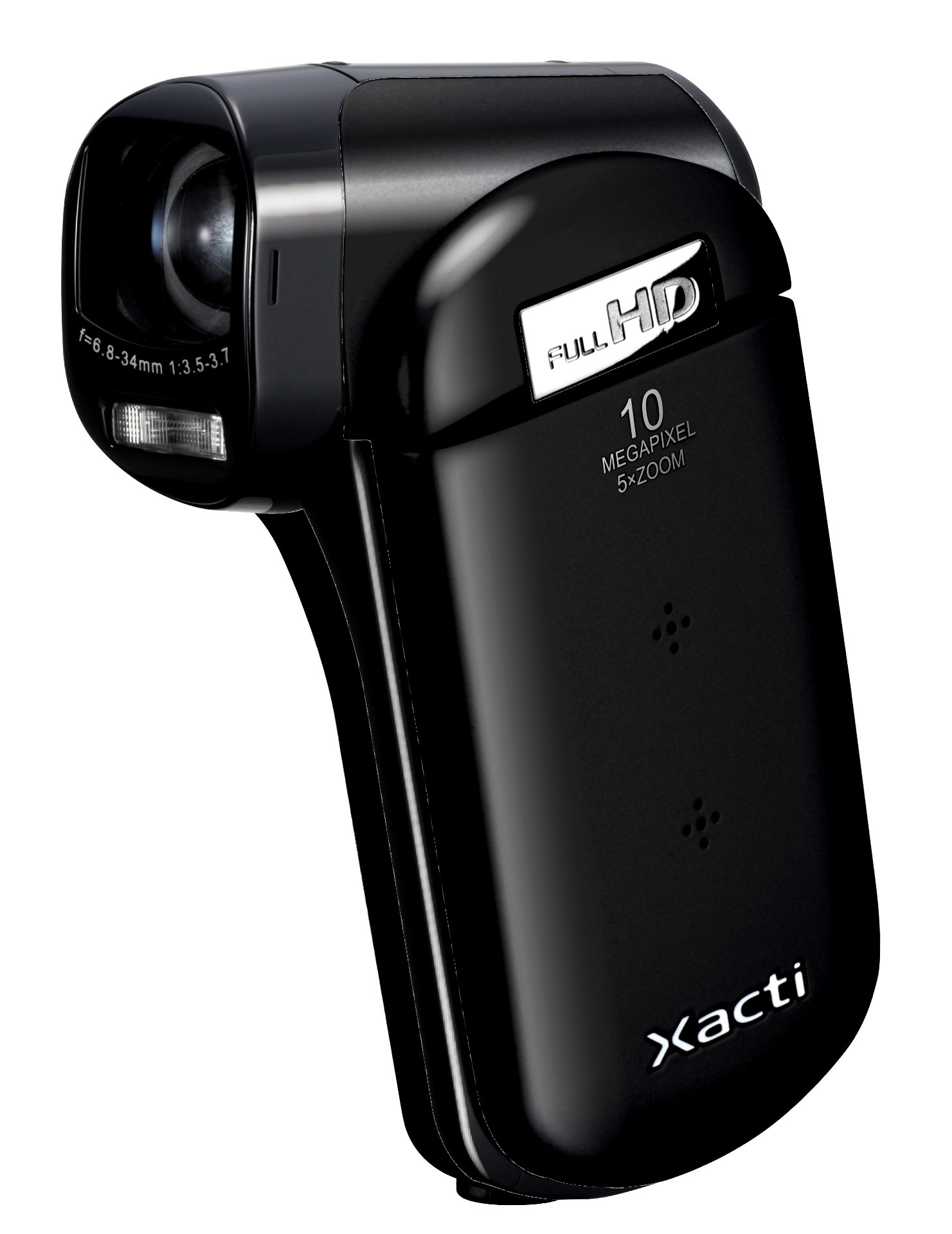
ภาพที่ 1.1: ด้านหน้า view of the SANYO VPC-CG20 High Definition Camcorder.
2. เนื้อหาบรรจุภัณฑ์
กรุณาตรวจสอบว่ารายการทั้งหมดต่อไปนี้รวมอยู่ในแพ็คเกจผลิตภัณฑ์ของคุณ:
- SANYO VPC-CG20 Camcorder
- แบตเตอรี่แบบชาร์จไฟได้
- อะแดปเตอร์ AC / เครื่องชาร์จ
- สาย USB
- เคเบิ้ล AV
- สายรัดข้อมือ
- คู่มือการใช้งาน (เอกสารนี้)
3. ชิ้นส่วนและการควบคุม
ทำความคุ้นเคยกับส่วนต่างๆ และปุ่มควบคุมของกล้องวิดีโอของคุณ
3.1. ด้านหน้า View
The front of the camcorder features the lens, flash, and microphone.
3.2. ด้านหลัง View
The rear panel typically includes the record button and power indicator.
3.3 ด้าน View (LCD Monitor Open)
When the 2.7-inch LCD monitor is open, you will find navigation buttons, menu access, and the zoom lever. The USB and AV ports are also located on the side, often beneath a protective cover.
3.4. ด้านล่าง View
The bottom of the camcorder houses the battery compartment and the SD card slot.
4. การตั้งค่า
4.1. การชาร์จแบตเตอรี่
- Insert the rechargeable battery into the camcorder's battery compartment, ensuring correct orientation.
- Connect the AC adapter to the camcorder's power input.
- เสียบอะแดปเตอร์ AC เข้ากับเต้ารับที่ผนัง ไฟแสดงสถานะการชาร์จจะสว่างขึ้น
- Charge the battery until the indicator light changes or turns off, signaling a full charge.
4.2. Inserting an SD Memory Card
The VPC-CG20 uses SD memory cards for storage.
- Open the SD card slot cover, usually located on the bottom or side of the camcorder.
- เสียบการ์ด SD โดยให้ด้านที่เป็นโลหะหันไปในทิศทางที่ถูกต้อง (ดูแผนภาพที่อยู่ใกล้ช่องเสียบ) ดันเข้าไปจนกระทั่งได้ยินเสียงคลิกเข้าที่
- ปิดฝาช่องใส่การ์ด SD ให้แน่น
บันทึก: Ensure the SD card is not locked (write-protected) before insertion.
5. การใช้งานกล้องวิดีโอ
5.1. การเปิด/ปิดเครื่อง
- To power on, open the LCD monitor. The camcorder will typically power on automatically.
- To power off, close the LCD monitor.
5.2. การบันทึกวิดีโอ
The VPC-CG20 records Full HD 1080i video (1920 x 1080) at 60 frames per second in H.264/MPEG-4 format.
- Ensure the camcorder is in video recording mode (check the mode switch or menu).
- จัดองค์ประกอบภาพของคุณโดยใช้จอ LCD ขนาด 2.7 นิ้ว
- กดปุ่ม บันทึก button to start recording. The record indicator will light up.
- กดปุ่ม บันทึก ปุ่มอีกครั้งเพื่อหยุดการบันทึก
5.3.การถ่ายภาพ
The camcorder can capture 10-megapixel still images in JPEG format.
- Switch the camcorder to still image mode.
- Compose your shot on the LCD monitor.
- กดปุ่ม ชัตเตอร์ button halfway to focus, then press fully to take the picture.
5.4. การใช้ซูม
Use the zoom lever to adjust the 5x optical zoom. Push the lever towards 'T' for telephoto (zoom in) and 'W' for wide-angle (zoom out).
5.5. ระบบป้องกันภาพสั่นไหว
The VPC-CG20 features optical image stabilization to reduce blur from camera shake during both video recording and photo capture. This feature is typically active by default.
5.6. การเล่น
- เปลี่ยนกล้องวิดีโอไปที่โหมดเล่น
- Use the navigation buttons to select the desired video or photo.
- กดปุ่ม เล่น ปุ่มที่จะ view videos or display photos.
5.7. การเชื่อมต่อกับคอมพิวเตอร์
การถ่ายโอน files, connect the camcorder to your computer using the supplied USB cable. The camcorder will appear as a removable storage device, allowing you to copy files.
6. การบำรุงรักษา
6.1. การทำความสะอาดกล้องวิดีโอ
- ใช้ผ้าแห้งนุ่มๆ เช็ดทำความสะอาดตัวกล้องวิดีโอ
- สำหรับการทำความสะอาดเลนส์และหน้าจอ LCD ให้ใช้ผ้าทำความสะอาดเลนส์และน้ำยาทำความสะอาดเฉพาะ หลีกเลี่ยงวัสดุที่มีฤทธิ์กัดกร่อน
- Do not use organic solvents such as alcohol or thinner.
6.2. การจัดเก็บ
เก็บกล้องวิดีโอไว้ในที่แห้งและเย็น หลีกเลี่ยงแสงแดดโดยตรงและอุณหภูมิที่สูงหรือต่ำเกินไป ถอดแบตเตอรี่ออกหากเก็บไว้เป็นเวลานาน
7 การแก้ไขปัญหา
| ปัญหา | สารละลาย |
|---|---|
| กล้องวิดีโอไม่สามารถเปิดได้ | Ensure the battery is charged and correctly inserted. Try charging the battery. |
| ไม่สามารถบันทึกวีดีโอ/ถ่ายภาพได้ | Check if an SD card is inserted and has sufficient free space. Ensure the SD card is not write-protected. |
| คุณภาพรูปภาพ/วิดีโอไม่ดี | Clean the lens. Ensure adequate lighting. Check shooting mode settings. |
| Computer does not recognize camcorder. | Ensure the USB cable is securely connected. Try a different USB port or cable. Restart both camcorder and computer. |
8. ข้อมูลจำเพาะ
| คุณสมบัติ | รายละเอียด |
|---|---|
| ชื่อรุ่น | VPC-CG20 |
| ความละเอียดในการจับภาพวิดีโอ | 1080p (Full HD 1920 x 1080, 60i) |
| ความละเอียดของภาพนิ่งที่มีประสิทธิภาพ | 10 MP |
| ซูมออปติคอล | 5x |
| ระบบป้องกันภาพสั่นไหว | ออฟติคอล |
| ขนาดหน้าจอ | 2.7 นิ้ว |
| ประเภทหน่วยความจำแฟลช | SD (SDHC compatible) |
| รูปแบบการจับภาพวิดีโอ | เอช.264, เมจีโอ-4 |
| รูปแบบภาพที่รองรับ | เจพีเจ |
| เทคโนโลยีการเชื่อมต่อ | ยูเอสบี |
| ประเภทโฟกัส | โฟกัสอัตโนมัติ |
| โหมดการถ่ายภาพ | การตรวจจับใบหน้า |
| น้ำหนักสินค้า | 0.35 ปอนด์ (ประมาณ 159 กรัม) |
9. การรับประกันและการสนับสนุน
For information regarding the product warranty, please refer to the warranty card included in your original packaging or visit the official SANYO support website. For technical assistance, troubleshooting beyond this manual, or service inquiries, please contact SANYO customer support through their official channels.
โปรดเก็บหลักฐานการซื้อของคุณไว้เพื่อเรียกร้องการรับประกัน