
1. บทนำ
The Intermatic FM1STUZH-120U Electromechanical Timer Module is designed for integration into machine control panels, circuit boards, or other equipment. This module provides 24-hour scheduling with a 21 Amp switching capacity, suitable for controlling various electrical loads. Applications include heating, ventilation, air conditioning, refrigeration, lighting, security systems, circulating pumps, spas, and other OEM applications requiring precise 24-hour timing. The unit features a manual override switch for flexible operation.
2. คุณสมบัติ
- เล่มที่tage and Switch: 120 โวลต์ 21 Amp SPDT (Single Pole Double Throw) switch.
- เวลา: 24-Hour operation with 96 captive trippers, allowing 15-minute interval settings.
- การแทนที่ด้วยตนเอง: Integrated switch for manual control (ON, AUTO, OFF).
- การเชื่อมต่อ: 1/4-inch quick-connect terminals for easy wiring.
- ความทนทาน: Noise immune design, suitable for robust industrial and commercial applications.
- ขับ: Synchronous drive mechanism.
- ความสะดวกในการใช้งาน: Clear clock face for straightforward time setting.
- การออกแบบที่กะทัดรัด: Small footprint for versatile installation.
- ผ้าคลุมเสริม (เลือกได้): Compatible with clear plastic cover (DC-FME-A, sold separately).
3. ข้อมูลจำเพาะ
| หมายเลขรุ่น | FM1STUZH-120U |
| ปริมาณอุปทานtage | 120 โวลต์ |
| การใช้พลังงาน | 1 วีเอ |
| ประเภทสวิตซ์ | สป.ด.ที. |
| คะแนนการสลับ | 21A Resistive @ 120-250 VAC 1 แรงม้าที่ 120 VAC 2 แรงม้าที่ 250 VAC 1350 W Tungsten @ 240 VAC |
| การเชื่อมต่อสายไฟ | 1/4" quick-connect terminals |
| อุณหภูมิในการทำงาน | -4°F ถึง 185°F (-20°C ถึง 85°C) |
| ขนาด (สูง x กว้าง x ลึก) | 2.36" x 2.36" x 1.25" (60 มม. x 60 มม. x 32 มม.) |
| น้ำหนักสินค้า | 3.2 ออนซ์ |
| วัสดุ | เหล็ก |
| ประเภทการติดตั้ง | แผงยึด |
หมายเหตุ: ข้อมูลจำเพาะอาจเปลี่ยนแปลงได้โดยไม่ต้องแจ้งให้ทราบล่วงหน้า
4. การติดตั้ง
ความปลอดภัยเป็นสิ่งสำคัญที่สุด: Before beginning any installation, ensure that the main power supply to the circuit is disconnected at the breaker or fuse box to prevent electrical shock.
- การติดตั้ง: The FM1STUZH-120U is designed for panel mounting. Secure the timer module firmly within the machine control panel, circuit board, or other designated equipment using appropriate fasteners.
- การเดินสายไฟ: Connect the electrical leads to the 1/4-inch quick-connect terminals. Refer to the wiring diagram below for correct terminal connections. Ensure all connections are secure and properly insulated.
- ตรวจสอบการเชื่อมต่อ: Double-check all wiring against the diagram to ensure proper installation and prevent damage to the unit or connected equipment.
- คืนค่าพลัง: เมื่อการติดตั้งเสร็จสมบูรณ์และตรวจสอบแล้ว ให้จ่ายไฟให้กับวงจรอีกครั้ง

ภาพที่ 1: Manual page showing features, ratings, and wiring connections for the FM1STUZH-120U timer module. This diagram illustrates the physical dimensions and electrical specifications.

ภาพที่ 2: Manual page detailing various timer module specifications, including a diagram of product dimensions and terminal connections. It also shows the 3-way manual override switch operation.
5. การดำเนินการ
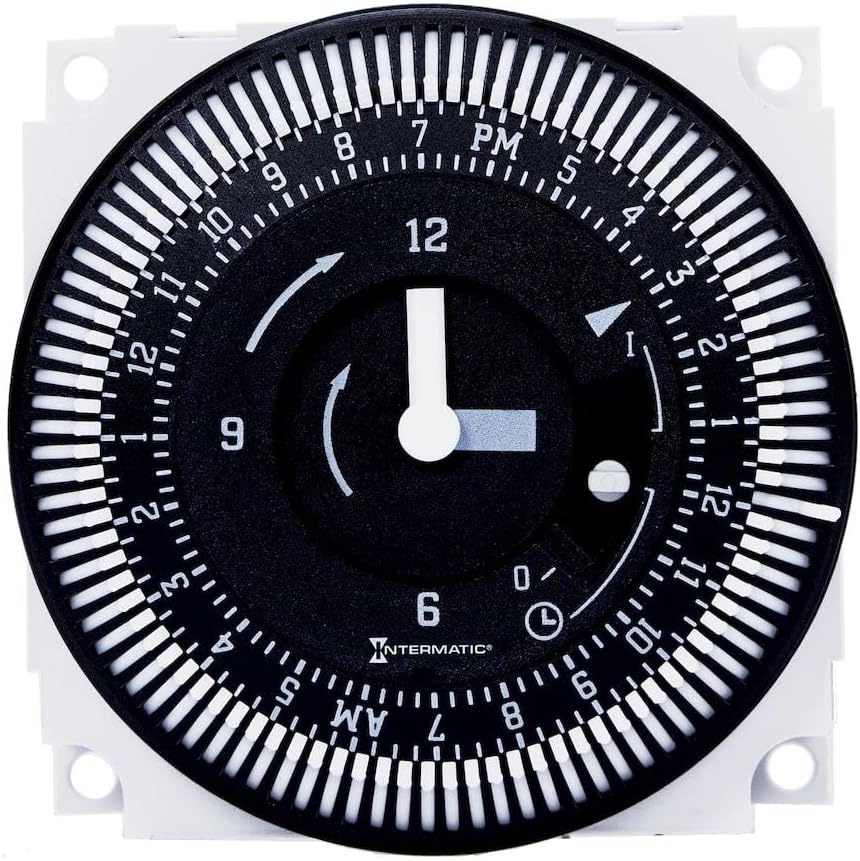
ภาพที่ 3: ด้านหน้า view of the Intermatic FM1STUZH-120U Electromechanical Timer Module, showing the clock face, captive trippers, and manual override switch.
- การตั้งเวลาปัจจุบัน: Rotate the clock dial in the direction of the arrow until the current time aligns with the time indicator mark. The clock face is marked with AM/PM for clarity.
- การตั้งค่าเวลาเปิด/ปิด: The timer features 96 captive trippers around the dial, each representing 15 minutes. To set an ON period, push the trippers outwards for the desired duration. To set an OFF period, leave the trippers in their inward position.
- สวิตช์แทนที่ด้วยตนเอง: The module includes a 3-way override switch (often labeled ON, AUTO, OFF or similar symbols).
- ตำแหน่ง: Forces the connected load to remain ON, overriding the programmed schedule.
- ตำแหน่งอัตโนมัติ: Allows the timer to operate according to the programmed ON/OFF schedule.
- ปิดตำแหน่ง: Forces the connected load to remain OFF, overriding the programmed schedule.
6. การบำรุงรักษา
The Intermatic FM1STUZH-120U Electromechanical Timer Module is designed for reliable, long-term operation with minimal maintenance. Regular inspection of wiring connections for tightness and signs of wear is recommended. Keep the unit free from dust and debris. No user-serviceable parts are inside; refer to qualified personnel for any repairs beyond basic installation and operation.
7 การแก้ไขปัญหา
- ตัวจับเวลาไม่ทำงาน: Check the power supply to the module. Ensure the manual override switch is in the 'AUTO' position. Verify that the captive trippers are correctly set for ON periods.
- โหลดไม่สลับ: Confirm that the load is properly connected to the timer's output terminals. Check the load itself for functionality. Ensure the timer is receiving power and the internal mechanism is rotating.
- เวลาไม่ถูกต้อง: Verify that the current time is accurately set on the dial. Ensure the ON/OFF trippers are correctly positioned for the desired schedule.
- การทำงานเป็นระยะ: Inspect all wiring connections for looseness or corrosion. Ensure the operating environment is within the specified temperature range.
If issues persist after performing these checks, contact Intermatic customer support or a qualified electrician.
8. การรับประกันและการสนับสนุน
For warranty information, technical support, or service inquiries regarding your Intermatic FM1STUZH-120U Electromechanical Timer Module, please refer to the official Intermatic webหรือติดต่อฝ่ายบริการลูกค้าโดยตรง โปรดเก็บใบเสร็จรับเงินไว้เป็นหลักฐานการซื้อสำหรับการเคลมประกัน
ข้อมูลติดต่อของ Intermatic:
Webเว็บไซต์: www.intermatic.com
อ้างถึง webเว็บไซต์นี้มีหมายเลขติดต่อและแหล่งข้อมูลสนับสนุนล่าสุด