
การแนะนำ
The Nokia Bluetooth Stereo Headset BH-905 is designed to provide a superior audio experience with active noise cancellation and wide compatibility. This manual provides instructions for setting up, operating, and maintaining your headset to ensure optimal performance.
The headset features 10 microphones: 8 dedicated to capturing ambient noise for cancellation and 2 for capturing speech in noisy environments. It offers versatile connectivity, supporting both wireless Bluetooth and wired connections with various devices.
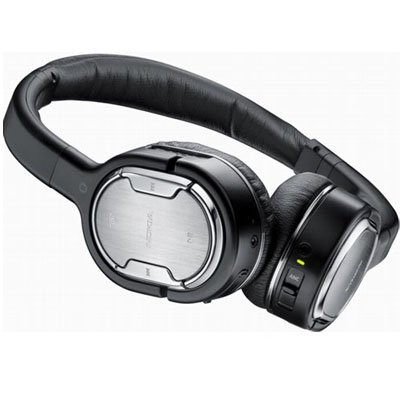
Image: The Nokia Bluetooth Stereo Headset BH-905, showcasinด้วยดีไซน์ที่เรียบหรูและที่ครอบหูแบบครอบหู
คุณสมบัติหลัก
- การตัดเสียงรบกวนแบบแอคทีฟ (ANC): Significantly reduces ambient noise for an immersive listening experience.
- 10 Microphones: Utilizes 8 microphones for noise capture and 2 for clear speech transmission in loud surroundings.
- ความเข้ากันได้กว้าง: Connects wirelessly via Bluetooth or wired to a variety of mobile phones, music players, and other audio devices.
- การควบคุมแบบไร้รอยต่อ: Intuitive controls allow for easy switching between music and calls without needing to look at the device.
การตั้งค่า
จับคู่บลูทู ธ
- Ensure your headset is charged and powered off.
- เปิดใช้งานบลูทูธบนอุปกรณ์มือถือของคุณ
- Press and hold the power button on the headset until the indicator light flashes blue rapidly, indicating pairing mode.
- On your device, search for Bluetooth devices and select "Nokia BH-905" from the list.
- If prompted, enter the passcode (usually "0000").
- Once paired, the indicator light will turn solid blue or flash slowly.
การเชื่อมต่อแบบใช้สาย
For devices without Bluetooth or when battery is low, use the provided audio cables. The headset includes plugs for standard audio jacks and airplane adapters for versatile use.
- Connect one end of the audio cable to the headset's audio input port.
- Connect the other end to your audio source (e.g., mobile phone, MP3 player, airplane entertainment system).
คำแนะนำการใช้งาน
เปิด/ปิดเครื่อง
- ในการเปิดเครื่อง ให้กดปุ่มเปิด/ปิดค้างไว้จนกว่าไฟแสดงสถานะจะสว่างขึ้น
- หากต้องการปิดเครื่อง ให้กดปุ่มเปิด/ปิดค้างไว้จนกว่าไฟแสดงสถานะจะดับลง
การตัดเสียงรบกวนแบบแอคทีฟ (ANC)
The BH-905 features advanced Active Noise Cancellation technology. With 8 dedicated microphones, it captures ambient low-frequency noise and generates an inverse sound wave, effectively canceling out unwanted sounds. This allows for a clearer audio experience, especially in noisy environments like airplanes or busy streets.
- To activate ANC, locate the ANC switch on the headset and slide it to the 'On' position. A green indicator light will confirm activation.
- To deactivate ANC, slide the switch to the 'Off' position.
การจัดการการโทร
The headset is equipped with 2 microphones specifically designed for speech. These microphones not only capture your voice clearly but also work to cancel out ambient noise, ensuring that the person you are speaking with hears you, not your surroundings.
- การรับ / วางสาย: Use the dedicated call button on the headset.
- Switching between Music and Calls: The headset allows for seamless transitions between listening to music and taking calls. When a call comes in, your music will pause, and you can answer the call directly from the headset.
การเล่นเพลง
Control your music directly from the headset using the intuitive buttons. The design supports "blind usage," meaning you can operate the controls by feel without needing to look at them.
- เล่น/หยุดชั่วคราว: Use the play/pause button.
- ข้ามแทร็ก: Use the forward/backward track buttons.
- การควบคุมระดับเสียง: ปรับระดับเสียงโดยใช้ปุ่มปรับระดับเสียงที่กำหนดไว้
Video: An official Nokia video demonstrating the features and technology behind the BH-905 headset, including its active noise cancellation and multi-microphone system for clear audio and calls.
การซ่อมบำรุง
- ทำความสะอาดชุดหูฟังเป็นประจำด้วยผ้าแห้งนุ่ม
- ควรหลีกเลี่ยงการนำชุดหูฟังไปวางไว้ในที่ที่มีอุณหภูมิสูงหรือต่ำเกินไป ความชื้น หรือแสงแดดโดยตรง
- ควรเก็บหูฟังไว้ในกล่องป้องกันเมื่อไม่ใช้งาน เพื่อป้องกันความเสียหาย
- ห้ามถอดประกอบหรือดัดแปลงชุดหูฟัง เนื่องจากจะทำให้การรับประกันเป็นโมฆะ
การแก้ไขปัญหา
- ไม่มีไฟฟ้า: ตรวจสอบให้แน่ใจว่าชุดหูฟังชาร์จเต็มแล้ว
- ไม่สามารถจับคู่ได้: Make sure the headset is in pairing mode and within range of your device. Try restarting both devices.
- ไม่มีเสียง/คุณภาพเสียงไม่ดี: Check volume levels on both the headset and your connected device. For wired connections, ensure cables are securely plugged in. For Bluetooth, ensure a stable connection.
- ANC ไม่ทำงานอย่างมีประสิทธิภาพ: ตรวจสอบให้แน่ใจว่าสวิตช์ ANC อยู่ในตำแหน่ง 'เปิด'
- Callers Cannot Hear Me Clearly: Ensure the headset's microphones are not obstructed.
If issues persist, refer to the Nokia support webไซต์หรือติดต่อฝ่ายบริการลูกค้าเพื่อขอความช่วยเหลือเพิ่มเติม
ข้อมูลจำเพาะ
| คุณสมบัติ | ข้อมูลจำเพาะ |
|---|---|
| ยี่ห้อ | โนเกีย |
| หมายเลขรุ่น | 02716J5 |
| ฟอร์มแฟกเตอร์ | Over-ear (two_ear) |
| การควบคุมเสียงรบกวน | ระบบตัดเสียงรบกวนแบบแอคทีฟ |
| เทคโนโลยีการเชื่อมต่อ | บลูทูธ,แบบมีสาย |
| เทคโนโลยีการสื่อสารไร้สาย | บลูทูธ |
| คุณสมบัติเพิ่มเติม | Microphone; Stereo |
| ประเภทการควบคุม | การควบคุมสื่อ |
| น้ำหนักสินค้า | 0.32 ปอนด์ |
| ยูพีซี | 758478021477 |
| GTIN | 758478021477 |
การรับประกันและการสนับสนุน
The Nokia Bluetooth Stereo Headset BH-905 comes with a รับประกัน 12 เดือน นับจากวันที่ซื้อ การรับประกันนี้ครอบคลุมข้อบกพร่องจากการผลิตภายใต้การใช้งานปกติ โปรดเก็บหลักฐานการซื้อไว้เพื่อขอรับสิทธิ์การรับประกัน
For technical support, warranty service, or additional information, please visit the official Nokia support website or contact your local Nokia customer service center.