
1. บทนำ
The Laney CXP-110 is an ultra-compact, active enclosure designed for use as a stage monitor or mounted on a speaker stand. It features a robust construction with a tough vinyl covering, metal corners, rubber feet, and a kick-proof steel grill, ensuring durability for various performance environments. Engineered in Great Britain, this unit delivers 130 watts of power through its 10-inch woofer. It includes essential controls such as a balanced Mic input, 1/4-inch jack Line input, two-band EQ, and Master Volume. The CXP-110 also provides a Line Link socket for connecting to additional active enclosures or monitors, and a 35mm pole stand fitting for versatile placement options.
2. ข้อมูลด้านความปลอดภัย
Please read and understand all safety instructions before operating the Laney CXP-110. Retain this manual for future reference.
- แหล่งพลังงาน: เชื่อมต่ออุปกรณ์เข้ากับแหล่งจ่ายไฟประเภทที่ระบุไว้ในคู่มือนี้หรือที่ระบุไว้บนตัวเครื่องเท่านั้น
- การระบายอากาศ : ตรวจสอบให้แน่ใจว่ามีการระบายอากาศที่เพียงพอ อย่าปิดกั้นช่องระบายอากาศใดๆ
- น้ำและความชื้น: อย่าให้ตัวเครื่องโดนฝนหรือความชื้น อย่าวางสิ่งของที่บรรจุของเหลว เช่น แจกัน ไว้บนตัวเครื่อง
- ความร้อน: ห้ามวางเครื่องไว้ใกล้แหล่งความร้อน เช่น หม้อน้ำ เครื่องทำความร้อน เตา หรืออุปกรณ์อื่นๆ (รวมถึง ampเครื่องให้ความร้อน) ที่ผลิตความร้อน
- การทำความสะอาด: ทำความสะอาดด้วยผ้าแห้งเท่านั้น
- การบริการ: อย่าพยายามให้บริการผลิตภัณฑ์นี้ด้วยตนเอง ส่งต่อการบริการทั้งหมดไปยังช่างบริการที่ผ่านการรับรอง
- สาย: ปกป้องสายไฟไม่ให้ถูกเหยียบหรือถูกหนีบ โดยเฉพาะที่ปลั๊ก เต้ารับไฟฟ้า และจุดที่สายไฟออกจากเครื่อง
- ความเสถียร: Ensure the unit is placed on a stable surface or securely mounted on a compatible speaker stand (35mm pole stand fitting).
3. การตั้งค่า
The Laney CXP-110 can be used in two primary configurations: as a floor monitor or mounted on a speaker stand.
3.1. Floor Monitor Setup
Place the CXP-110 on a stable, flat surface directly on the stage floor. Its angled design allows it to project sound upwards towards the performer. Ensure the unit is positioned to avoid obstruction and provide optimal sound coverage.
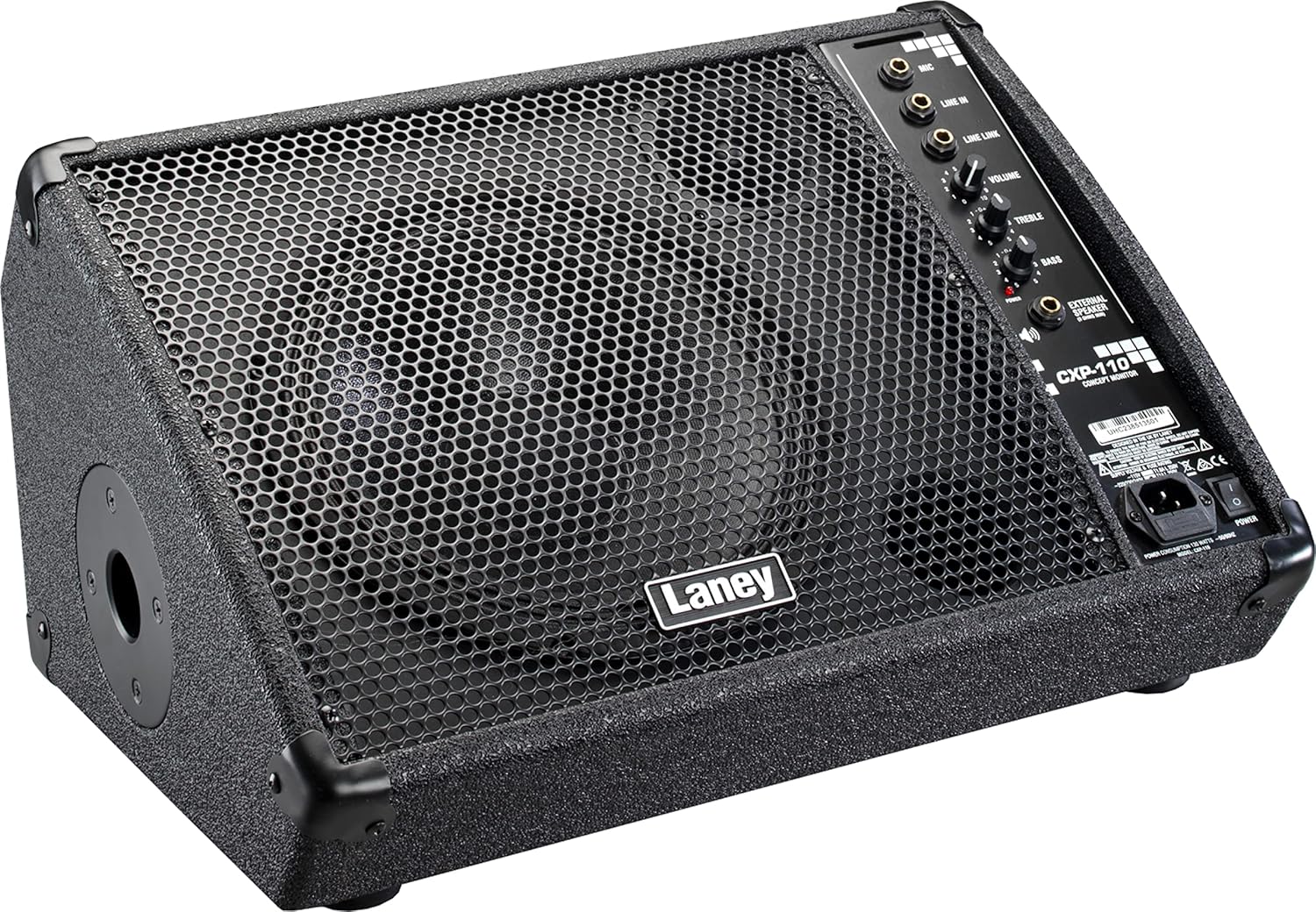
Figure 3.1: Laney CXP-110 in floor monitor position.
This image shows the Laney CXP-110 from an angled perspective, highlighting its design for use as a stage floor monitor. The speaker grille faces upwards, and the control panel is visible on the right side.
3.2. Speaker Stand Setup
For use as a side fill monitor or front-of-house speaker, the CXP-110 is equipped with a 35mm pole stand fitting. Carefully mount the unit onto a compatible speaker stand, ensuring it is stable and secure before operation.

Figure 3.2: Laney CXP-110 showing the pole mount socket.
ภาพนี้แสดงด้านข้าง view of the Laney CXP-110, clearly showing the circular opening for the 35mm pole stand fitting on its left side, allowing for elevated placement.
3.3. การเชื่อมต่อไฟฟ้า
Connect the supplied power cable to the IEC power inlet on the rear panel of the CXP-110 and then to a suitable AC power outlet. Ensure the power switch is in the OFF position before connecting.
4. คู่มือการใช้งาน
The CXP-110 features a straightforward control panel for easy operation.

รูปที่ 4.1: แผงควบคุมด้านบนview.
This detailed image focuses on the control panel of the Laney CXP-110, showing the various input jacks (Mic, Line In, Line Link), and control knobs (Volume, Treble, Bass), along with the power indicator and external speaker output.
4.1. อินพุต
- อินพุตไมโครโฟน: Use this balanced input for connecting a microphone.
- LINE IN Input: Use this 1/4-inch jack input for connecting line-level sources such as mixers, instruments, or playback devices.
- LINE LINK Output: This socket allows you to connect the CXP-110 to an additional active enclosure or monitor, expanding your sound system.
4.2. การควบคุม
- ปริมาณ: Adjusts the overall output level of the monitor. Start with this control at a low setting and gradually increase to the desired level.
- เสียงแหลม: Controls the high-frequency response of the monitor. Turn clockwise to increase treble, counter-clockwise to decrease.
- เบส: Controls the low-frequency response of the monitor. Turn clockwise to increase bass, counter-clockwise to decrease.
4.3. การเปิด/ปิดเครื่อง
After connecting all inputs and outputs, switch the power button to the ON position. The power indicator light will illuminate. To power off, switch the button to the OFF position.
5. การบำรุงรักษา
Proper maintenance will ensure the longevity and optimal performance of your Laney CXP-110.
- การทำความสะอาด: ใช้ผ้านุ่มและแห้งเช็ดทำความสะอาดภายนอกตัวเครื่อง ห้ามใช้น้ำยาทำความสะอาดที่มีฤทธิ์กัดกร่อน ตัวทำละลาย หรือแว็กซ์
- พื้นที่จัดเก็บ: เมื่อไม่ใช้งาน ควรเก็บจอภาพไว้ในที่แห้งและเย็น หลีกเลี่ยงแสงแดดโดยตรงและอุณหภูมิที่สูงหรือต่ำเกินไป
- การขนส่ง: When transporting the unit, ensure it is securely packed to prevent damage. The robust construction with metal corners and a steel grill provides good protection.
- การตรวจสอบ: Periodically inspect the power cord and all input/output jacks for any signs of wear or damage.

Figure 5.1: Integrated Handle.
This image displays the top of the Laney CXP-110, clearly showing the sturdy integrated handle designed for easy and secure transportation of the unit.
6 การแก้ไขปัญหา
If you encounter issues with your Laney CXP-110, refer to the following common problems and solutions.
| ปัญหา | สาเหตุที่เป็นไปได้ | สารละลาย |
|---|---|---|
| ไม่มีเสียงออก |
|
|
| เสียงผิดเพี้ยน |
|
|
| เสียงหึ่งๆ หรือเสียงซ่า |
|
|
If the problem persists after attempting these solutions, please contact Laney customer support or a qualified service technician.
7. ข้อมูลจำเพาะ
| คุณสมบัติ | รายละเอียด |
|---|---|
| แบบอย่าง | ซีเอ็กซ์พี-110 |
| พิมพ์ | แอคทีฟ Stagอี มอนิเตอร์ |
| กำลังขับ | 130 วัตต์ |
| การกำหนดค่าลำโพง | 10-inch Woofer & HF Tweeter |
| การตอบสนองความถี่ | 78Hz ถึง 20KHz |
| ข้อมูลอินพุต | Balanced Mic Input, 1/4-inch Jack Line Input |
| เอาท์พุต | Line Link Socket (for additional active enclosure/monitor) |
| การควบคุม | ระดับเสียง, เสียงแหลม, เบส |
| ตัวเลือกการติดตั้ง | Floor or 35mm Pole Stand Operation |
| วัสดุก่อสร้าง | Tough Vinyl Covering, Metal Corners, Rubber Feet, Kick-proof Steel Grill |
| ขนาด (D x W x H) | ลึก 13.66 นิ้ว x กว้าง 18.43 นิ้ว x สูง 10.79 นิ้ว |
| น้ำหนักสินค้า | 11 ปอนด์ (ประมาณ 5 กก.) |
8. ข้อมูลการรับประกัน
Laney products come with a limited warranty. Please refer to the warranty card included with your product or visit the official Laney webดูรายละเอียดข้อกำหนดและเงื่อนไขการรับประกันได้ที่เว็บไซต์ โปรดเก็บหลักฐานการซื้อไว้เพื่อใช้ในการเรียกร้องการรับประกัน
9. การสนับสนุนลูกค้า
For technical assistance, service, or parts, please contact Laney customer support. Contact information can typically be found on the official Laney webไซต์หรือบนบรรจุภัณฑ์ผลิตภัณฑ์
Webเว็บไซต์: www.laney.co.uk
