
การแนะนำ
ขอบคุณสำหรับการซื้อasing the Discovery Kids Handheld Metal Detector. This device is designed for recreational use, allowing users to explore and discover metallic objects. It features a built-in magnifying lens, compass, and flashlight to enhance the exploration experience. Please read this manual thoroughly before operating the device to ensure proper use and maintenance.
ข้อมูลด้านความปลอดภัย
- ความปลอดภัยของแบตเตอรี่: Do not mix old and new batteries. Do not mix alkaline, standard (carbon-zinc), or rechargeable batteries. Remove batteries if the device will not be used for an extended period. Dispose of used batteries properly. Never dispose of batteries in fire, as they may explode or leak.
- การกำกับดูแล: ควรมีผู้ใหญ่คอยดูแลขณะใช้งานสำหรับผู้ใช้งานที่เป็นเด็ก
- การใช้สิ่งแวดล้อม: Avoid using the metal detector in extreme weather conditions or near sensitive electronic equipment.
- การสัมผัสน้ำ: The device has an International Protection Rating of IP54, meaning it is protected from limited dust ingress and water spray from any direction. Do not submerge the device in water.
เนื้อหาแพ็คเกจ
Ensure all items are present before use:
- Discovery Kids Handheld Metal Detector
- คู่มือการใช้งาน
Note: 2 x "AA" size batteries are ไม่ รวมอยู่และต้องซื้อแยกต่างหาก
การระบุชิ้นส่วน
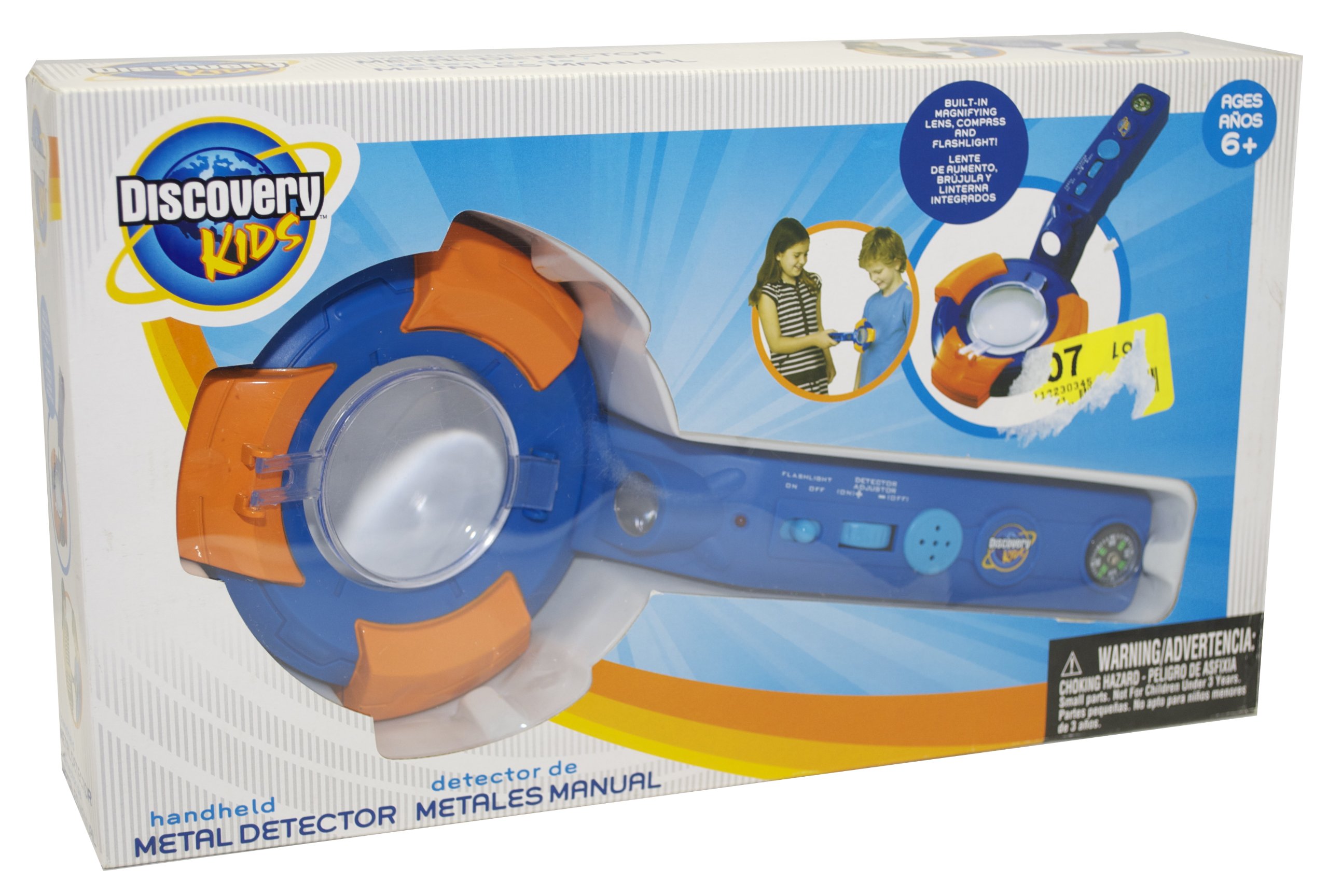
รูปที่ 1: Packaging of the Discovery Kids Handheld Metal Detector, highlighting its features such as the metal detection indicator light, buzzer alarm, compass, flashlight, and magnifying lens.

รูปที่ 2: รายละเอียด view of the Discovery Kids Handheld Metal Detector, showing the main body, search coil, handle, and integrated features.
- ค้นหาคอยล์: The circular part at the bottom used to detect metal.
- รับมือ: For gripping the device.
- Control Panel/Buttons: For operating flashlight and other functions.
- Metal Detection Indicator Light: Illuminates when metal is detected.
- Metal Detection Buzzer Alarm: Sounds when metal is detected.
- เข็มทิศ: Integrated for direction finding.
- ไฟฉาย: Built-in for illumination.
- เลนส์ขยาย: Built-in for examining discoveries.
- ช่องใส่แบตเตอรี่: Located on the device, typically in the handle or main body.
การตั้งค่า
การติดตั้งแบตเตอรี่
- Locate the battery compartment on the device. This is typically secured with a small screw or latch.
- Using a small screwdriver (if necessary), open the battery compartment cover.
- Insert 2 x "AA" size batteries, ensuring the correct polarity (+ and -) as indicated inside the compartment.
- ปิดฝาช่องใส่แบตเตอรี่กลับเข้าที่และขันให้แน่น
สำคัญ: Always use fresh batteries and ensure they are inserted correctly. Refer to the Safety Information section for battery handling guidelines.
คำแนะนำการใช้งาน
การเปิด/ปิด
Locate the power switch or button on the device. Press or slide it to the "ON" position to power on the metal detector. To turn off, press or slide it to the "OFF" position.
การตรวจจับโลหะ
- Once powered on, hold the metal detector by its handle.
- Sweep the search coil slowly and steadily over the area you wish to scan, keeping it parallel to the ground.
- When a metallic object is detected, the device will emit a Metal Detection Buzzer Alarm และ Metal Detection Indicator Light จะให้แสงสว่าง
- Move the coil back and forth over the detected area to pinpoint the exact location of the object.
Using the Integrated Features
- ไฟฉาย: Activate the built-in flashlight by pressing its dedicated button (if available) or by a specific switch. Use it to illuminate dark areas during your search.
- เข็มทิศ: The integrated compass provides directional guidance. Hold the device steady and level to read the compass accurately.
- เลนส์ขยาย: Use the magnifying lens to closely examine small objects or details of your discoveries.
การซ่อมบำรุง
- การทำความสะอาด: เช็ดอุปกรณ์ด้วยผ้าแห้งนุ่มๆ หลังการใช้งานทุกครั้ง ห้ามใช้สารทำความสะอาดที่มีฤทธิ์กัดกร่อนหรือตัวทำละลาย
- พื้นที่จัดเก็บ: Store the metal detector in a cool, dry place away from direct sunlight and extreme temperatures.
- การถอดแบตเตอรี่: Always remove batteries if the device will not be used for an extended period to prevent leakage and damage.
การแก้ไขปัญหา
| ปัญหา | สาเหตุที่เป็นไปได้ | สารละลาย |
|---|---|---|
| อุปกรณ์ไม่เปิด | แบตเตอรี่หมดหรือใส่ไม่ถูกต้อง | Replace with fresh "AA" batteries, ensuring correct polarity. |
| ไม่มีการตรวจจับโลหะหรือมีสัญญาณอ่อน | แบตเตอรี่เหลือน้อย; สภาพแวดล้อมรบกวน | Replace batteries. Move to a different location away from large metal structures or strong electromagnetic fields. |
| Buzzer alarm sounds continuously. | Device is too close to a large metal object or experiencing interference. | Move the device away from known metal objects. Check for environmental interference. |
ข้อมูลจำเพาะ
- หมายเลขรุ่น: KSD5021
- ยี่ห้อ: ดิสคัฟเวอรี่คิดส์
- แหล่งพลังงาน: แบตเตอรี่ขนาด "AA" 2 ก้อน (ไม่รวมอยู่ในชุด)
- วัสดุ: Metal (components)
- น้ำหนักสินค้า: 8.8 ออนซ์ (0.55 ปอนด์)
- ขนาดสินค้า : 14 x 8 x 3 นิ้ว
- ระดับการป้องกันระหว่างประเทศ: IP54
- คุณสมบัติ: Metal Detection Buzzer Alarm, Metal Detection Indicator Light, Compass, Flashlight, Magnifying Lens
การรับประกันและการสนับสนุน
This product is manufactured by Discovery Kids. For support or warranty inquiries, please contact the manufacturer directly. Information found on the product packaging indicates the manufacturer is Discovery Kids and the distributor is Kids Station Toys International Ltd.
ผู้ผลิต: ดิสคัฟเวอรี่คิดส์
จัดจำหน่ายโดย : Kids Station Toys International Ltd.
เบอร์ติดต่อ : 1-888-321-7191
Webเว็บไซต์: discoverykids.com
Product and colors may vary. Conforms to ASTM F-963.