
การแนะนำ
ขอบคุณสำหรับการซื้อasing the Snakebyte Wireless Bluetooth Premium PS3 Controller. This manual provides detailed instructions for setting up, operating, maintaining, and troubleshooting your new controller. Please read this manual thoroughly before use to ensure optimal performance and longevity of your device.
เนื้อหาแพ็คเกจ
กรุณาตรวจสอบว่าสินค้าทั้งหมดมีอยู่ในแพ็คเกจ:
- Snakebyte Wireless Bluetooth Premium PS3 Controller
- USB Charging Cable (approximately 3 meters)
- คู่มือการใช้งาน (เอกสารนี้)

Image: The Snakebyte Wireless Bluetooth Premium PS3 Controller shown in its retail blister packaging, indicating the product and included cable.
การตั้งค่า
1. การชาร์จคอนโทรลเลอร์
Before initial use, fully charge the controller. Connect the supplied USB charging cable to the controller's charging port and the other end to a USB port on your PlayStation 3 console or a compatible USB power adapter. The indicator lights on the controller will show charging status and turn off or change color when fully charged.
2 การเชื่อมต่อกับ PlayStation 3
To connect the controller wirelessly to your PlayStation 3 console:
- โปรดตรวจสอบให้แน่ใจว่าเครื่อง PlayStation 3 ของคุณเปิดอยู่
- Connect the controller to the PS3 console using the supplied USB charging cable. This will register the controller with the console.
- กดปุ่ม ปุ่ม PS (located in the center of the controller) once. The controller will power on and attempt to establish a connection.
- Once the controller is registered and connected, the indicator lights will illuminate, typically assigning a player number.
- You can now disconnect the USB cable for wireless gameplay. If the connection is lost, reconnect the USB cable and press the PS button again.

ภาพ: ด้านหน้า view of the Snakebyte Wireless Bluetooth Premium PS3 Controller, showing the button layout including the central PS button.
คำแนะนำการใช้งาน
โครงสร้างและการทำงานของตัวควบคุม
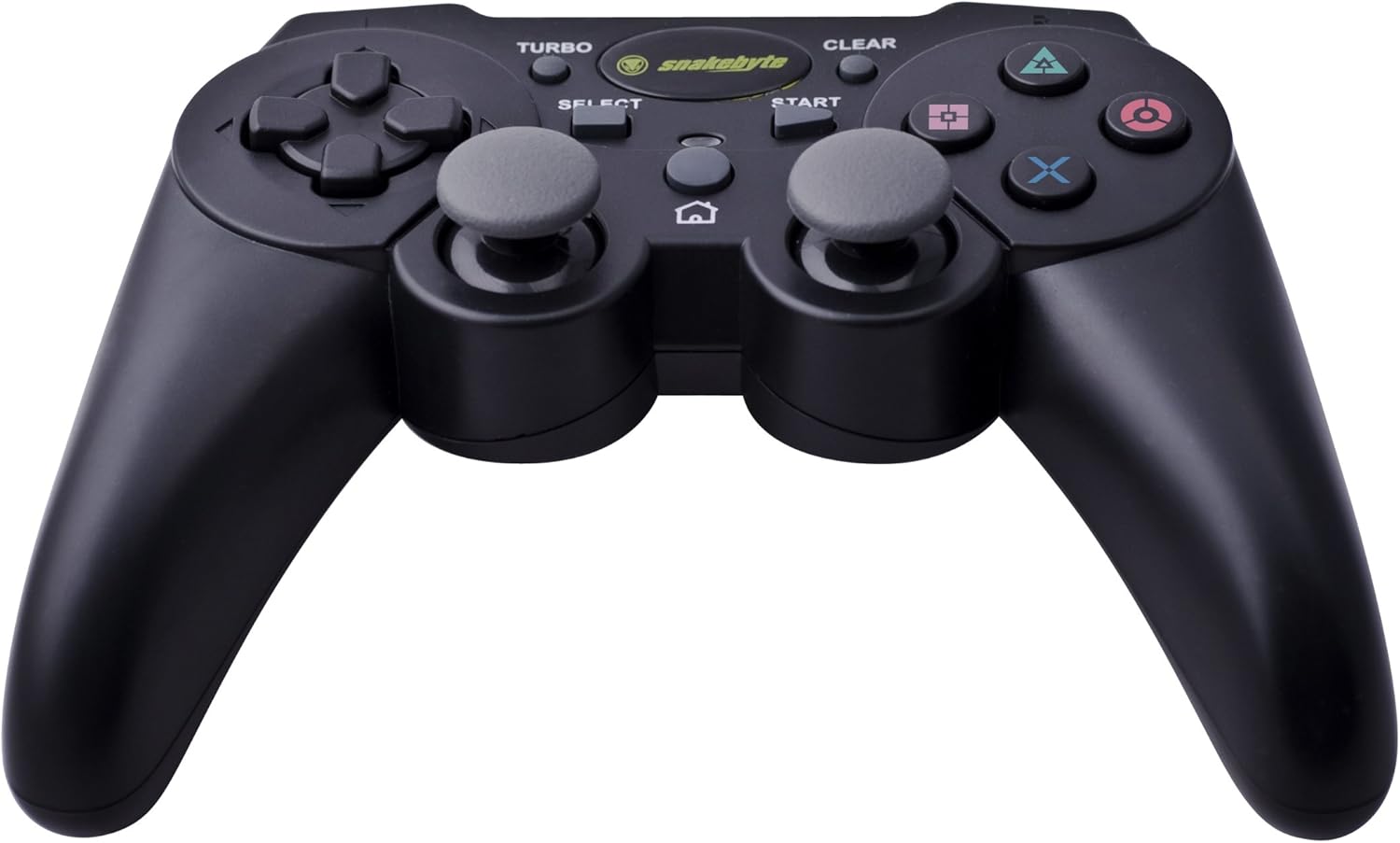
Image: The Snakebyte Wireless Bluetooth Premium PS3 Controller, highlighting the dual analog sticks and various buttons.
- แผงทิศทาง (D-Pad): For precise directional input in games.
- แท่งอนาล็อกซ้าย: การควบคุมการเคลื่อนไหวเบื้องต้น
- อนาล็อกสติ๊กขวา: การควบคุมกล้องหรือการเคลื่อนไหวรอง
- ปุ่มควบคุมการทำงาน (สามเหลี่ยม วงกลม กากบาท สี่เหลี่ยม): การกระทำเฉพาะเกม
- ปุ่ม L1/R1: ปุ่มด้านข้างลำตัวใช้สำหรับฟังก์ชั่นต่างๆ ในเกม
- ปุ่ม L2/R2: Analog triggers for pressure-sensitive input, often used for acceleration/braking or aiming/firing.
- ปุ่มเริ่มต้น: Pauses games or opens menus.
- ปุ่มเลือก: Opens in-game maps, inventories, or other menus.
- ปุ่ม PS: Powers on the controller, accesses the PS3 XMB (Cross Media Bar) menu, or turns off the controller/console.
- ปุ่มเทอร์โบ: Activates the turbo function for other buttons.
- ปุ่ม CLEAR: ปิดใช้งานฟังก์ชันเทอร์โบ
ฟังก์ชันเทอร์โบ
The controller features a TURBO function, allowing a selected button to register multiple presses rapidly with a single hold. This can be useful for certain game mechanics.
- To activate TURBO: Press and hold the ปุ่มเทอร์โบ, then press the desired action button (e.g., Cross, Square, Circle, Triangle, L1, R1, L2, R2). Release both buttons. The selected button will now have the TURBO function enabled.
- To deactivate TURBO for a specific button: Press and hold the ปุ่ม CLEAR, then press the button for which TURBO is currently active. Release both buttons.
- To deactivate all TURBO functions: Press the ปุ่ม CLEAR once without holding it down.
Motion Sensing and Vibration Feedback
This controller supports motion sensing capabilities, allowing for intuitive control in compatible games. It also provides vibration feedback to enhance immersion during gameplay, reacting to in-game events such as impacts or explosions.
การเปิดและปิดเครื่อง
- เพื่อเปิดเครื่อง: กดปุ่ม ปุ่ม PS.
- To power off: The controller will automatically enter sleep mode after a period of inactivity to conserve battery. Alternatively, you can hold the ปุ่ม PS for several seconds to bring up the PS3 menu, where you can choose to turn off the controller.
การซ่อมบำรุง
- การทำความสะอาด: ใช้ผ้านุ่มและแห้งทำความสะอาดคอนโทรลเลอร์ ห้ามใช้น้ำยาทำความสะอาดหรือตัวทำละลายที่มีฤทธิ์กัดกร่อน
- พื้นที่จัดเก็บ: เก็บตัวควบคุมไว้ในที่แห้งและเย็น ห่างจากแสงแดดโดยตรงและอุณหภูมิที่สูงหรือต่ำมาก
- การดูแลแบตเตอรี่ เพื่อยืดอายุการใช้งานแบตเตอรี่ ควรหลีกเลี่ยงการปล่อยประจุแบตเตอรี่จนหมดบ่อยๆ ควรชาร์จเป็นประจำ แม้จะไม่ได้ใช้งานบ่อยก็ตาม
- หลีกเลี่ยงความเสียหาย: Do not drop the controller or expose it to excessive force or moisture.
การแก้ไขปัญหา
| ปัญหา | วิธีแก้ปัญหาที่เป็นไปได้ |
|---|---|
| ตัวควบคุมไม่เชื่อมต่อแบบไร้สาย |
|
| ปุ่มหรือแท่งอนาล็อกไม่ตอบสนอง |
|
| ตัวควบคุมไม่สามารถชาร์จไฟได้ |
|
การรีเซ็ตคอนโทรลเลอร์
If the controller behaves erratically or becomes unresponsive, you can perform a reset. Locate the small reset button on the back of the controller (often in a small hole). Use a thin, pointed object (like a straightened paperclip) to press and hold the reset button for a few seconds. This will restart the controller's internal electronics.
ข้อมูลจำเพาะ
- ยี่ห้อ: Snakebyte
- หมายเลขรุ่น: SB904714
- แพลตฟอร์มที่เข้ากันได้: โซนี่ เพลย์สเตชั่น 3
- การเชื่อมต่อ: ไร้สาย (Bluetooth)
- จำนวนปุ่ม: 16
- ขนาด (ยาว x กว้าง x สูง): ประมาณ 23.01 x 16.31 x 8.51 ซม. (9.06 x 6.42 x 3.35 นิ้ว)
- น้ำหนัก: ประมาณ 419.99 กรัม (0.93 ปอนด์)
- สี: สีดำ
การรับประกันและการสนับสนุน
For warranty information and technical support, please refer to the documentation provided with your purchase or contact your retailer. You may also visit the official Snakebyte webเว็บไซต์นี้เหมาะสำหรับขอความช่วยเหลือเพิ่มเติมและดูข้อมูลผลิตภัณฑ์