
Mintcraft JL-45891-3L
ProSource JL-45891-3L Digital Electronic Safe User Manual
Model: JL-45891-3L
Brand: Mintcraft
1. บทนำ
This manual provides detailed instructions for the safe and efficient operation, setup, and maintenance of your ProSource JL-45891-3L Digital Electronic Safe. Please read this manual thoroughly before using the product and retain it for future reference.
The ProSource JL-45891-3L Digital Electronic Safe is designed to provide secure storage for your valuables. It features a digital electronic keypad for access and is constructed from solid steel with a powder coating finish for durability.
2. ข้อมูลด้านความปลอดภัย
คำเตือน:
- This safe is NOT fireproof. Do not store highly flammable materials inside.
- Keep emergency backup keys in a secure location away from the safe.
- ตรวจสอบให้แน่ใจว่าได้ติดตั้งตู้เซฟอย่างแน่นหนาเพื่อป้องกันการถอดออกโดยไม่ได้รับอนุญาต
- Do not attempt to force the safe open if the electronic lock malfunctions. Refer to the troubleshooting section or contact support.
- เก็บแบตเตอรี่ให้พ้นจากมือเด็ก
3. เนื้อหาบรรจุภัณฑ์
ตรวจสอบว่ารายการทั้งหมดที่ระบุไว้ด้านล่างนี้รวมอยู่ในแพ็คเกจของคุณ:
- 1 x Digital Electronic Safe (Model: JL-45891-3L)
- แบตเตอรี่ AA 4 ก้อน
- 2 x Emergency Back-Up Keys
- 4 x Anchor Bolts
- 1 x คู่มือผู้ใช้ (เอกสารนี้)
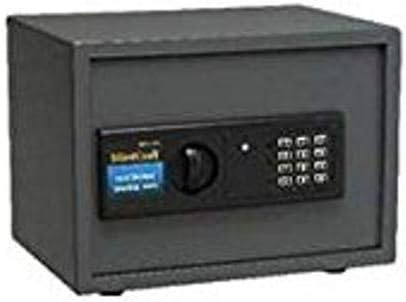
Figure 1: Mintcraft Digital Electronic Safe, showing the main unit with its electronic keypad and manual override knob.
4. การตั้งค่า
4.1. การติดตั้งแบตเตอรี่
- หาช่องใส่แบตเตอรี่ที่อยู่ด้านในประตูตู้เซฟ
- ใส่แบตเตอรี่ AA จำนวน 4 ก้อน โดยให้แน่ใจว่าขั้วถูกต้อง (+/-)
- ปิดฝาช่องใส่แบตเตอรี่
4.2. การตั้งค่ารหัสเริ่มต้น
- With the safe door open, press the red reset button located on the inside of the door near the hinge. A beep will sound, and the indicator light will flash.
- Enter your desired 3 to 8 digit code on the keypad.
- Press the "E" or "#" button to confirm. The light will flash green, indicating the code is set.
- ทดสอบโค้ดใหม่ด้วยการเปิดประตูก่อนจะปิด
4.3. การติดตั้งตู้เซฟ
The safe can be mounted to a wall or floor using the provided anchor bolts. Choose a secure, discreet location.
- Mark the desired drilling points through the pre-drilled holes on the back or bottom of the safe.
- Drill pilot holes in the wall or floor using an appropriate drill bit.
- Align the safe with the drilled holes and secure it using the anchor bolts.
- ตรวจสอบให้แน่ใจว่าตู้เซฟติดตั้งแน่นหนาและไม่สามารถถอดออกได้ง่าย
5. คู่มือการใช้งาน
5.1. การเปิดตู้นิรภัยด้วยรหัสแบบดิจิทัล
- ป้อนรหัสส่วนตัว 3 ถึง 8 หลักของคุณบนแป้นพิมพ์
- กดปุ่ม "E" หรือ "#"
- If the code is correct, the green light will illuminate. Within 5 seconds, turn the knob clockwise to open the door.
- If the code is incorrect, the yellow light will flash, and a beep will sound.
5.2. การเปิดตู้เซฟด้วยกุญแจฉุกเฉิน
In case of battery failure or forgotten code, the safe can be opened using the emergency key.
- Locate the keyhole cover, usually hidden behind the keypad or a removable panel.
- ถอดฝาครอบออก
- Insert the emergency key and turn it counter-clockwise while simultaneously turning the knob clockwise to open the door.
- Once opened, replace the keyhole cover.
5.3. การปิดและล็อคตู้นิรภัย
ในการล็อกตู้เซฟ เพียงปิดประตูและหมุนลูกบิดทวนเข็มนาฬิกา ตู้เซฟจะล็อกโดยอัตโนมัติ
6. การบำรุงรักษา
- การเปลี่ยนแบตเตอรี่: Replace batteries annually or when the low battery indicator light (if present) illuminates. Always use 4 new AA batteries.
- การทำความสะอาด: เช็ดภายนอกตู้เซฟด้วยผ้านุ่มๆamp ผ้า ห้ามใช้สารทำความสะอาดที่มีฤทธิ์กัดกร่อนหรือตัวทำละลาย
- การดูแลรักษาแป้นพิมพ์: Avoid pressing the keypad buttons with excessive force. Keep the keypad dry and free from dust.
- การหล่อลื่น: Periodically apply a small amount of lubricant to the door hinges and locking mechanism to ensure smooth operation.
7 การแก้ไขปัญหา
| ปัญหา | สาเหตุที่เป็นไปได้ | สารละลาย |
|---|---|---|
| ตู้เซฟไม่สามารถเปิดด้วยรหัสได้ | Incorrect code entered; Batteries are low or dead; Keypad malfunction. | Re-enter code carefully. Replace batteries. Use emergency key to open, then reset code. |
| แป้นพิมพ์ไม่ตอบสนอง | แบตเตอรี่หมด; ขั้วต่อแบตเตอรี่หลวม | Replace batteries. Ensure batteries are correctly inserted. |
| ประตูไม่สามารถปิดหรือล็อคได้อย่างถูกต้อง | Obstruction in door frame; Locking bolts misaligned. | Check for obstructions. Gently push the door inward while turning the knob. |
| กุญแจฉุกเฉินใช้การไม่ได้ | Key not fully inserted; Internal mechanism jammed. | Ensure key is fully inserted and turned correctly. Do not force. Contact support if issue persists. |
8. ข้อมูลจำเพาะ
| คุณสมบัติ | รายละเอียด |
|---|---|
| หมายเลขรุ่น | JL-45891-3L |
| ขนาดภายนอก (สูง x กว้าง x ลึก) | 9-7/8 in x 13-3/4 in x 9-7/8 in (25.08 cm x 34.93 cm x 25.08 cm) |
| ขนาดสินค้า (กว้าง x ยาว x สูง) | 12.25 x 12.5 x 15.88 นิ้ว (31.12 x 31.75 x 40.34 ซม.) |
| น้ำหนัก | 30.8 ปอนด์ (13.97 กก.) |
| ประเภทล็อค | ระบบอิเล็กทรอนิกส์ดิจิทัลพร้อมกุญแจฉุกเฉิน |
| ความยาวโค้ด | 3 ถึง 8 หลัก |
| วัสดุ | Solid Steel with Powder Coating Finish |
| แหล่งพลังงาน | 4 x AA แบตเตอรี่ (รวมอยู่ด้วย) |
| ประเภทการติดตั้ง | ติดผนัง |
| ทนไฟ | เลขที่ |
| ระดับความต้านทานต่อน้ำ | ไม่ทนน้ำ |
9. ข้อมูลการรับประกัน
Please refer to the product packaging or contact the manufacturer directly for specific warranty details. Typically, products are covered against defects in materials and workmanship for a limited period from the date of purchase.
10. การสนับสนุนลูกค้า
For technical assistance, replacement parts, or any questions regarding your Mintcraft Digital Electronic Safe, please contact your retailer or the manufacturer directly.
Note: Specific contact information may be found on the product packaging or the manufacturer's official webเว็บไซต์.
Ask a question about this manual
Ask about setup, troubleshooting, compatibility, parts, safety, or missing instructions. Manuals+ will review the question and use this page’s manual context to help answer it.