
ความชัดเจน 600
Clarity Wake Assure+ Desktop Alarm Clock
รุ่น : 600
สินค้าเกินview
The Clarity Wake Assure+ Desktop Alarm Clock is designed to provide a reliable and effective wake-up solution, especially for heavy sleepers, the deaf, and the hard of hearing. It combines a loud audible alarm with a powerful vibrating bed shaker to ensure you never miss an important wake-up call.
คุณสมบัติที่สำคัญ ได้แก่:
- Guaranteed Wake-Up: Choose between a loud audible alarm (up to 85dB), a powerful vibrating bed shaker, or both.
- ระบบเตือนภัยที่ปรับแต่งได้: Adjustable volume and tone settings for the audible alarm.
- จอแสดงผลที่อ่านง่าย: Large 1.8-inch digital LCD display with full dimmable functionality to reduce light disturbance.
- แบตเตอรี่สำรอง: Maintains time and program settings during power outages with a standard 9V battery (not included).
- Built-in Telephone Jack: Alerts users to incoming phone calls, beneficial for landline users or those with videophones.
- ใช้พลังงานไฟฟ้ากระแสสลับ: Plugs into any standard wall outlet, eliminating the need for frequent battery replacements for primary operation.
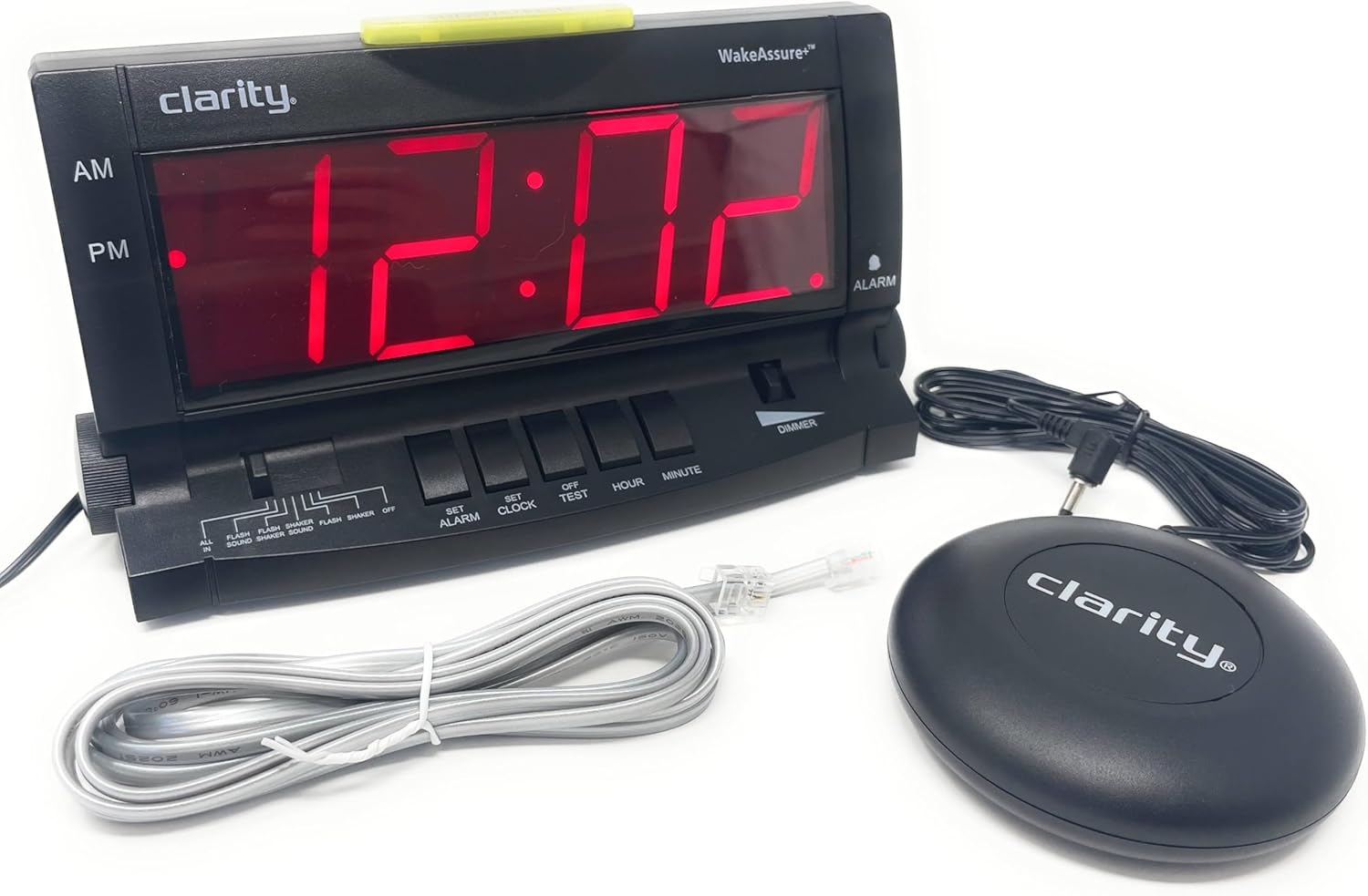
การตั้งค่า
- การแกะกล่อง: Carefully remove all components from the packaging. Verify that you have the alarm clock unit, vibrating bed shaker, and AC power adapter.
- การเชื่อมต่อไฟฟ้า: Insert the small plug of the AC power adapter into the 9V DC jack located on the back of the alarm clock. Plug the AC adapter into a standard wall outlet. The display will illuminate.

รูปที่ 2: ด้านหลัง view of the alarm clock, highlighting the 9V DC power input and the vibrating shaker port. - Battery Backup Installation (Optional but Recommended): เพื่ออำนาจ outage protection, open the battery compartment on the back of the unit and insert one standard 9V battery (not included). Close the compartment securely. This battery will maintain time and alarm settings during a power interruption.
- Connecting the Vibrating Bed Shaker: Plug the cord of the vibrating bed shaker into the dedicated shaker port on the back of the alarm clock. Place the shaker under your pillow or mattress for optimal vibration.
- การตั้งเวลา:
- กดปุ่มค้างไว้ ตั้งนาฬิกา ปุ่ม.
- ขณะถืออยู่ ตั้งนาฬิกา, กดปุ่ม ชั่วโมง button to adjust the hour. Observe the AM/PM indicator.
- ขณะถืออยู่ ตั้งนาฬิกา, กดปุ่ม นาที ปุ่มเพื่อปรับนาที
- ปล่อยตัว ตั้งนาฬิกา button when the correct time is set.
- Connecting to Telephone Line (Optional): If you wish to be alerted to incoming phone calls, connect a telephone line cord (included) from your wall jack to either the LINE 1 or LINE 2 port on the side of the alarm clock.
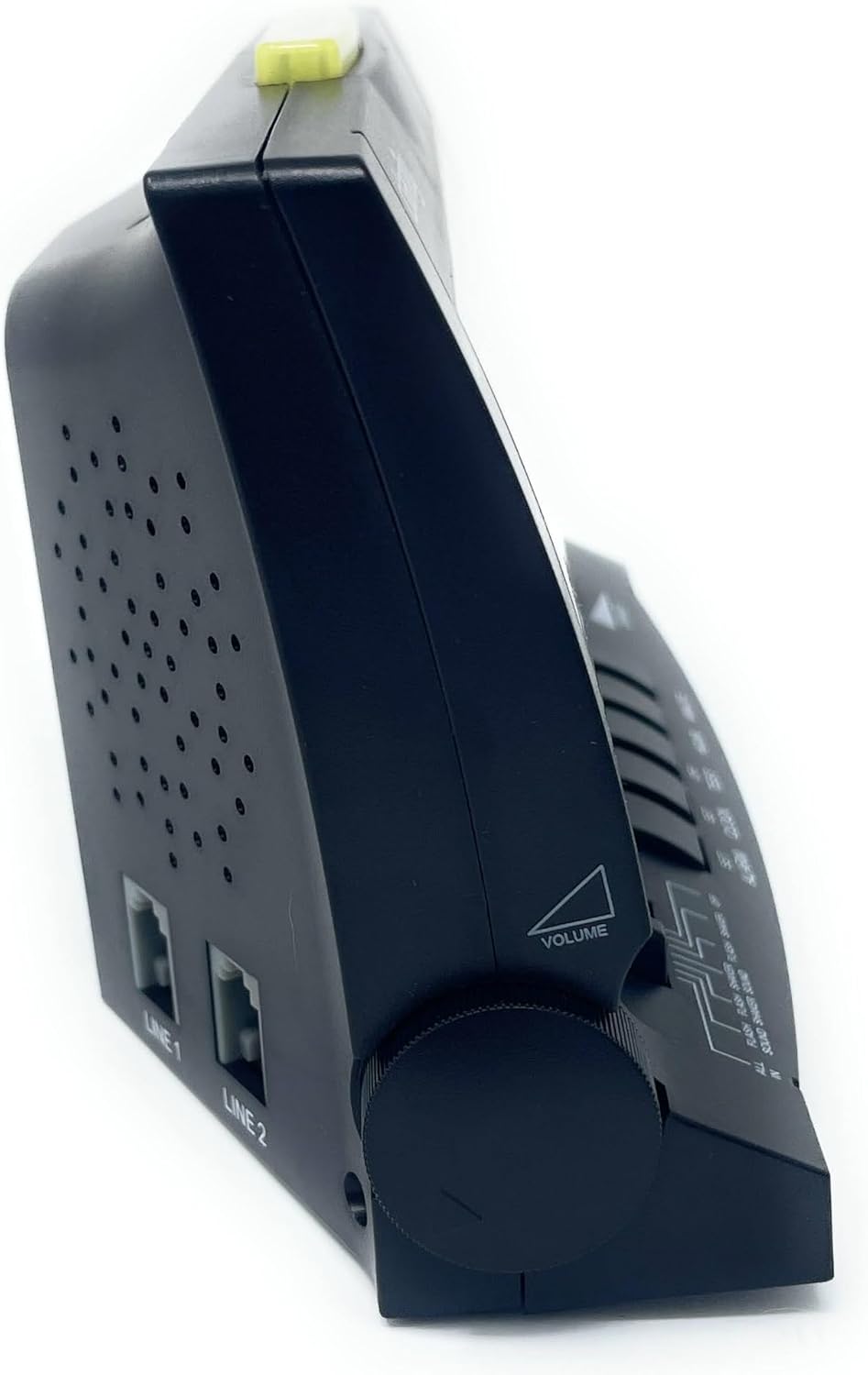
รูปที่ 3: ด้านข้าง view of the alarm clock, illustrating the volume control knob and the telephone line input jacks.
คำแนะนำการใช้งาน
การตั้งปลุก
- กดปุ่มค้างไว้ ตั้งนาฬิกาปลุก ปุ่ม.
- ขณะถืออยู่ ตั้งนาฬิกาปลุก, กดปุ่ม ชั่วโมง กดปุ่มเพื่อปรับเวลาปลุก สังเกตตัวบ่งชี้ AM/PM
- ขณะถืออยู่ ตั้งนาฬิกาปลุก, กดปุ่ม นาที ปุ่มเพื่อปรับนาทีการปลุก
- ปล่อยตัว ตั้งนาฬิกาปลุก button when the desired alarm time is set.
- เพื่อเปิดใช้งานสัญญาณเตือน ให้เลื่อน โหมดนาฬิกาปลุก switch (located on the front panel) to your preferred setting:
- ทั้งหมดใน: Activates sound, flash, and shaker.
- FLASH SOUND SHAKER: Activates flash, sound, and shaker.
- เสียงแฟลช: Activates flash and sound.
- FLASH SHAKER: Activates flash and shaker.
- เสียง: Activates sound only.
- SHAKER: Activates shaker only.
- ปิด: นาฬิกาปลุกถูกปิดใช้งาน

รูปที่ 4 : ด้านหน้า view of the alarm clock, showing the large digital display and the alarm mode selection switch.
Adjusting Alarm Volume and Tone
- ปริมาณ: หมุน ปริมาณ knob located on the left side of the unit to increase or decrease the audible alarm volume.
- โทนสี : หมุน โทนเสียง knob located on the right side of the unit to adjust the pitch (frequency) of the audible alarm. This is particularly useful for individuals with specific hearing loss frequencies.

รูปที่ 5: ด้านข้าง view of the alarm clock, illustrating the tone control knob.
ฟังก์ชั่นการพักชั่วคราว
เมื่อเสียงสัญญาณเตือนดังขึ้น ให้กดปุ่มขนาดใหญ่ เลื่อน/รีเซ็ต bar located on the top of the unit to temporarily silence the alarm. The alarm will sound again after approximately 9 minutes.

ฟังก์ชั่นหรี่แสง
เลื่อน หรี่ไฟ switch (located on the front panel) to adjust the brightness of the digital display. This allows you to set the display to a comfortable level for day or night viewการไอเอ็นจี
Telephone Call Alert
If connected to a telephone line, the alarm clock will provide an alert (flash, sound, or shaker, depending on alarm mode settings) when an incoming call is detected, even if the alarm is not set to go off.
การซ่อมบำรุง
- การทำความสะอาด: To clean the alarm clock, wipe the exterior surfaces with a soft, dry cloth. Do not use abrasive cleaners, waxes, or solvents as they may damage the finish. Ensure the unit is unplugged before cleaning.
- การเปลี่ยนแบตเตอรี่: If the battery backup is installed, replace the 9V battery annually or if the clock loses time during a power outage.
- พื้นที่จัดเก็บ: If storing the unit for an extended period, unplug it from the power outlet and remove the 9V battery.
การแก้ไขปัญหา
| ปัญหา | สาเหตุที่เป็นไปได้ | สารละลาย |
|---|---|---|
| หน้าจอแสดงผลนาฬิกาว่างเปล่า | No power, AC adapter unplugged, or power outage with no battery backup. | Ensure AC adapter is securely plugged into the clock and a working wall outlet. Install a fresh 9V battery for backup. |
| สัญญาณเตือนไม่ส่งเสียง/สั่น/กระพริบ | Alarm not set, alarm mode switch set to OFF, or volume too low. | Verify alarm time is set correctly. Check that the ALARM MODE switch is set to a desired alert option (e.g., ALL IN, SOUND, SHAKER). Increase volume if using audible alarm. Ensure shaker is properly connected. |
| หน้าจอแสดงผลสว่าง/มืดเกินไป | Dimmer switch setting. | Adjust the DIMMER switch on the front panel to your preferred brightness level. Note: The display has specific brightness levels, not a continuous dimming range. |
| Telephone alert not working. | Telephone line not connected, or alarm mode not set to include flash/sound/shaker. | Ensure telephone line is securely connected to the clock and wall jack. Check that the ALARM MODE switch is set to an option that includes a visual, audible, or vibratory alert. |
| เวลาไม่ถูกต้องหลังจากไฟดับtage. | No 9V battery installed, or battery is depleted. | Install a fresh 9V battery for battery backup. Reset the time if necessary. |
ข้อมูลจำเพาะ
| คุณสมบัติ | รายละเอียด |
|---|---|
| ยี่ห้อ | ความชัดเจน |
| หมายเลขรุ่น | 600 |
| ประเภทจอภาพ | Digital LCD (1.8" tall) |
| ระดับเสียงปลุก | สูงถึง 85dB |
| แหล่งพลังงาน | AC-Powered with 9V Battery Backup (battery not included) |
| ขนาดสินค้า | กว้าง 6.5 นิ้ว x สูง 4 นิ้ว |
| น้ำหนักสินค้า | 2.45 ปอนด์ |
| วัสดุ | พลาสติก |
| คุณสมบัติพิเศษ | Vibrating Bed Shaker, Adjustable Tone, Dimmable Display, Telephone Jack |
ข้อมูลการรับประกัน
The Clarity Wake Assure+ Desktop Alarm Clock comes with a การรับประกันแบบจำกัด. Please refer to the warranty card included in your product packaging for specific terms, conditions, and duration of coverage. Retain your proof of purchase for warranty claims.
การสนับสนุนลูกค้า
For technical assistance, troubleshooting beyond this manual, or warranty inquiries, please contact Clarity customer support. Contact information can typically be found on the manufacturer's webไซต์หรือบนบรรจุภัณฑ์ผลิตภัณฑ์
You may also visit the product page on Amazon for additional resources and frequently asked questions: หน้าผลิตภัณฑ์ของ Amazon