
การแนะนำ
This manual provides essential instructions for the safe and effective operation of your Microlife WS100 Digital Body Fat Analyzer Weight Scale. Please read this manual thoroughly before using the device and retain it for future reference. The Microlife WS100 is designed to measure body weight, body fat percentage และมวลกล้ามเนื้อ
ข้อมูลด้านความปลอดภัย
- Do not use this device if you have a pacemaker or other electronic medical implant.
- หญิงตั้งครรภ์ควรปรึกษาแพทย์ก่อนใช้เครื่องมือนี้
- Ensure the scale is placed on a hard, flat surface for accurate measurements. Avoid carpets or uneven floors.
- ห้ามใช้เครื่องชั่งบนพื้นผิวที่เปียกหรือลื่นเพื่อป้องกันการหกล้ม
- เก็บอุปกรณ์ให้พ้นจากมือเด็ก
- ห้ามถอดประกอบหรือพยายามซ่อมแซมอุปกรณ์ด้วยตนเอง หากพบปัญหา โปรดติดต่อฝ่ายบริการลูกค้า
การตั้งค่า
1. การแกะกล่องและการตรวจสอบเบื้องต้น
Carefully remove the Microlife WS100 scale from its packaging. Inspect the device for any signs of damage. If any damage is observed, do not use the scale and contact your retailer.
2. การติดตั้งแบตเตอรี่
The Microlife WS100 scale comes with batteries included. Locate the battery compartment on the underside of the scale. Open the compartment cover and ensure the batteries are correctly inserted according to the polarity indicators (+/-). Close the battery compartment securely.
3. การสอบเทียบเบื้องต้น
Before first use or after moving the scale, it is recommended to perform an initial calibration. Place the scale on a hard, flat surface. Briefly step onto the scale, then step off. The display will show "0.0" or a similar indication, confirming calibration.
4. ผู้ใช้มืออาชีพfile Setup (for Body Fat Analysis)
To utilize the body fat and muscle mass analysis features, you must set up a user profile. Refer to the detailed instructions in the "Operating Instructions" section for setting up user profiles, including age, gender, and height.
คำแนะนำการใช้งาน
1. การวัดน้ำหนักพื้นฐาน
- วางเครื่องชั่งบนพื้นผิวที่มั่นคงและเรียบ
- ก้าวเข้าสู่มาตราส่วนด้วยเท้าเปล่าและยืนนิ่ง
- Your weight will be displayed on the screen. The scale will automatically turn off after a few seconds.
2. Body Fat and Muscle Mass Measurement
For body composition analysis, ensure your user profile ได้ถูกตั้งค่าไว้แล้ว
- Press the "SET" button to enter user selection mode.
- Use the arrow buttons to select your user number (P1, P2, etc.).
- Step onto the scale barefoot, ensuring your feet are positioned on the metal electrodes.
- Stand still until the measurements (weight, body fat percentage เปอร์เซ็นต์มวลกล้ามเนื้อtage) are displayed sequentially.
- The scale will automatically store the data and turn off.
3. การสลับหน่วยการวัด
The unit switch button (usually located on the underside of the scale) allows you to toggle between kilograms (kg) and pounds (lb). Press this button to select your preferred unit before taking a measurement.
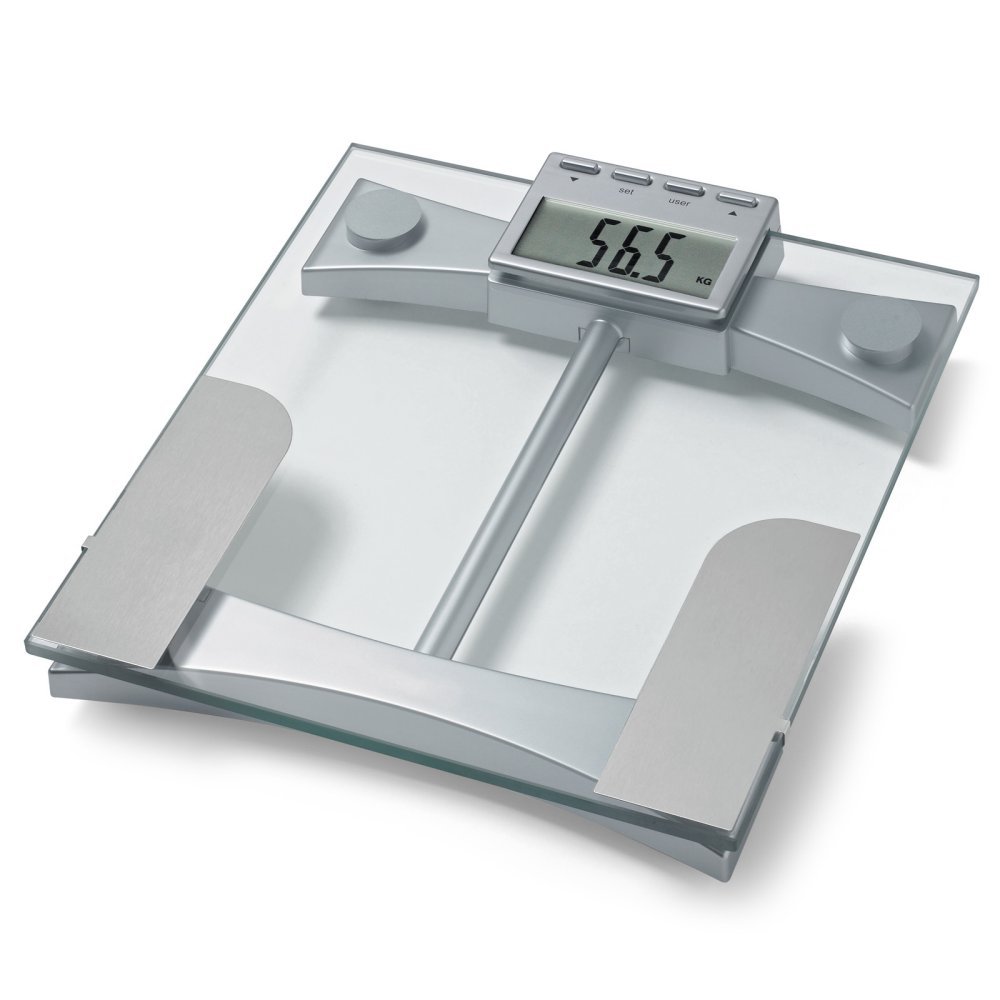
รูปที่ 1: สูงสุด view of the Microlife WS100 scale. Note the display area and the metallic electrodes for body composition analysis. Ensure feet are placed correctly on these electrodes for accurate readings.
การซ่อมบำรุง
1. การทำความสะอาดคราบตะกรัน
เช็ดพื้นผิวของเกล็ดด้วยผ้าเนื้อนุ่มและแห้งamp cloth. Do not use abrasive cleaners or immerse the scale in water. Avoid harsh chemicals that may damage the surface or electronic components.
2. การจัดเก็บ
เก็บเครื่องชั่งไว้ในที่แห้งและเย็น หลีกเลี่ยงแสงแดดโดยตรงและอุณหภูมิที่สูงหรือต่ำเกินไป หลีกเลี่ยงการวางของหนักบนเครื่องชั่งเมื่อไม่ได้ใช้งาน
3. การเปลี่ยนแบตเตอรี่
When the display shows a "Lo" indicator, it is time to replace the batteries. Open the battery compartment on the underside of the scale, remove the old batteries, and insert new ones of the same type, observing correct polarity. Dispose of old batteries responsibly.
การแก้ไขปัญหา
| ปัญหา | สาเหตุที่เป็นไปได้ | สารละลาย |
|---|---|---|
| แสดง "โล" | พลังงานแบตเตอรี่ต่ำ | เปลี่ยนแบตเตอรี่ใหม่ |
| แสดงคำว่า "เอ่อ" | เกิดการโอเวอร์โหลดหรือเกิดข้อผิดพลาดในการวัด | Ensure the scale is not overloaded. Step off and then back on the scale. Ensure stable footing. |
| การอ่านที่ไม่ถูกต้อง | Scale on uneven surface, not calibrated, or user profile ไม่ถูกต้อง. | Place scale on a hard, flat surface. Perform initial calibration. Verify user profile settings (age, height, gender). |
| ไม่มีจอแสดงผล | Batteries incorrectly installed or completely drained. | ตรวจสอบขั้วแบตเตอรี่ เปลี่ยนแบตเตอรี่หากจำเป็น |
ข้อมูลจำเพาะ
- แบบอย่าง: WS100
- ยี่ห้อ: ไมโครไลฟ์
- ประเภทจอภาพ: ดิจิตอล
- คุณสมบัติพิเศษ: Body Fat, Bodyweight, Muscle Mass
- วัสดุ: พลาสติก
- สี: สีดำ
- แหล่งพลังงาน: แบตเตอรี่ (รวม)
- ขนาดสินค้า : 31.75 x 7.62 x 37.47 ซม. (12.5 x 3 x 14.75 นิ้ว)
- น้ำหนักสินค้า: 2.99 กก. (6.59 ปอนด์)
- GTIN/UPC: 642632841233
การรับประกันและการสนับสนุน
For warranty information or technical support, please refer to the warranty card included with your product or visit the official Microlife webไซต์ อย่าพยายามซ่อมแซมอุปกรณ์ด้วยตนเอง เพราะอาจทำให้การรับประกันเป็นโมฆะได้