
การแนะนำ
This manual provides detailed instructions for the proper setup, operation, and maintenance of your Kodak EasyShare M893IS Digital Camera. Please read this manual thoroughly before using your camera to ensure optimal performance and longevity.
1. การตั้งค่า
1.1. การติดตั้งและการชาร์จแบตเตอรี่
The Kodak EasyShare M893IS uses a rechargeable Lithium-Ion battery. Ensure the battery is fully charged before first use.
- หาฝาปิดช่องใส่แบตเตอรี่ที่ด้านล่างหรือด้านข้างของกล้อง
- เลื่อนสลักเพื่อเปิดช่องเก็บของ
- Insert the Li-Ion battery with the contacts facing inward, ensuring it clicks into place.
- ปิดฝาช่องใส่แบตเตอรี่ให้แน่น
- Connect the camera to a power source using the provided USB cable for in-camera charging. The charging indicator light will show the charging status.

รูปที่ 1.1: ด้านข้าง view of the camera, indicating the general location of the battery compartment.
1.2. การติดตั้งการ์ดหน่วยความจำ
กล้องรองรับการ์ดหน่วยความจำ SD/SDHC (ไม่รวมอยู่ในชุด) จำเป็นต้องใช้การ์ดหน่วยความจำเพื่อจัดเก็บภาพถ่ายและวิดีโอ
- Open the battery compartment door. The memory card slot is usually located next to the battery.
- Insert the SD/SDHC card into the slot with the metal contacts facing the correct direction (refer to the diagram inside the compartment). Push until it clicks into place.
- ปิดประตูช่องใส่แบตเตอรี่
2. การใช้งานกล้องของคุณ
2.1. การควบคุมกล้องview
Familiarize yourself with the main controls of your Kodak EasyShare M893IS camera.

รูปที่ 2.1 : ด้านหน้า view of the camera. Key components include the lens, flash, and microphone.
- ปุ่มเปิด/ปิด: Located on the top panel, turns the camera on/off.
- ปุ่มชัตเตอร์: Press halfway to focus, fully to capture a photo.
- คันโยกซูม: Controls the 3x optical zoom and 5x digital zoom.
- ปุ่มหมุน/ปุ่มเลือกโหมด: Selects shooting modes (e.g., Auto, Program, Scene modes).
- หน้าจอ LCD: 2.7-inch display for framing shots, reviewการใส่รูปภาพและการนำทางเมนู
- ปุ่มทิศทาง/ปุ่มตกลง: ใช้สำหรับการนำทางและเลือกเมนู
- ปุ่มเมนู: เข้าถึงการตั้งค่าและตัวเลือกของกล้อง
- Review/Playback Button: Displays captured photos and videos.
- ปุ่มลบ: Removes unwanted images or videos.
- ปุ่มแบ่งปัน: For easy sharing options (if configured).
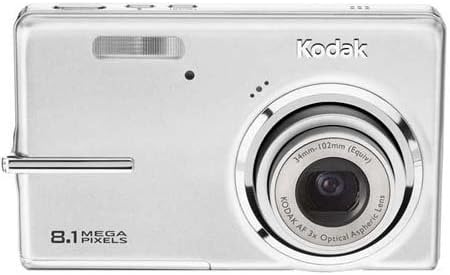
รูปที่ 2.2: ด้านหลัง view of the camera, showing the 2.7-inch LCD and control buttons.
2.2.การถ่ายภาพ
- Turn on the camera by pressing the Power button.
- Select your desired shooting mode using the Mode dial/button. Common modes include:
- อัตโนมัติ: Camera automatically adjusts settings for most situations.
- โหมดฉาก: Specific settings for various scenarios like 'Night mode' or 'Sports'.
- Frame your shot using the LCD screen. Use the zoom lever to adjust the 3x optical zoom or 5x digital zoom.
- Press the Shutter button halfway down to allow the camera to focus (Contrast Detection Auto Focus, Multi-zone, Center Spot options available). A green frame indicates focus lock.
- Press the Shutter button fully to capture the image. The camera features optical image stabilization to reduce blur.
- For low-light conditions, adjust the flash mode (Auto, On, Off, Slow Synch) or utilize the High ISO (up to 1600) setting.
2.3. บันทึกวิดีโอ
- Switch the camera to video recording mode (refer to your camera's mode dial/menu for the video icon).
- จัดกรอบวัตถุของคุณบนหน้าจอ LCD
- กดปุ่มชัตเตอร์เพื่อเริ่มบันทึก กดอีกครั้งเพื่อหยุด
- Videos are recorded in VGA resolution (640 x 480 at 15 fps or 320 x 240 at 30 fps) in MJPEG format.
2.4. เรื่องviewการพัฒนาและการจัดการสื่อ
- กดรีview/Playback button to view รูปภาพและวิดีโอของคุณ
- Use the directional pad to scroll through your media.
- To delete an unwanted item, select it and press the Delete button. Confirm deletion when prompted.
- Connect the camera to a computer via USB to transfer files.
3. การบำรุงรักษา
3.1. การทำความสะอาดกล้อง
- เลนส์: Use a soft, lint-free cloth specifically designed for camera lenses. Gently wipe in a circular motion. Avoid using harsh chemicals.
- หน้าจอ LCD: Wipe with a soft, dry microfiber cloth. For stubborn smudges, slightly dampชุบผ้าด้วยน้ำหรือน้ำยาทำความสะอาดหน้าจอ
- ตัวกล้อง: ใช้ผ้าแห้งนุ่มเช็ดฝุ่นและลายนิ้วมือออกไป
3.2. การดูแลแบตเตอรี่
- เก็บแบตเตอรี่ไว้ในที่เย็นและแห้งเมื่อไม่ได้ใช้งาน
- หลีกเลี่ยงการปล่อยแบตเตอรี่จนหมดบ่อยครั้งเพื่อยืดอายุการใช้งาน
- หากจะเก็บกล้องไว้เป็นเวลานาน ควรถอดแบตเตอรี่ออก
3.3. การจัดเก็บ
Store the camera in a protective case or bag to prevent scratches and damage from dust or moisture. Avoid extreme temperatures.
4 การแก้ไขปัญหา
| ปัญหา | สาเหตุที่เป็นไปได้ | สารละลาย |
|---|---|---|
| กล้องไม่สามารถเปิดได้ | แบตเตอรี่หมดหรือใส่ไม่ถูกต้อง | Charge the battery. Ensure the battery is inserted correctly with contacts aligned. |
| ภาพถ่ายมันเบลอๆ | กล้องสั่น การเคลื่อนไหวของวัตถุ หรือการโฟกัสไม่ถูกต้อง | Hold the camera steady. Ensure the subject is within the camera's focus range. Use optical image stabilization. Increase ISO in low light. |
| ข้อความ "ข้อผิดพลาดการ์ดหน่วยความจำ" | Memory card is full, corrupted, or incorrectly inserted. | Insert a new or empty SD/SDHC card. Reinsert the card. Format the card (this will erase all data). |
| แฟลชไม่ทำงาน | Flash is set to "Off" or battery is low. | Change flash mode to "Auto" or "On". Charge the battery. |
| ไม่สามารถโอนรูปภาพไปยังคอมพิวเตอร์ได้ | Incorrect USB connection or driver issues. | Ensure USB cable is securely connected to both camera and computer. Try a different USB port. Check computer's device manager for driver issues. |
5. ข้อมูลจำเพาะ
| คุณสมบัติ | รายละเอียด |
|---|---|
| ชื่อรุ่น | Easyshare M893IS |
| ความละเอียดของเซนเซอร์ภาพ | 8.1 MP |
| ซูมออปติคอล | 3x |
| ซูมดิจิตอล | 5x |
| ระบบป้องกันภาพสั่นไหว | ออฟติคอล |
| ขนาดหน้าจอ | จอ LCD ขนาด 2.7 นิ้ว |
| รองรับ File รูปแบบ | JPEG (Stills), MJPEG (Video) |
| ความละเอียดวิดีโอ | 640 x 480 (15 เฟรมต่อวินาที), 320 x 240 (30 เฟรมต่อวินาที) |
| ความไวแสง ISO | มาตรฐาน ISO ขยายขั้นต่ำ 80, มาตรฐาน ISO ขยายขั้นสูงสุด 1600 |
| ความเร็วชัตเตอร์ขั้นต่ำ | 4 วินาที |
| ความเร็วชัตเตอร์สูงสุด | 1/2000 วินาที |
| โหมดแฟลช | อัตโนมัติ, เปิด, ปิด, ซิงค์ช้า |
| ประเภทแบตเตอรี่ | ลิเธียมไอออน |
| การเชื่อมต่อ | ยูเอสบี |
| Compatible Flash Memory | การ์ด SD, SDHC (สูงสุด 32 GB) |
| น้ำหนักสินค้า | 0.35 ปอนด์ |
| สี | เงิน |
6. ข้อมูลการรับประกัน
Your Kodak EasyShare M893IS Digital Camera is covered by a รับประกันจำกัด 1 ปี from the date of purchase. This warranty covers manufacturing defects and workmanship under normal use. It does not cover damage caused by misuse, accidents, unauthorized modifications, or external causes.
Please retain your proof of purchase for warranty claims. For detailed terms and conditions, refer to the warranty card included with your product or visit the official Kodak support webเว็บไซต์.
7. การสนับสนุนลูกค้า
If you encounter any issues not covered in the troubleshooting section or require further assistance, please contact Kodak Customer Support.
- การสนับสนุนทางออนไลน์: เยี่ยมชมเว็บไซต์ฝ่ายสนับสนุนอย่างเป็นทางการของ Kodak webเว็บไซต์สำหรับคำถามที่พบบ่อย ไดรเวอร์ และการดาวน์โหลดซอฟต์แวร์
- การสนับสนุนทางโทรศัพท์: โปรดดูที่บรรจุภัณฑ์ของผลิตภัณฑ์หรือเว็บไซต์ของ Kodak webเว็บไซต์สำหรับหมายเลขติดต่อในภูมิภาค
- When contacting support, please have your camera model (M893IS) and serial number ready.