
การแนะนำ
The AT&T 1070 is a versatile 4-line expandable corded phone system designed for small business environments. It features Caller ID, Call Waiting, and a speakerphone for hands-free communication. This system supports up to four telephone lines and can be expanded to include up to 16 stations when used with compatible AT&T models 1040 and 1080.
คุณสมบัติที่สำคัญ ได้แก่:
- 4-line operation, compatible with 1 to 4 telephone lines.
- 32 Speed Dial and 16 Intercom locations for quick access.
- 3-Party Conferencing capability.
- Integrated Speakerphone for hands-free calls.
- Adjustable volume for handset, speaker, headset, and ringer.
- Caller ID and Call Waiting functionality.
- Compatibility with AT&T 1040 and AT&T 1080 models for system expansion.

Image: The AT&T 1070 4-Line Expandable Corded Phone System, showing the handset, keypad, display, and line buttons.
การตั้งค่า
Follow these steps to set up your AT&T 1070 phone system.
1. การเชื่อมต่อไฟฟ้า
Connect the power adapter to the phone and then to a standard electrical outlet. Ensure the connection is secure.
2. Telephone Line Connection
Connect your telephone lines to the corresponding LINE 1, LINE 2, LINE 3, and LINE 4 jacks on the back of the phone. Use standard RJ11 telephone cords.
บันทึก: If you are a DSL subscriber, you may need to use a DSL filter for each telephone line to prevent interference. This product does not work on a digital line.
3. Handset and Headset Connection
- Connect the coiled handset cord to the handset and the designated handset jack on the phone base.
- For hands-free operation, you can connect a 2.5-millimeter headset to the headset jack.
ภาพ: จากบนลงล่าง view of the AT&T 1070 phone, highlighting the handset and overall layout.
4. Battery Installation (for memory backup)
The phone requires 4 AA batteries (included) for memory loss protection. Install these batteries into the compartment located on the underside of the phone base, observing correct polarity.
5. การขยายระบบ
The AT&T 1070 system can be expanded to up to 16 stations using compatible AT&T models 1040 and 1080. Refer to the manuals of those specific models for detailed expansion instructions.
คำแนะนำการใช้งาน
การโทรออกและรับสาย
- การโทร: ยกหูโทรศัพท์หรือกด ผู้พูด button. Select an available line (LINE 1-4) if not automatically selected. Dial the desired number.
- เพื่อรับสาย: ยกหูโทรศัพท์หรือกด ผู้พูด button when the phone rings. The corresponding line indicator will flash.
- Automatic Line Selection: When the phone rings, picking up the handset or pressing SPEAKER will automatically connect you to the ringing line.
ภาพ: ระยะใกล้ view of the AT&T 1070 keypad and function buttons, including DO NOT DISTURB, REDIAL, FLASH, and TRANSFER.
Speakerphone Usage
กดปุ่ม ผู้พูด button to activate the speakerphone function. Press it again to end the call or lift the handset to switch to handset mode.
ID ผู้โทรและสายเรียกซ้อน
- The large display shows incoming caller information (name and number) if you subscribe to Caller ID service.
- With Call Waiting service, you will see who is calling even if you are already on another line.
- The phone stores a 200-name-and-number Caller ID history. Numbers can be dialed directly from this history.
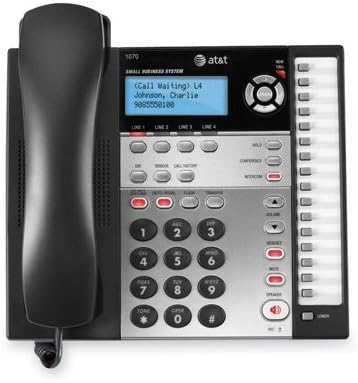
Image: Close-up of the AT&T 1070 display showing "Call Waiting" and caller information, along with line indicators.
3-Party Conferencing
To initiate a 3-party conference call, establish a call on one line, then use the การประชุม button to add another party from a different line. Refer to the full user manual for detailed steps.
Intercom and Paging
If your system is expanded with compatible AT&T 1040 or 1080 models, you can use the intercom feature to communicate between stations and page other users. The phone has 16 intercom number locations.
โทรด่วน
The phone supports 32 speed dial locations for frequently called numbers. Consult the detailed manual for programming instructions.
การควบคุมระดับเสียง
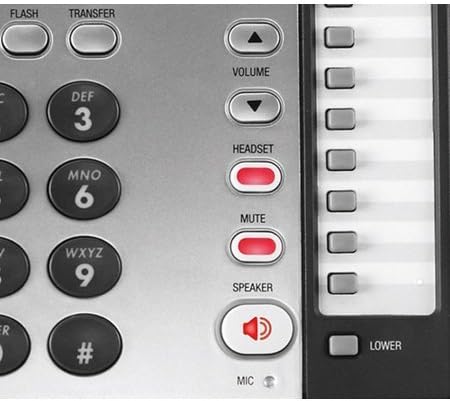
ใช้ ปริมาณ up/down buttons to adjust the listening volume for the handset, speakerphone, or connected headset. Ringer volume can also be adjusted.
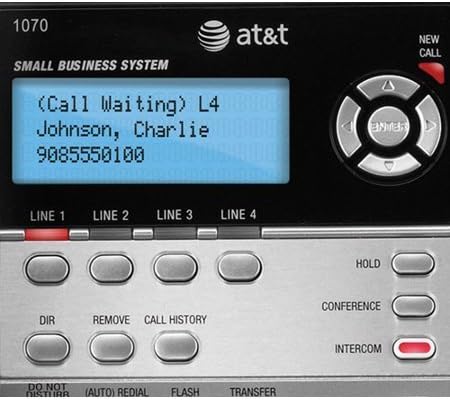
Image: Close-up of the right-side control panel of the AT&T 1070, showing the VOLUME, HEADSET, MUTE, and SPEAKER buttons.
Voicemail Indicator
If you subscribe to a voicemail service, a red light will blink on the phone when you have new voicemail messages.
การซ่อมบำรุง
- การทำความสะอาด: เช็ดทำความสะอาดภายนอกโทรศัพท์ด้วยผ้าเนื้อนุ่มที่ชุบน้ำเล็กน้อยamp ผ้า. อย่าใช้สารเคมีที่รุนแรงหรือน้ำยาทำความสะอาดที่มีฤทธิ์กัดกร่อน
- การเปลี่ยนแบตเตอรี่: Replace the 4 AA batteries annually or as needed to ensure memory backup functionality.
- การจัดการสายไฟ: Ensure all cords are free from kinks or excessive tension to prevent damage.
การแก้ไขปัญหา
| ปัญหา | สารละลาย |
|---|---|
| ไม่มีเสียงโทรออก |
|
| ไม่แสดงหมายเลขผู้โทร |
|
| Interference or static on the line. |
|
| Memory settings lost after power outage. |
|
ข้อมูลจำเพาะ
| คุณสมบัติ | รายละเอียด |
|---|---|
| ยี่ห้อ | เอทีแอนด์ที |
| หมายเลขรุ่น | 1070 |
| ประเภทโทรศัพท์ | แบบมีสาย |
| จำนวนบรรทัด | 4 |
| สี | สีดำ/เงิน |
| แหล่งพลังงาน | สายไฟ |
| แบตเตอรี่ที่จำเป็น | 4 AA batteries (included, for memory backup) |
| ขนาดรายการ (ยาว x กว้าง x สูง) | 8 x 5 x 10 นิ้ว |
| น้ำหนักสินค้า | 3 ปอนด์ |
| การระบุหมายเลขผู้โทร | ใช่ |
| ความสามารถในการประชุมทางโทรศัพท์ | 3 ทาง |
| Speed Dial Locations | 32 |
| Intercom Locations | 16 |
| อุปกรณ์ที่รองรับ | AT&T Models 1040, 1070, and 1080 |
ข้อมูลการรับประกัน
The AT&T 1070 4-Line Expandable Corded Phone System comes with a รับประกันจำกัด 1 ปี. Please retain your proof of purchase for warranty claims. For specific terms and conditions, refer to the warranty card included with your product or visit the official AT&T support webเว็บไซต์.
สนับสนุน
หากต้องการความช่วยเหลือเพิ่มเติม การสนับสนุนทางเทคนิค หรือสอบถามเกี่ยวกับชิ้นส่วนอะไหล่ โปรดไปที่เว็บไซต์ฝ่ายสนับสนุนอย่างเป็นทางการของ AT&T website or contact their customer service department. Contact information can typically be found on the AT&T webไซต์หรือในวัสดุบรรจุภัณฑ์
การสนับสนุนทางออนไลน์: www.att.com/support