
เพื่อน 5218301
Fellowes Galaxy E Electric Comb Binding Machine (Model 5218301)
คู่มือการใช้งาน
สินค้าเกินview
The Fellowes Galaxy E Comb Binding Machine is designed for high-performance binding in large office environments. It offers electric operation for efficient punching and binding of documents. Key features include a high sheet punch capacity, large binding capacity, and user-friendly design elements to ensure professional results.
- Automatically punches up to 25 sheets of paper at a time with a single touch.
- Binds up to 500 sheets using a 2-inch comb.
- Features vertical document loading for accurate punch alignment.
- Includes a removable binding mechanism for increased productivity, allowing two users to work simultaneously.
- Equipped with releasable dies for various document sizes.
- Built-in comb storage tray and integrated document measurement device for convenience.
- Adjustable edge guide for precise document centering.
- Front-access waste tray for easy disposal of paper chips.
คำแนะนำการตั้งค่า
- แกะเครื่องออกจากบรรจุภัณฑ์: Carefully remove the binding machine from its packaging. Ensure all components and accessories are present.
- การจัดวาง: Place the machine on a stable, flat surface with adequate space around it for operation and paper handling.
- การเชื่อมต่อไฟฟ้า: Plug the power cord into a grounded electrical outlet. Ensure the power switch is in the "off" position before plugging in.
- ถาดใส่ขยะ: Verify the front-access waste tray is properly inserted. This tray collects paper chips during punching.
- Removable Binding Mechanism (Optional): If utilizing the removable binding mechanism for dual operation, detach it from the main unit as needed. It can be reattached for integrated use.

Figure 1: The Fellowes Galaxy E Electric Comb Binding Machine in its closed, compact state.
คำแนะนำการใช้งาน
1. การเจาะรูเอกสาร
- เตรียมเอกสาร: Ensure all pages are aligned and free from staples or paper clips. The machine can punch up to 25 sheets of 20lb paper at once.
- Adjust Edge Guide: Use the adjustable edge guide to center your documents for precise punching. This ensures consistent hole placement across all pages.
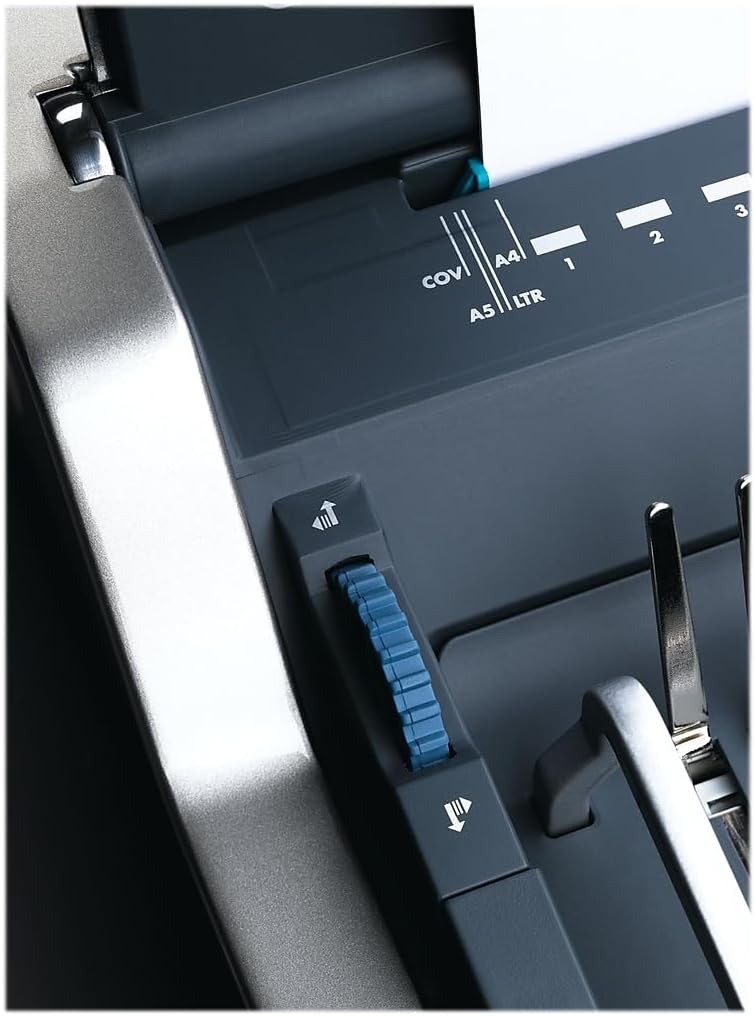
Figure 2: Adjusting the edge guide for accurate document alignment.
- โหลดเอกสาร: Load your documents vertically into the punching slot. This vertical loading mechanism aids in accurate alignment.

Figure 3: Document loaded vertically into the punching slot.
- ต่อย: Press the electric punch button to create the holes. The machine will automatically punch the sheets.

Figure 4: The electric punch button for effortless operation.
- ทำซ้ำ: Repeat the punching process for all sections of your document.
2. Selecting and Preparing Binding Combs
- Measure Document Thickness: Use the integrated document measurement device located in the comb storage tray to determine the correct comb size for your document.
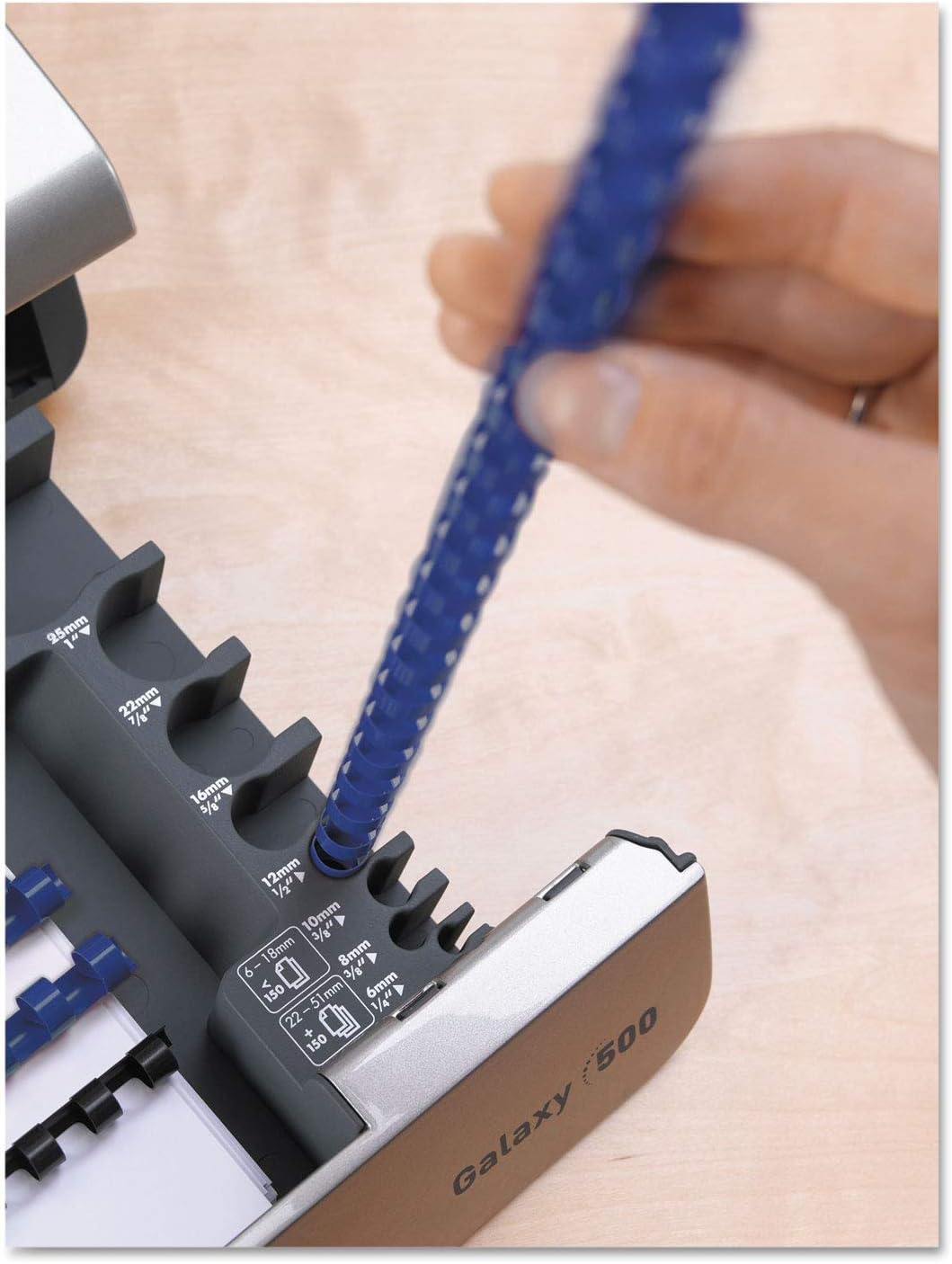
Figure 5: Using the integrated document measurement tool to select the appropriate comb size.
- Access Comb Storage: The machine features a built-in comb storage tray for convenient access to your binding combs.

Figure 6: The convenient built-in comb storage tray.
3. เอกสารผูกพัน
- หวีแบบเปิด: Place the selected binding comb onto the comb opener. Use the lever to open the comb rings.
- กำลังโหลดหน้าเว็บ: Carefully load the punched pages onto the open comb rings. Start with the back cover, then the main document pages, and finally the front cover.
- หวีให้ชิดขอบ: Once all pages are loaded, use the lever to close the comb rings securely.
- ลบเอกสาร: Remove your bound document from the machine.
วิดีโอสาธิตผลิตภัณฑ์
Video 1: A demonstration of the Fellowes Galaxy E Electric Comb Binding System, showcasing its features and operation, including punching and binding processes. This video highlights the machine's efficiency and ease of use for office binding tasks.
การซ่อมบำรุง
- Empty Waste Tray: Regularly check and empty the front-access waste tray to prevent paper chip buildup, which can affect punching performance.
- ภายนอกสะอาด: เช็ดทำความสะอาดภายนอกเครื่องด้วยผ้าแห้งเนื้อนุ่ม ห้ามใช้สารทำความสะอาดที่มีฤทธิ์กัดกร่อนหรือตัวทำละลาย
- Die Maintenance: Periodically check the punching dies for any debris. The releasable dies allow for easier cleaning if necessary.
การแก้ไขปัญหา
| ปัญหา | สาเหตุที่เป็นไปได้ | สารละลาย |
|---|---|---|
| เครื่องไม่สามารถเปิดได้ | Power cord not securely plugged in; power switch is off; no power from outlet. | Ensure power cord is fully inserted into the machine and a working electrical outlet. Check if the power switch is in the "on" position. Test the outlet with another device. |
| Pages are not punched cleanly. | Too many sheets loaded; dull dies; paper chips obstructing dies. | Reduce the number of sheets per punch (do not exceed 25 sheets). Empty the waste tray. Inspect dies for obstructions and clean if necessary. |
| Pages are not aligned correctly after punching. | Edge guide not properly set; pages not loaded vertically. | Adjust the edge guide to firmly hold documents in place. Ensure documents are loaded vertically and pushed completely into the punching slot. |
| Binding comb does not close properly. | Incorrect comb size for document thickness; comb not properly seated on opener. | Verify the comb size matches the document thickness using the measurement tool. Ensure the comb is correctly placed on the comb opener before closing. |
ข้อมูลจำเพาะ
- แบบอย่าง: Fellowes Galaxy E (5218301)
- ความจุหมัด: Up to 25 sheets (20lb paper)
- ความจุการเข้าเล่ม: Up to 500 sheets (with 2-inch comb)
- การดำเนินการ: ไฟฟ้า
- ขนาด : 19.75 x 8.31 x 23 นิ้ว (ยาว x กว้าง x สูง)
- น้ำหนัก: 32 ปอนด์
- สี: Metallic Silver/Black
- คุณสมบัติ: Vertical document loading, adjustable edge guide, removable binding mechanism, comb storage tray, document measurement tool, front-access waste tray.
การรับประกันและการสนับสนุน
For warranty information, technical support, or to purchase replacement parts and accessories, please visit the official Fellowes webเข้าชมเว็บไซต์หรือติดต่อฝ่ายบริการลูกค้า เก็บหลักฐานการซื้อไว้เพื่อใช้ในการเคลมประกัน
การสนับสนุนทางออนไลน์: www.fellowes.com/support
บริการลูกค้า: Refer to your product packaging or the official Fellowes webเว็บไซต์สำหรับข้อมูลการติดต่อในแต่ละภูมิภาค
Ask a question about this manual
Ask about setup, troubleshooting, compatibility, parts, safety, or missing instructions. Manuals+ will review the question and use this page’s manual context to help answer it.