
Nyrius LT12
คู่มือการใช้งานเครื่องแปลภาษาดิจิทัล Nyrius LT12
รุ่น : LT12
1. บทนำ
This manual provides comprehensive instructions for the operation and maintenance of your Nyrius LT12 Digital Translator. The LT12 is designed to facilitate communication across 12 international languages, offering a convenient solution for travelers and language learners.
The device features a speaking function for phrases, a backlit LCD screen for visibility in various lighting conditions, and an organized database of over 8,400 travel-related phrases across eight conversational categories.
2. เนื้อหาบรรจุภัณฑ์
ตรวจสอบว่ามีสินค้าทั้งหมดที่ระบุไว้ด้านล่างอยู่ในแพ็คเกจของคุณ:
- 1 Nyrius LT12 Pocket Translator
- 2 Lithium Batteries (pre-installed in unit)
- 2 Extra Lithium Batteries
- กระเป๋าหิ้ว 1 ใบ
- สายคล้องคอ 1 เส้น
- 1. คู่มือการใช้งาน (เอกสารฉบับนี้)
3. อุปกรณ์โอเวอร์view
Familiarize yourself with the components of your Nyrius LT12 Digital Translator.
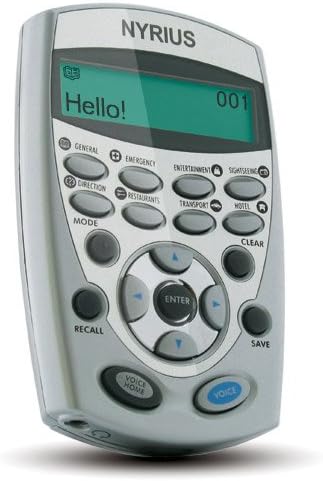
รูปที่ 3.1 : ด้านหน้า View of Nyrius LT12 Translator. This image shows the device with its LCD screen displaying "Hello!" and the various function buttons, including category buttons (General, Emergency, Entertainment, Sightseeing, Direction, Restaurants, Transport, Hotel), navigation buttons, and Voice/Voice Home buttons.
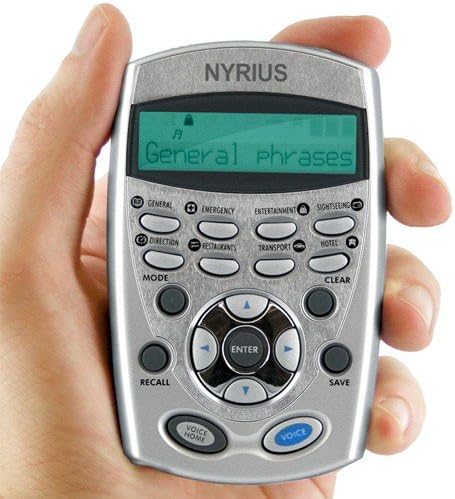
Figure 3.2: Nyrius LT12 Translator in Hand. This image illustrates the compact size of the device, held comfortably in an adult's hand. The screen displays "General phrases," indicating a category selection. The layout of the buttons is clearly visible.
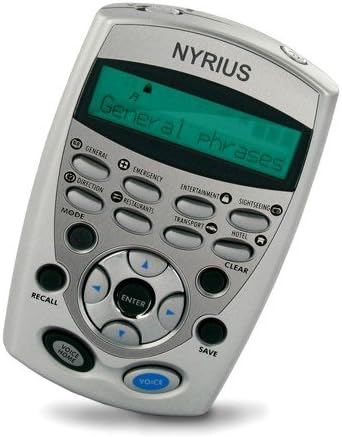
รูปที่ 3.3: มุม View of Nyrius LT12 Translator. This image provides an angled perspective of the device, highlighting its ergonomic design. The screen shows "General phrases," and the various buttons for navigation and function selection are visible.
3.1 ส่วนประกอบหลัก
- จอแสดงผล LCD: Shows phrases, menu options, and settings. Features a backlight for low-light conditions.
- ปุ่มหมวดหมู่: Dedicated buttons for General Speech, Emergency, Entertainment, Sightseeing, Direction, Restaurants, Transport, and Hotel & Accommodation.
- ปุ่มนำทาง: Up, Down, Left, Right, and ENTER buttons for menu navigation and selection.
- ปุ่มโหมด: Switches between different functions and settings.
- ปุ่ม CLEAR: Clears current input or returns to the previous screen.
- ปุ่มเรียกคืน: Accesses saved phrases or phone book entries.
- ปุ่มบันทึก: Saves current phrase or contact information.
- ปุ่มเสียง: Activates the speaking function for the displayed phrase.
- VOICE HOME Button: Returns to the home screen and may activate a default voice function.
- แจ็คหูฟัง: For private listening of translated phrases.
4. การตั้งค่า
4.1 การติดตั้งแบตเตอรี่
Your Nyrius LT12 comes with two lithium batteries pre-installed. If replacement is necessary, follow these steps:
- ค้นหาฝาครอบช่องใส่แบตเตอรี่ที่ด้านหลังของอุปกรณ์
- Carefully slide or unclip the cover to open the compartment.
- Remove the old batteries, noting their polarity (+/-).
- Insert new lithium batteries, ensuring correct polarity.
- ใส่ฝาปิดช่องใส่แบตเตอรี่กลับเข้าที่อย่างแน่นหนา
บันทึก: ทิ้งแบตเตอรี่ที่ใช้แล้วตามระเบียบข้อบังคับของท้องถิ่น
5. คู่มือการใช้งาน
5.1 เปิด/ปิดเครื่อง
หากต้องการเปิดเครื่อง ให้กดปุ่มค้างไว้ โหมด กดปุ่มค้างไว้จนกว่าหน้าจอจะสว่างขึ้น หากต้องการปิดเครื่อง ให้กดปุ่มค้างไว้ โหมด กดปุ่มอีกครั้งจนกระทั่งหน้าจอดับลง
5.2 การเลือกภาษา
The LT12 supports cross-translation between 12 languages: English, French, German, Spanish, Italian, Dutch, Russian, Turkish, Japanese, Portuguese, Mandarin Chinese, and Swedish.
- จากหน้าจอหลัก ให้กด โหมด ปุ่มเพื่อเข้าสู่เมนูหลัก
- Use the navigation buttons (Up/Down) to select "Language" and press เข้า.
- Select your desired source and target languages using the navigation buttons and เข้า.
- กดปุ่ม ชัดเจน เพื่อกลับไปที่หน้าจอหลัก
5.3 Accessing Phrase Categories
The device organizes over 8,400 phrases into eight categories for quick access:
- General Speech
- ภาวะฉุกเฉิน
- ความบันเทิง
- เที่ยวชมสถานที่
- ทิศทาง
- ร้านอาหาร
- ขนส่ง
- Hotel & Accommodation
To select a category, simply press the corresponding dedicated button on the device's front panel.
5.4 Displaying and Speaking Phrases
- Select a language pair as described in Section 5.2.
- Press one of the eight category buttons (e.g., ทั่วไป).
- Use the navigation buttons (Up/Down) to scroll through the available phrases within that category.
- Once the desired phrase is displayed on the LCD screen, press the เสียง button to hear the phrase spoken aloud in the selected target language.
- To listen privately, connect headphones to the headphone jack.
5.5 ฟังก์ชันไฟแบ็คไลท์
The LCD screen features a backlight for improved visibility in dim lighting conditions. The backlight typically activates automatically when a button is pressed and may turn off after a period of inactivity to conserve battery life.
5.6 สมุดโทรศัพท์
The LT12 includes an electronic phone book for storing contact information. This feature can be protected with a password.
- จากหน้าจอหลัก ให้กด โหมด เพื่อเข้าสู่เมนูหลัก
- Navigate to "Phone Book" and press เข้า.
- Follow the on-screen prompts to add, edit, or view การติดต่อ
- To set or change the password, access the "Settings" menu and locate the "Password Protection" option.
5.7 Home and World Time Display
The device can display both your home time and the current time in 24 worldwide cities/time zones.
- จากหน้าจอหลัก ให้กด โหมด เพื่อเข้าสู่เมนูหลัก
- Navigate to "Time" or "World Time" and press เข้า.
- Set your home time and select desired cities for world time display.
5.8 นาฬิกาปลุก
The built-in alarm clock can be set to assist with your schedule.
- จากหน้าจอหลัก ให้กด โหมด เพื่อเข้าสู่เมนูหลัก
- Navigate to "Alarm" and press เข้า.
- Set the desired alarm time and activate the alarm.
6. การบำรุงรักษา
- การทำความสะอาด: ใช้ผ้านุ่มและแห้งเช็ดทำความสะอาดอุปกรณ์ ห้ามใช้น้ำยาทำความสะอาดหรือวัสดุขัดถู
- พื้นที่จัดเก็บ: เก็บเครื่องแปลภาษาไว้ในที่แห้งและเย็น หลีกเลี่ยงแสงแดดโดยตรงและอุณหภูมิที่สูงหรือต่ำเกินไป
- การดูแลแบตเตอรี่ หากจะไม่ใช้อุปกรณ์เป็นเวลานาน ควรถอดแบตเตอรี่ออกเพื่อป้องกันการรั่วไหล
- หลีกเลี่ยงผลกระทบ: ปกป้องอุปกรณ์จากการตกหล่นและแรงกระแทกซึ่งอาจทำให้ส่วนประกอบภายในเสียหายได้
7 การแก้ไขปัญหา
| ปัญหา | สาเหตุที่เป็นไปได้ | สารละลาย |
|---|---|---|
| อุปกรณ์ไม่เปิดเครื่อง | แบตเตอรี่ใกล้หมดหรือหมดประจุ การติดตั้งแบตเตอรี่ไม่ถูกต้อง | เปลี่ยนแบตเตอรี่ใหม่โดยตรวจสอบให้แน่ใจว่าใส่ขั้วถูกต้อง |
| ไม่มีเสียงจากลำโพง | ระดับเสียงเบาเกินไป เสียบหูฟังแล้ว | Increase volume. Disconnect headphones if not needed. |
| หน้าจอมืดหรือไม่สามารถอ่านได้ | ไฟแบ็คไลท์ดับ แบตเตอรี่เหลือน้อย | Ensure backlight is active. Replace batteries. |
| อุปกรณ์หยุดทำงานหรือไม่ตอบสนอง | ซอฟต์แวร์มีปัญหาชั่วคราว | Remove and reinsert batteries to reset the device. |
8. ข้อมูลจำเพาะ
- แบบอย่าง: LT12
- ขนาด : 2.5 x 0.5 x 4 นิ้ว (6.35 x 1.27 x 10.16 ซม.)
- น้ำหนัก: 2.4 ออนซ์ (68 กรัม)
- ภาษาที่รองรับ: English, French, German, Spanish, Italian, Dutch, Russian, Turkish, Japanese, Portuguese, Mandarin Chinese, Swedish
- Phrase Count: Over 8,400 travel-related phrases
- แหล่งพลังงาน: แบตเตอรี่ลิเธียม
- ผู้ผลิต: Nyrius
- ASIN: B000WS1SBU
9. การรับประกันและการสนับสนุนลูกค้า
9.1 ข้อมูลการรับประกัน
The Nyrius LT12 Digital Translator comes with a 1-Year Limited Warranty from the date of purchase. This warranty covers defects in materials and workmanship under normal use. It does not cover damage caused by misuse, accident, unauthorized modification, or external causes.
โปรดเก็บหลักฐานการซื้อของคุณไว้เพื่อเรียกร้องการรับประกัน
9.2 การสนับสนุนลูกค้า
For technical assistance, troubleshooting, or warranty inquiries, please contact Nyrius Customer Support. Lifetime customer support is available 24/7.
Refer to the official Nyrius website or the product packaging for current contact information.