
เบห์ริงเกอร์
คู่มือผู้ใช้ Behringer ULTRATONE K3000FX
Ultra-Flexible 300 Watt 4 Channel PA System/Keyboard Amplifier พร้อมการตรวจจับคำติชม FX และ FBQ
การแนะนำ
The Behringer ULTRATONE K3000FX is a versatile 300-Watt, 4-channel PA system and keyboard amplifier designed for robust sound reproduction. It features a powerful 15-inch BUGERA woofer and a custom-made 1-inch driver, an integrated digital effects processor, and the FBQ Feedback Detection System. This manual provides essential information for the proper setup, operation, and maintenance of your K3000FX ampชีวิต.
คำแนะนำด้านความปลอดภัยที่สำคัญ
- โปรดอ่านคำแนะนำเหล่านี้อย่างละเอียดก่อนใช้งานเครื่อง
- เก็บคำแนะนำเหล่านี้ไว้เพื่อใช้อ้างอิงในอนาคต
- โปรดปฏิบัติตามคำเตือนทั้งหมดบนผลิตภัณฑ์และในคู่มือนี้
- ปฏิบัติตามคำแนะนำทั้งหมดเพื่อการดำเนินงานที่ปลอดภัย
- ห้ามใช้เครื่องมือนี้ใกล้น้ำหรือในที่ชื้นแฉะamp สภาพแวดล้อม
- ทำความสะอาดด้วยผ้าแห้งเท่านั้น
- อย่าปิดกั้นช่องระบายอากาศใดๆ ติดตั้งตามคำแนะนำของผู้ผลิต
- ห้ามติดตั้งใกล้แหล่งความร้อน เช่น หม้อน้ำ เครื่องทำความร้อน เตา หรืออุปกรณ์อื่น ๆ (รวมถึง ampเครื่องให้ความร้อน) ที่ผลิตความร้อน
- อย่าละเลยจุดประสงค์ด้านความปลอดภัยของปลั๊กแบบมีขั้วหรือแบบมีสายดิน ปลั๊กแบบมีขั้วจะมีใบมีด 2 ใบ โดยใบหนึ่งจะกว้างกว่าอีกใบ ปลั๊กแบบมีสายดินจะมีใบมีด 2 ใบและขาต่อสายดินที่สาม ขาที่กว้างหรือขาต่อสายดินที่สามนั้นมีไว้เพื่อความปลอดภัยของคุณ หากปลั๊กที่ให้มาไม่พอดีกับเต้ารับของคุณ ให้ปรึกษาช่างไฟฟ้าเพื่อขอเปลี่ยนเต้ารับที่ล้าสมัย
- ปกป้องสายไฟไม่ให้ถูกเหยียบหรือถูกหนีบ โดยเฉพาะที่ปลั๊ก เต้ารับไฟฟ้า และจุดที่สายไฟออกจากเครื่อง
- ใช้เฉพาะอุปกรณ์เสริม/สิ่งที่แนบตามที่ผู้ผลิตกำหนดเท่านั้น
- ใช้ได้เฉพาะกับรถเข็น ขาตั้ง ขาตั้งกล้อง ขายึด หรือโต๊ะที่ผู้ผลิตกำหนด หรือจำหน่ายพร้อมกับอุปกรณ์เท่านั้น เมื่อใช้รถเข็น ควรใช้ความระมัดระวังในการเคลื่อนย้ายรถเข็น/อุปกรณ์รวมกันเพื่อหลีกเลี่ยงการบาดเจ็บจากการล้ม
- ถอดปลั๊กอุปกรณ์นี้ในระหว่างพายุฝนฟ้าคะนองหรือเมื่อไม่ได้ใช้งานเป็นเวลานาน
- แจ้งบริการทั้งหมดให้ช่างที่ผ่านการรับรองทราบ จำเป็นต้องให้บริการเมื่ออุปกรณ์ได้รับความเสียหายในลักษณะใดก็ตาม เช่น สายไฟหรือปลั๊กชำรุด ของเหลวหกหรือมีวัตถุตกลงไปในอุปกรณ์ อุปกรณ์โดนฝนหรือความชื้น ไม่สามารถทำงานได้ตามปกติ หรือตกหล่น
การตั้งค่า
การแกะบรรจุภัณฑ์และการตรวจสอบ
Carefully unpack your K3000FX amplifier. Inspect the unit for any signs of damage that may have occurred during transit. If damage is found, contact your dealer immediately. Retain the original packing materials for future shipping or storage.
การจัดวาง
วาง amplifier on a stable, level surface. Ensure adequate ventilation around the unit. Avoid placing it in direct sunlight or near heat sources. The K3000FX also features an integrated 35-mm pole socket for stand mounting, allowing it to be used as a PA system.

รูปที่ 1 : ด้านหน้า view of the K3000FX ampชีวิต.
การเชื่อมต่อ
The K3000FX offers multiple input and output options for various applications.
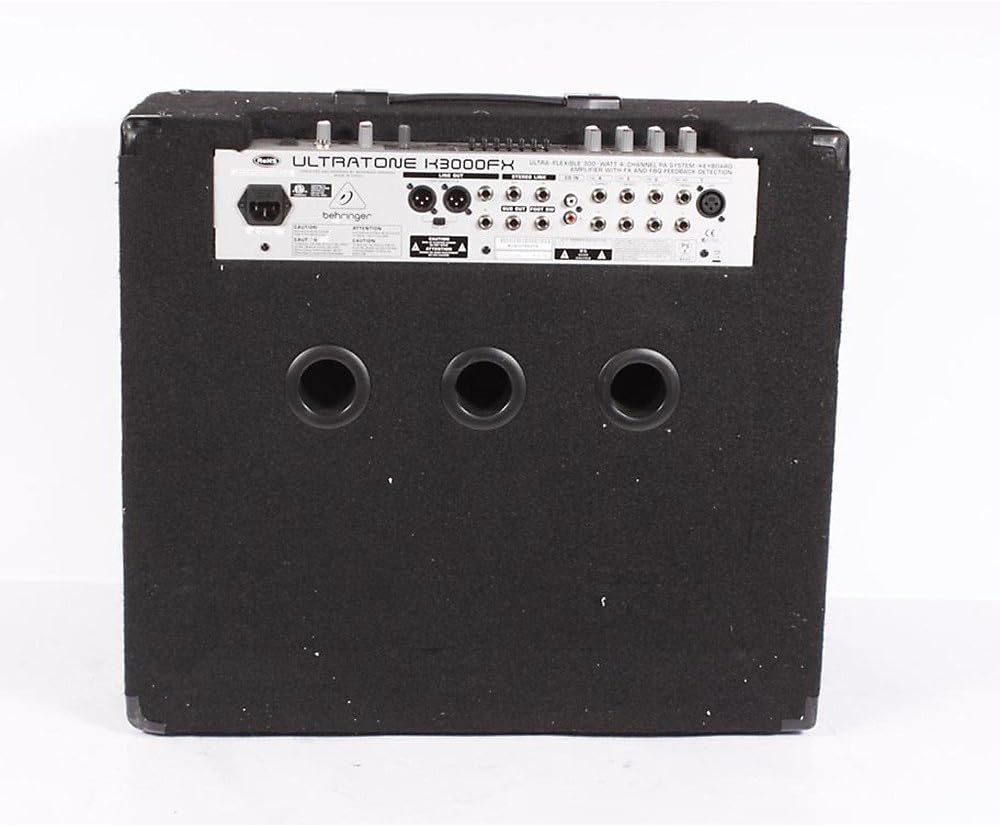
Figure 2: Rear panel connections of the K3000FX ampชีวิต.
- การเชื่อมต่อไฟฟ้า: Connect the supplied power cord to the AC inlet on the rear panel and then to a suitable power outlet.
- อินพุตช่องสัญญาณ (1-4): Each channel features 1/4" stereo inputs. Channel 1 also includes an additional XLR microphone input for direct connection of dynamic microphones.
- อินพุตซีดี: Use the RCA (phono) inputs to connect an external audio source like a CD player or MP3 player for playback or practicing along.
- เอาท์พุตหูฟัง: Connect headphones to the dedicated 1/4" stereo headphone jack for quiet practicing.
- เอาต์พุต DI: The balanced stereo XLR DI output with a Ground Lift switch allows for direct connection to a mixing console or external PA system.
- ลิงค์เอาท์พุต: Connect this output to a slave amplifier (e.g., another K3000FX) for true stereo operation or to expand your sound system.
- เอาต์พุตซับวูฟเฟอร์: Connect an active subwoofer to this output for enhanced low-end power.
คำแนะนำการใช้งาน
การเปิด/ปิดเครื่อง
Ensure all connections are secure before powering on. Turn the MASTER VOLUME control to its minimum setting. Press the POWER switch to turn on the unit. Wait a few seconds for the amplifier to stabilize before increasing the volume. To power off, reverse this procedure.
การทำงานของช่อง
The K3000FX features four independent stereo channels, each with dedicated controls:
- การควบคุมระดับเสียง: ปรับระดับสัญญาณอินพุตสำหรับแต่ละช่องสัญญาณ
- FX Send Control: Determines the amount of signal sent from each channel to the internal digital effects processor.
- Channel 1 XLR Input: For connecting dynamic microphones.
โปรเซสเซอร์เอฟเฟกต์ดิจิตอล
The integrated 24-bit digital FX processor offers 100 presets, including reverb, chorus, flanger, delay, pitch shifter, and various multi-effects. Use the FX program selector to choose your desired effect. The FX RETURN level in the Main section controls the overall wet/dry mix of the effects.
ระบบตรวจจับข้อเสนอแนะ FBQ
The revolutionary FBQ Feedback Detection System instantly reveals critical frequencies that cause feedback. When feedback occurs, the corresponding LED on the 7-band graphic EQ will illuminate, indicating which frequency band needs adjustment to eliminate the feedback.
EQ กราฟิค 7 แบนด์
Use the dedicated 7-band graphic equalizer to shape your sound. Adjust the sliders for each frequency band to boost or cut specific frequencies, optimizing the amplifier's output for your instrument and acoustic environment. The FBQ system works in conjunction with this EQ.
Main Section Controls
- ระดับผลตอบแทน FX: Controls the overall level of the effects returned to the main mix.
- ปริมาณหลัก: ปรับระดับเสียงโดยรวมของเอาต์พุต ampชีวิต.
- ระดับโทรศัพท์: ควบคุมระดับเสียงของเอาต์พุตหูฟัง
- Shape Switch: Engages a specific equalization curve for a quick tonal adjustment.
การซ่อมบำรุง
การทำความสะอาด
ทำความสะอาด amplifier's exterior with a soft, dry cloth. Do not use abrasive cleaners, solvents, or waxes, as these can damage the finish. Ensure no liquids enter the unit.
พื้นที่จัดเก็บ
หากมีการเก็บข้อมูล amplifier for an extended period, ensure it is in a dry, dust-free environment. It is recommended to use the original packaging for protection.
การแก้ไขปัญหา
| ปัญหา | สาเหตุที่เป็นไปได้ | สารละลาย |
|---|---|---|
| ไม่มีเสียงออก |
|
|
| เสียงเพี้ยน |
|
|
| เสียงสะท้อน (เสียงหอน) |
|
|
ข้อมูลจำเพาะ
| คุณสมบัติ | รายละเอียด |
|---|---|
| เอาท์พุต วัดtage | 300 วัตต์ |
| การกำหนดค่าลำโพง | 15-inch BUGERA Woofer, 1-inch Custom Driver |
| ช่องทางการ | 4 Stereo Channels |
| Digital FX Processor | 24-bit, 100 Presets (Reverb, Chorus, Flanger, Delay, Pitch Shifter, Multi-effects) |
| อีควอไลเซอร์ | 7-band Graphic EQ with FBQ Feedback Detection System |
| ข้อมูลอินพุต | 1/4" Stereo (Channels 1-4), XLR Mic (Channel 1), RCA (CD Input) |
| เอาท์พุต | Balanced Stereo XLR DI, 1/4" Headphone, Link, Subwoofer |
| แหล่งพลังงาน | สายไฟ |
| ขนาด (สูง x กว้าง x ลึก) | ขนาด 26.77 x 19.49 x 24.02 นิ้ว (โดยประมาณ) |
| น้ำหนัก | 70.11 ปอนด์ (โดยประมาณ) |
| ประเภทการติดตั้ง | Pole Mount (35mm socket) |
การรับประกันและการสนับสนุน
สำหรับข้อมูลและเงื่อนไขการรับประกันโดยละเอียด โปรดดูบัตรรับประกันที่แนบมากับผลิตภัณฑ์ของคุณ หรือเยี่ยมชมเว็บไซต์อย่างเป็นทางการของ Behringer website. For technical support, service, or spare parts, please contact Behringer customer service through their official channels. Ensure you have your product model number (K3000FX) and serial number ready when contacting support.
ผู้ผลิต: Behringer USA
หมายเลขรุ่น: K3000FX
Ask a question about this manual
Ask about setup, troubleshooting, compatibility, parts, safety, or missing instructions. Manuals+ will review the question and use this page’s manual context to help answer it.