
1. บทนำ
The Technoline WS 7208 is a versatile weather station designed to provide accurate local weather information. It features a clear display for weather forecasts, temperature trends, and a radio alarm clock. This device monitors both indoor and outdoor temperatures, including minimum and maximum values, and supports up to three external transmitters. The package includes one TX16 external transmitter.
คุณสมบัติที่สำคัญ ได้แก่:
- Weather forecast and trend display
- Radio alarm clock function
- Internal and external temperature display with min/max memory
- Support for up to 3 external transmitters (one TX16 included)
- Wall-mountable or table-top placement
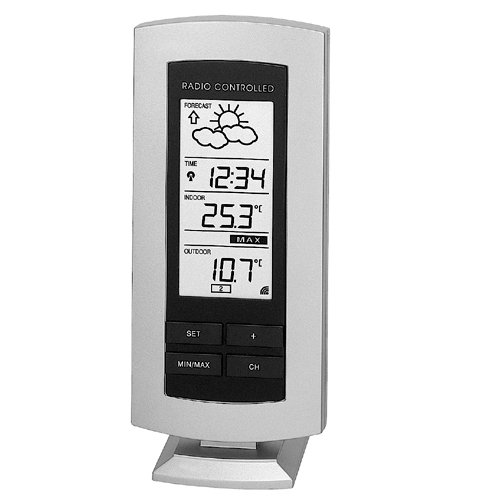
Figure 1: The Technoline WS 7208 Weather Station main unit. This image shows the front display and overall design of the weather station.
2. เนื้อหาบรรจุภัณฑ์
โปรดตรวจสอบสิ่งของภายในบรรจุภัณฑ์อย่างละเอียด หากมีสินค้าใดสูญหายหรือเสียหาย โปรดติดต่อผู้ค้าปลีกของคุณ
- Technoline WS 7208 Weather Station (Main Unit)
- TX16 External Transmitter
- คู่มือการใช้งาน (เอกสารนี้)
3. การตั้งค่า
3.1. การติดตั้งแบตเตอรี่
Both the main weather station unit and the external transmitter require batteries for operation.
- หน่วยหลัก: Open the battery compartment on the back of the main unit. Insert 2 x AA (LR06, stylus) 1.5 V batteries, ensuring correct polarity (+/-). Close the compartment.
- External Transmitter (TX16): Open the battery compartment on the back of the transmitter. Insert 2 x AA (LR06, stylus) 1.5 V batteries, ensuring correct polarity (+/-). Close the compartment.
สำคัญ: Always replace all batteries at the same time. Do not mix old and new batteries, or different types of batteries.
3.2. การวางตำแหน่งเซนเซอร์
Proper placement of the external transmitter is crucial for accurate outdoor temperature readings.
- Place the external transmitter in a shaded, dry location, protected from direct sunlight and rain.
- Ensure the transmitter is within the operational range of the main unit, which is up to 100 meters in an open field. Walls, metal structures, and electronic devices can reduce this range.
- The main unit can be placed on a table or mounted on a wall. Choose a location that allows for easy viewของจอแสดงผล
4. คู่มือการใช้งาน
4.1 การซิงโครไนซ์เบื้องต้น
After battery installation, the main unit will automatically search for the external transmitter. This process may take a few minutes. Ensure both units are close to each other during initial setup.
- The indoor temperature is displayed immediately.
- Once synchronized, the outdoor temperature will appear on the display.
- The main unit receives data from the external transmitter approximately every 5 minutes.
4.2. แสดงข้อมูล
The display provides various pieces of information:
- อุณหภูมิในร่ม: วัดจากหน่วยหลัก
- อุณหภูมิภายนอก: Received from the external transmitter.
- อุณหภูมิต่ำสุด/สูงสุด: The station automatically records the minimum and maximum indoor and outdoor temperatures. Consult the specific buttons on your device (e.g., "MIN/MAX" button) to view and reset these values.
- พยากรณ์อากาศ: Indicated by graphical icons (e.g., sun, clouds, rain) and a trend arrow. This forecast is based on atmospheric pressure changes.
- นาฬิกาปลุกวิทยุ: The time is automatically set via radio signal. Refer to the device's buttons for setting alarms and other time-related functions.
4.3. Temperature Measurement Details
The device offers precise temperature measurements:
- ช่วงอุณหภูมิภายใน: 0°C ถึง 60°C
- External Temperature Range: -29.9°C ถึง +69.9°C
- ความแม่นยำในการวัด: ±0.1 องศาเซลเซียส
- Room Temperature Test Interval: ทุก ๆ 10 วินาที
5. การบำรุงรักษา
- การเปลี่ยนแบตเตอรี่: When the battery indicator appears on the display, replace the batteries in both the main unit and the external transmitter as described in Section 3.1.
- การทำความสะอาด: Clean the device and transmitter with a soft, damp ผ้า ห้ามใช้สารทำความสะอาดที่มีฤทธิ์กัดกร่อนหรือตัวทำละลาย
- พื้นที่จัดเก็บ: หากจะไม่ใช้อุปกรณ์เป็นเวลานาน ควรถอดแบตเตอรี่ออกเพื่อป้องกันการรั่วไหล
6 การแก้ไขปัญหา
| ปัญหา | สาเหตุที่เป็นไปได้ | สารละลาย |
|---|---|---|
| No outdoor temperature display (shows "----") |
|
|
| พยากรณ์อากาศที่ไม่ถูกต้อง |
|
|
| จอแสดงผลสลัวหรือว่างเปล่า | แบตเตอรี่ในตัวเครื่องหลักเหลือน้อย | เปลี่ยนแบตเตอรี่ในตัวเครื่องหลัก |
7. ข้อมูลจำเพาะ
| คุณสมบัติ | รายละเอียด |
|---|---|
| แบบอย่าง | WS 7208 |
| Main Unit Dimensions (L x W x H) | 73 x 26 x 169 มม. |
| External Transmitter Dimensions (L x W x H) | 59 x 22 x 65 มม. |
| ช่วงอุณหภูมิภายใน | 0°C ถึง 60°C |
| External Temperature Range | -29.9°C ถึง +69.9°C |
| Temperature Measurement Error Margin | ±0.1 องศาเซลเซียส |
| ช่วงความชื้น | 1% to 99% (Error Margin ±1%) |
| Room Temperature Test Interval | ทุก ๆ 10 วินาที |
| External Transmitter Data Reception | ทุก ๆ 5 นาที |
| ช่วงการส่งผ่าน | สูงถึง 100 เมตร (เปิดโล่ง) |
| แหล่งจ่ายไฟหลัก | 2 x AA (LR06, stylus) 1.5 V batteries |
| External Transmitter Power Supply | 2 x AA (LR06, stylus) 1.5 V batteries |
| ตัวเลือกตำแหน่ง | Wall-mounted or table-top |
8. การรับประกันและการสนับสนุน
This Technoline WS 7208 Weather Station comes with a รับประกัน 2 ปี นับจากวันที่ซื้อ โปรดเก็บหลักฐานการซื้อไว้เพื่อใช้ในการเคลมประกัน
For technical support, troubleshooting assistance, or warranty inquiries, please contact your retailer or the Technoline customer service department. Contact information can typically be found on the product packaging or the manufacturer's official webเว็บไซต์.