
1. บทนำ
This manual provides essential information for the safe and efficient operation of your Grundig Lenaro 40 LXW 102-8620 Dolby HD Television. Please read these instructions thoroughly before using the product and retain them for future reference. This television features a 40-inch LCD screen, offering high-definition viewing and integrated Dolby audio technology.
2. ข้อมูลด้านความปลอดภัย
เพื่อให้การใช้งานปลอดภัยและป้องกันความเสียหาย โปรดปฏิบัติตามข้อควรระวังด้านความปลอดภัยดังต่อไปนี้:
- อย่าวางโทรทัศน์ไว้ในที่ที่มีฝนหรือความชื้น เพื่อป้องกันไฟไหม้หรือไฟฟ้าช็อต
- ตรวจสอบให้แน่ใจว่ามีการระบายอากาศที่เหมาะสม อย่าปิดกั้นช่องระบายอากาศ
- Place the television on a stable, level surface to prevent it from falling.
- อย่าวางของหนักทับสายไฟ
- Disconnect the power plug from the wall outlet during lightning storms or when unused for long periods.
- ส่งต่อการบริการทั้งหมดไปยังบุคลากรบริการที่มีคุณสมบัติเหมาะสม
3. เนื้อหาบรรจุภัณฑ์
ตรวจสอบว่ามีรายการทั้งหมดอยู่ในแพ็คเกจ:
- Grundig Lenaro 40 LXW 102-8620 Dolby HD Television
- รีโมทคอนโทรล
- สายไฟ
- Table Stand (components for assembly)
- คู่มือการใช้งาน (เอกสารนี้)
4. การตั้งค่า
4.1 การแกะกล่อง
นำโทรทัศน์และอุปกรณ์เสริมทั้งหมดออกจากบรรจุภัณฑ์อย่างระมัดระวัง เก็บวัสดุบรรจุภัณฑ์ไว้สำหรับการขนส่งหรือจัดเก็บในอนาคต
4.2 Attaching the Table Stand
The Grundig Lenaro 40 LXW 102-8620 Dolby is designed for table mounting. Follow these steps to attach the stand:
- Place the television face down on a soft, clean cloth to prevent screen damage.
- Align the stand base with the mounting holes on the bottom of the television.
- ยึดขาตั้งด้วยสกรูที่ให้มา ตรวจสอบให้แน่ใจว่าขันสกรูทั้งหมดให้แน่น
- Carefully lift the television and place it on a stable, level surface.
4.3 การต่อสายไฟ
Connect the power cable to the power input on the back of the television, then plug the other end into a wall outlet.
4.4 การเชื่อมต่ออุปกรณ์ภายนอก
Your television supports various connections:
- ช่องต่อ HDMI: For high-definition video and audio from devices like Blu-ray players, game consoles, or set-top boxes. Use an HDMI cable to connect the device to an HDMI port on the TV.
- อีเธอร์เน็ต: For wired network connectivity. Connect an Ethernet cable from your router to the LAN port on the TV.
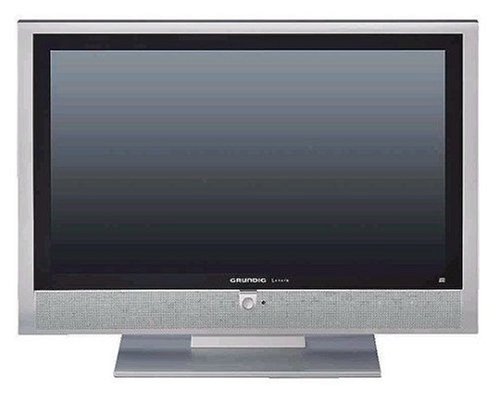
รูปที่ 1 : ด้านหน้า view of the Grundig Lenaro 40 LXW 102-8620 Dolby HD TV, showing the screen and bezel.
5. คู่มือการใช้งาน
5.1 การเปิด/ปิดเครื่อง
กดปุ่ม พลัง button on the remote control or on the television to turn the TV on or off.
5.2 ฟังก์ชั่นการควบคุมระยะไกล
The remote control allows you to access all television functions. Key buttons include:
- พลัง: เปิดหรือปิดทีวี
- SOURCE/INPUT: Selects the input source (HDMI, TV, etc.).
- ฉบับ +/-: ปรับระดับเสียง
- ช +/-: เปลี่ยนช่อง
- เมนู: เข้าสู่เมนูหลักเพื่อปรับแต่งการตั้งค่า
- ปุ่มควบคุมการนำทาง (ขึ้น/ลง/ซ้าย/ขวา): นำทางผ่านเมนู
- ตกลง/เข้าสู่ระบบ: ยืนยันการเลือก
- ทางออก/ด้านหลัง: กลับไปยังหน้าจอที่แล้วหรือออกจากเมนู
5.3 ตัวช่วยการตั้งค่าเริ่มต้น
Upon first power-on, the television will guide you through an initial setup wizard to configure language, country, time zone, and scan for available channels.
5.4 การเชื่อมต่อเครือข่าย
If connected via Ethernet, the TV can access network features. Navigate to the network settings in the main menu to configure or verify the connection.
6. การบำรุงรักษา
6.1 การทำความสะอาดหน้าจอ
เช็ดหน้าจอเบาๆ ด้วยผ้านุ่มที่ไม่เป็นขุย สำหรับรอยฝังแน่น ให้เช็ดเบาๆampชุบผ้าด้วยน้ำหรือน้ำยาทำความสะอาดหน้าจอชนิดพิเศษ ห้ามฉีดน้ำยาลงบนหน้าจอโดยตรง
6.2 การทำความสะอาดตู้
Wipe the television cabinet with a soft, dry cloth. Avoid using abrasive cleaners or solvents.
6.3 การดูแลทั่วไป
Ensure the television is placed in a well-ventilated area, away from direct sunlight and heat sources. Avoid placing objects on top of the television.
7 การแก้ไขปัญหา
หากคุณประสบปัญหาเกี่ยวกับโทรทัศน์ โปรดดูปัญหาทั่วไปและวิธีแก้ไขต่อไปนี้:
| ปัญหา | วิธีแก้ปัญหาที่เป็นไปได้ |
|---|---|
| ไม่มีไฟฟ้า | ตรวจสอบว่าสายไฟเชื่อมต่อกับทีวีและเต้ารับที่ผนังอย่างแน่นหนาหรือไม่ ลองใช้เต้ารับอื่น |
| ไม่มีภาพแต่มีเสียง | ตรวจสอบให้แน่ใจว่าได้เลือกแหล่งสัญญาณเข้าที่ถูกต้อง ตรวจสอบการเชื่อมต่อสายเคเบิลกับอุปกรณ์ภายนอก |
| ไม่มีเสียงแต่มีภาพ | Check the volume level and ensure the TV is not muted. Verify audio settings in the menu. |
| รีโมตคอนโทรลไม่ทำงาน | เปลี่ยนแบตเตอรี่ในรีโมทคอนโทรล ตรวจสอบให้แน่ใจว่าไม่มีสิ่งกีดขวางระหว่างรีโมทและเซ็นเซอร์อินฟราเรดของทีวี |
| คุณภาพของภาพไม่ดี | ตรวจสอบการเชื่อมต่อเสาอากาศ/สายเคเบิล ปรับการตั้งค่าภาพ (ความสว่าง ความคมชัด ความละเอียด) ในเมนูทีวี |
8. ข้อมูลจำเพาะ
| คุณสมบัติ | รายละเอียด |
|---|---|
| หมายเลขรุ่น | Lenaro 40 LXW 102-8620 Dolby |
| ยี่ห้อ | กรุนดิก |
| ขนาดหน้าจอ | 40 นิ้ว |
| เทคโนโลยีการแสดงผล | จอแอลซีดี |
| คุณสมบัติพิเศษ | จอแบน |
| เทคโนโลยีการเชื่อมต่อ | อีเธอร์เน็ต |
| ฮาร์ดแวร์อินเตอร์เฟซ | HDMI |
| ประเภทการติดตั้ง | ขาตั้งโต๊ะ |
| น้ำหนักผลิตภัณฑ์ | 68.56 ปอนด์ (ประมาณ 31.1 กก.) |
| รุ่นปี | 2018 |
| วัดtage | 20 วัตต์ |
| เวลาตอบสนอง | 8 มิลลิวินาที |
| วิธีการควบคุม | รีโมทคอนโทรล |
| ขนาดแพ็คเกจ | 108.2 x 80.7 x 34.5 ซม. |
9. การรับประกันและการสนับสนุน
For warranty information and technical support, please refer to the warranty card included with your product or visit the official Grundig website. You may also contact Grundig customer service for assistance with product registration, troubleshooting, or service requests.
Official Grundig Webเว็บไซต์: www.grundig.com