
การแนะนำ
ขอบคุณสำหรับการซื้อasing the Jamo I300 2.1 Channel Speaker System. This manual provides essential information for the safe and efficient use of your new audio system. Please read these instructions carefully before installation and operation, and retain them for future reference.
The Jamo I300 is a high-performance 2.1 channel speaker system designed to deliver rich, dynamic audio. It features a powerful subwoofer for deep bass and two satellite speakers for clear mid-range and treble. With Bluetooth connectivity, you can easily stream audio wirelessly from compatible devices. A remote control is included for convenient system management.
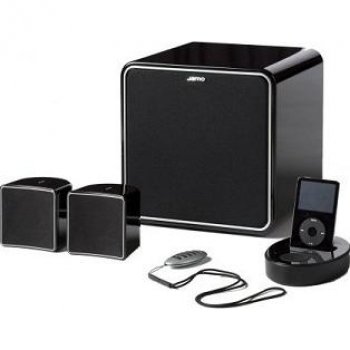
Image: The Jamo I300 2.1 Channel Speaker System, showcasinประกอบด้วยซับวูฟเฟอร์และลำโพงแซทเทิลไลท์สองตัว
เนื้อหาแพ็คเกจ
กรุณาตรวจสอบว่าสินค้าทั้งหมดมีอยู่ในแพ็คเกจ:
- 1 x Jamo I300 Subwoofer
- 2 x Jamo I300 Satellite Speakers
- 1 x รีโมทคอนโทรล
- สายไฟ 1 เส้น
- Audio Connection Cables (e.g., RCA to 3.5mm, speaker wires)
- คู่มือการใช้งานเล่มนี้
การตั้งค่า
1. การแกะกล่อง
นำส่วนประกอบทั้งหมดออกจากบรรจุภัณฑ์อย่างระมัดระวัง เก็บวัสดุบรรจุภัณฑ์ไว้สำหรับการขนส่งหรือจัดเก็บในอนาคต
2 การวาง
Optimal placement is crucial for sound quality. The Jamo I300 system can be placed on the floor or on a table, depending on your room layout and preference.
- ซับวูฟเฟอร์: Place the subwoofer on the floor, ideally in a corner or near a wall for enhanced bass response. Experiment with placement to find the best sound for your room.
- ลำโพงดาวเทียม: Position the satellite speakers equidistant from your primary listening position. For stereo imaging, place them at ear level or slightly above, angled towards the listener.
3. การเชื่อมต่อ
- เชื่อมต่อลำโพงดาวเทียม: Connect the satellite speakers to the corresponding outputs on the subwoofer using the provided speaker wires. Ensure correct polarity (positive to positive, negative to negative).
- เชื่อมต่อแหล่งเสียง: Connect your audio source (e.g., TV, computer, smartphone) to the subwoofer's input using the appropriate audio cable (e.g., RCA or 3.5mm jack).
- เชื่อมต่อพลังงาน: Plug the power cable into the subwoofer's power input, then connect the other end to a suitable wall outlet.
คำแนะนำการใช้งาน
1. การเปิด/ปิดเครื่อง
- To power on the system, press the power button on the subwoofer or the remote control. The power indicator will illuminate.
- หากต้องการปิด ให้กดปุ่มเปิด/ปิดอีกครั้ง
2. การควบคุมระดับเสียง
- Adjust the master volume using the volume controls on the subwoofer or the remote control.
- Some models may feature separate bass/treble controls for fine-tuning the sound.
3. การเลือกแหล่งที่มา
Use the 'Source' or 'Input' button on the subwoofer or remote control to switch between connected audio sources (e.g., Line In, Bluetooth).
4. การจับคู่บลูทู ธ
- Ensure the speaker system is powered on and set to Bluetooth input mode. The Bluetooth indicator will typically flash, indicating it's in pairing mode.
- บนอุปกรณ์ที่รองรับบลูทูธ (เช่น สมาร์ทโฟน แท็บเล็ต) ให้ไปที่การตั้งค่าบลูทูธ แล้วค้นหาอุปกรณ์ที่ใช้งานได้
- Select "Jamo I300" from the list of devices.
- Once paired, the Bluetooth indicator on the speaker system will become solid, and you can now stream audio wirelessly.
การซ่อมบำรุง
1. การทำความสะอาด
- ถอดสายไฟออกทุกครั้งก่อนทำความสะอาด
- Use a soft, dry cloth to wipe the surfaces of the speakers and subwoofer.
- Do not use liquid cleaners, aerosols, or abrasive materials, as these can damage the finish or internal components.
2. การจัดเก็บ
If storing the system for an extended period, ensure it is powered off and disconnected from the mains. Store it in a cool, dry place, away from direct sunlight and extreme temperatures.
การแก้ไขปัญหา
โปรดดูตารางด้านล่างเพื่อดูปัญหาทั่วไปและวิธีแก้ไข
| ปัญหา | สาเหตุที่เป็นไปได้ | สารละลาย |
|---|---|---|
| ไม่มีไฟฟ้า | สายไฟไม่ได้เชื่อมต่อ เต้ารับไฟฟ้าชำรุด | ตรวจสอบการเชื่อมต่อสายไฟ ลองใช้ปลั๊กไฟอื่นดู |
| ไม่มีเสียง | Incorrect input source; Volume too low; Audio cables loose/faulty | เลือกแหล่งอินพุตที่ถูกต้อง เพิ่มระดับเสียง ตรวจสอบการเชื่อมต่อสายสัญญาณเสียงทั้งหมด |
| บลูทูธไม่จับคู่ | ลำโพงไม่ได้อยู่ในโหมดจับคู่ อุปกรณ์อยู่ไกลเกินไป มีสัญญาณรบกวน | Ensure speaker is in pairing mode; Move device closer; Restart both devices |
| เสียงเพี้ยน | ระดับเสียงดังเกินไป; คุณภาพแหล่งเสียงไม่ดี; การจัดวางลำโพง | Reduce volume; Use a higher quality audio source; Adjust speaker placement |
ข้อมูลจำเพาะ
The following are the technical specifications for the Jamo I300 2.1 Channel Speaker System:
| คุณสมบัติ | ข้อมูลจำเพาะ |
|---|---|
| หมายเลขรุ่น | ไอ300บี |
| ช่องสัญญาณเสียง | 2.1 ช่อง |
| กำลัง RMS ทั้งหมด | 300 วัตต์ |
| กำลังขับ RMS ของซับวูฟเฟอร์ | 150 วัตต์ |
| ลำโพงดาวเทียม Power | 75 W per speaker (estimated) |
| ช่วงความถี่ | 45 - 20000 เฮิรตซ์ |
| ความไวต่อความรู้สึก | 86 เดซิเบล |
| อิมพีแดนซ์ | 6 โอห์ม |
| สี | สีดำ |
| ขนาด (ซับวูฟเฟอร์) | 9.09 x 9.09 x 9.19 ซม. (โดยประมาณ ขึ้นอยู่กับขนาดของผลิตภัณฑ์) |
| น้ำหนัก | 12 กก. (รวม) |
| เทคโนโลยีไร้สาย | บลูทูธ |
| ประเภทการควบคุม | รีโมทคอนโทรล |
| ประเภทการติดตั้ง | Floor, Table Mount |
การรับประกันและการสนับสนุน
Jamo products are manufactured to the highest quality standards. This product is covered by a limited warranty. For detailed warranty terms and conditions, please refer to the warranty card included with your product or visit the official Jamo webเว็บไซต์.
For technical support, service, or further assistance, please contact your local Jamo dealer or authorized service center. Contact information can typically be found on the official Jamo webไซต์หรือในเอกสารผลิตภัณฑ์ของคุณ