
การแนะนำ
This manual provides essential information for the installation, operation, and maintenance of the HP Procurve 3500yl-48G-PWR Managed Ethernet Switch. This device is designed to offer advanced intelligent edge switching capabilities, supporting demanding networking features such as Quality of Service (QoS) and security. It features a variety of Gigabit interfaces, integrated Power over Ethernet (PoE) on all 10/100/1000Base-T ports, and 10-Gigabit Ethernet (10-GbE) capability.
สินค้าเกินview
The HP Procurve 3500yl-48G-PWR is a robust managed Ethernet switch. It is equipped with 44 x 10/100/1000Base-T ports and 4 x 10/100/1000Base-T ports, providing extensive connectivity options for various network environments. The integrated PoE functionality simplifies deployment of IP phones, wireless access points, and other PoE-powered devices.
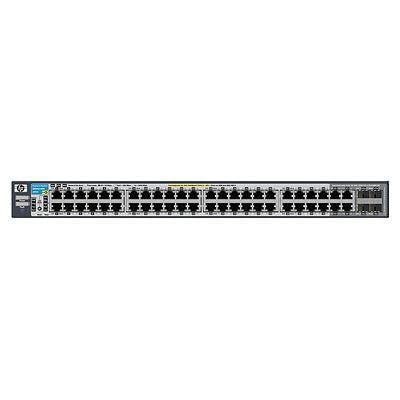
รูปที่ 1 : ด้านหน้า view of the HP Procurve 3500yl-48G-PWR Managed Ethernet Switch, showing the 48 Ethernet ports and status indicators.
การตั้งค่า
1. การเปิดออกและการตรวจสอบ
แกะสวิตช์ออกจากบรรจุภัณฑ์อย่างระมัดระวัง ตรวจสอบอุปกรณ์ว่ามีร่องรอยความเสียหายทางกายภาพหรือไม่ หากพบความเสียหายใด ๆ ให้แจ้งผู้จำหน่ายทันที
2. การติดตั้งบนแร็ค (ตัวเลือกเสริม)
The switch is designed for standard 19-inch rack mounting. Use the provided rack-mount kit and screws to secure the switch in the rack. Ensure adequate ventilation around the unit.
3. การเชื่อมต่อไฟฟ้า
- Connect the power cord to the AC power inlet on the rear of the switch.
- เสียบปลายอีกด้านของสายไฟเข้ากับเต้ารับไฟฟ้าที่มีสายดิน
- ตรวจสอบว่าไฟ LED แสดงสถานะพลังงานบนแผงด้านหน้าสว่างขึ้น แสดงว่าสวิตช์กำลังรับพลังงาน
4. การเชื่อมต่อเครือข่าย
Connect Ethernet cables from your network devices (computers, servers, other switches, access points) to the RJ45 ports on the front panel of the switch. The switch supports 10/100/1000Base-T connections. For PoE devices, simply connect them to any of the 48 ports; the switch will automatically detect and provide power if the device is PoE-compatible.
5. การเข้าถึงการกำหนดค่าเริ่มต้น
For initial configuration, connect a console cable (typically RJ45 to DB9) from your management workstation to the console port on the switch. Use a terminal emulation program (e.g., PuTTY, Tera Term) with the following settings: 9600 baud, 8 data bits, no parity, 1 stop bit, no flow control. Alternatively, if the switch has a default IP address, you can connect via a web browser or SSH/Telnet after assigning your workstation an IP address in the same subnet.
คำแนะนำการใช้งาน
1. เปิดเครื่อง
Once connected to power, the switch will automatically power on. Observe the front panel LEDs for status indications.
2. ไฟ LED
- กำลังไฟ LED: แสดงสถานะการทำงานของเครื่อง สีเขียวค้างหมายถึงการทำงานปกติ
- ไฟ LED แสดงสถานะพอร์ต: Each port has an LED indicating link status and activity. Typically, solid green indicates a link, and blinking green indicates activity. Amber may indicate a 10/100 Mbps link, while green indicates a 1000 Mbps link, depending on the specific model's LED scheme. Refer to the detailed LED guide in the full product documentation for precise interpretations.
- ไฟ LED สถานะ PoE: Indicate Power over Ethernet status for each port.
3. การใช้งานเครือข่ายขั้นพื้นฐาน
The switch operates as a Layer 2 device, forwarding Ethernet frames between connected devices. With its managed capabilities, you can configure VLANs, Spanning Tree Protocol (STP), Link Aggregation (LAG), and other advanced features via the command-line interface (CLI) or webอินเทอร์เฟซการจัดการตาม
4. คุณสมบัติขั้นสูง
The Procurve 3500yl-48G-PWR supports advanced features such as Quality of Service (QoS) for prioritizing network traffic, robust security features to protect your network, and 10-GbE uplink capabilities (if equipped with optional modules) for high-bandwidth connections.
การซ่อมบำรุง
1. การทำความสะอาด
Periodically clean the exterior of the switch with a soft, dry cloth. Do not use liquid or aerosol cleaners. Ensure ventilation openings are free from dust and obstructions to maintain proper airflow.
2. การอัปเดตเฟิร์มแวร์
ตรวจสอบผู้ผลิตเป็นประจำ webเว็บไซต์สำหรับอัปเดตเฟิร์มแวร์ การอัปเดตเฟิร์มแวร์ให้ทันสมัยอยู่เสมอจะช่วยให้ประสิทธิภาพ ความปลอดภัย และการเข้าถึงคุณสมบัติใหม่ๆ เป็นไปอย่างเหมาะสม โปรดปฏิบัติตามคำแนะนำที่ให้ไว้ในแพ็คเกจการอัปเดตเฟิร์มแวร์อย่างระมัดระวัง
3. การพิจารณาด้านสิ่งแวดล้อม
Operate the switch within its specified temperature range (up to 40 degrees Celsius). Avoid exposing the device to excessive heat, humidity, or direct sunlight. Ensure proper airflow around the unit to prevent overheating.
การแก้ไขปัญหา
1. ไม่มีอำนาจ
- ตรวจสอบว่าสายไฟเชื่อมต่อกับสวิตช์และเต้ารับไฟฟ้าอย่างแน่นหนา
- ตรวจสอบเต้ารับไฟฟ้าด้วยอุปกรณ์อื่นเพื่อให้แน่ใจว่าใช้งานได้
- ตรวจสอบให้แน่ใจว่าชุดจ่ายไฟ (หากเป็นอุปกรณ์ภายนอก) เชื่อมต่ออย่างถูกต้องและใช้งานได้
2. ไม่มีลิงก์บนพอร์ต
- ตรวจสอบสายอีเธอร์เน็ตว่ามีรอยชำรุดหรือไม่ และตรวจสอบให้แน่ใจว่าเสียบเข้ากับพอร์ตของสวิตช์และอุปกรณ์ที่เชื่อมต่ออย่างแน่นหนาแล้ว
- ตรวจสอบว่าอุปกรณ์ที่เชื่อมต่อเปิดอยู่และทำงานถูกต้อง
- ลองเสียบเข้ากับพอร์ตอื่นบนสวิตช์ หรือใช้สายอีเธอร์เน็ตเส้นอื่นดู
- Check the port configuration in the switch's management interface to ensure it is enabled and correctly configured.
3 ปัญหาการเชื่อมต่อเครือข่าย
- ยืนยันการตั้งค่าที่อยู่ IP บนอุปกรณ์ที่เชื่อมต่อและสวิตช์
- ตรวจสอบที่อยู่ IP ที่ขัดแย้งกันบนเครือข่าย
- Review switch configuration for VLANs, routing, or security policies that might be blocking traffic.
- รีสตาร์ทสวิตช์และอุปกรณ์ที่เชื่อมต่อ
If issues persist, consult the comprehensive troubleshooting guide available on the manufacturer's support webเว็บไซต์หรือติดต่อฝ่ายสนับสนุนด้านเทคนิค
ข้อมูลจำเพาะ
| คุณสมบัติ | ข้อมูลจำเพาะ |
|---|---|
| ยี่ห้อ | ฮิวเล็ตแพ็กการ์ด |
| หมายเลขรุ่น | เจ8693เอ |
| จำนวนพอร์ต | 48 (44 x 10/100/1000Base-T, 4 x 10/100/1000Base-T) |
| อัตราการถ่ายโอนข้อมูล | 1000 เมกะบิตต่อวินาที |
| อินเทอร์เฟซ | PoE, RJ45 |
| ประเภทสวิตซ์ | การบริหารจัดการ |
| เล่มที่tage | 48 โวลต์ (กระแสตรง) |
| น้ำหนักสินค้า | 16.1 ปอนด์ |
| คะแนนอุณหภูมิบน | 40 องศาเซลเซียส |
| ประเภทวัสดุตัวเรือน | โลหะ |
| อุปกรณ์ที่รองรับ | เดสก์ท็อป |
การรับประกันและการสนับสนุน
This product is subject to the manufacturer's warranty policy. For specific details regarding warranty length and coverage, please contact the manufacturer directly. Please note that returns for non-defective items may be subject to a restocking fee. Any merchandise returned for repair and found not to be defective by technicians will incur a 25% restocking fee. By purchasing this product, you acknowledge and accept these procedures.
For technical support, documentation, and additional resources, please visit the official HP Procurve support webเว็บไซต์หรือติดต่อฝ่ายบริการลูกค้าของพวกเขา