
1. บทนำ
Welcome to the user manual for your new Singing Machine SMVG-620 CD+G Karaoke System. This system is designed to provide hours of entertainment with its CD+G playback capabilities, built-in camera, 5.5-inch monitor, and AM/FM radio. Please read this manual thoroughly before operating your unit to ensure proper use and to maximize your enjoyment.
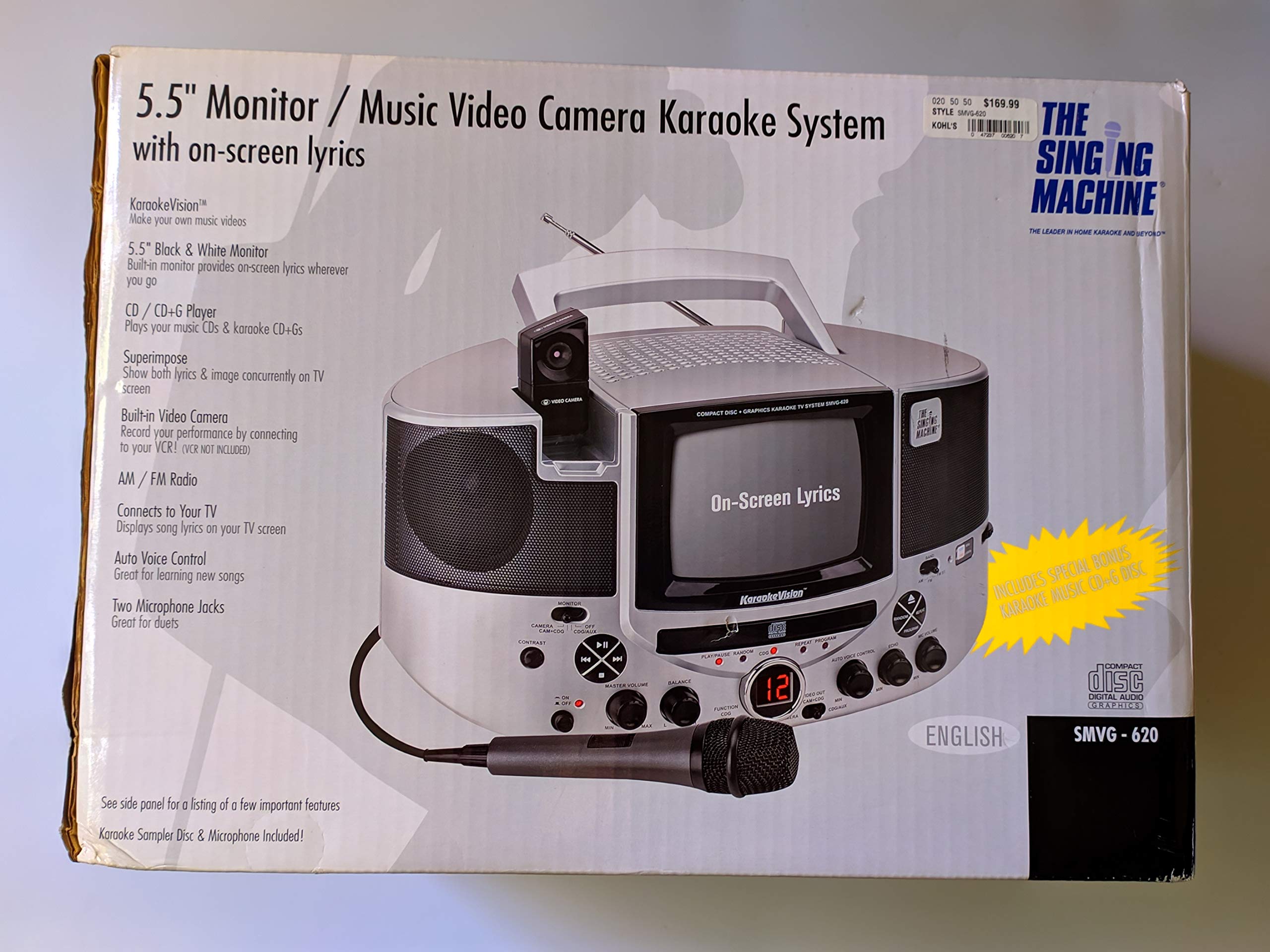
รูปที่ 1.1: The Singing Machine SMVG-620 CD+G Karaoke System.
For optimal performance and safety, always follow the instructions and warnings provided.
2. ข้อมูลด้านความปลอดภัยที่สำคัญ
- อ่านคำแนะนำ: ควรอ่านคำแนะนำด้านความปลอดภัยและการใช้งานทั้งหมดก่อนใช้งานเครื่อง
- เก็บรักษาคำแนะนำ: ควรเก็บคำแนะนำด้านความปลอดภัยและการใช้งานไว้เพื่อใช้อ้างอิงในอนาคต
- คำเตือน: ควรปฏิบัติตามคำเตือนทั้งหมดบนเครื่องและคู่มือการใช้งาน
- ปฏิบัติตามคำแนะนำ: ควรปฏิบัติตามคำแนะนำการใช้งานและการใช้งานทั้งหมด
- น้ำและความชื้น: ห้ามใช้อุปกรณ์นี้ใกล้น้ำ
- การทำความสะอาด: ทำความสะอาดด้วยผ้าแห้งเท่านั้น
- การระบายอากาศ : อย่าปิดกั้นช่องระบายอากาศใดๆ ติดตั้งตามคำแนะนำของผู้ผลิต
- ความร้อน: ห้ามติดตั้งใกล้แหล่งความร้อน เช่น หม้อน้ำ เครื่องทำความร้อน เตา หรืออุปกรณ์อื่น ๆ (รวมถึง ampเครื่องให้ความร้อน) ที่ผลิตความร้อน
- การป้องกันสายไฟ: ปกป้องสายไฟไม่ให้ถูกเหยียบหรือถูกหนีบ โดยเฉพาะที่ปลั๊ก เต้ารับไฟฟ้า และจุดที่สายไฟออกจากเครื่อง
- สิ่งที่แนบมา/อุปกรณ์เสริม: ใช้เฉพาะอุปกรณ์เสริม/สิ่งที่แนบตามที่ผู้ผลิตกำหนดเท่านั้น
- ฟ้าผ่า: ถอดปลั๊กอุปกรณ์นี้ในระหว่างพายุฝนฟ้าคะนองหรือเมื่อไม่ได้ใช้งานเป็นเวลานาน
- การบริการ: ส่งต่อการบริการทั้งหมดไปยังช่างบริการที่ผ่านการรับรอง จำเป็นต้องเข้ารับบริการเมื่ออุปกรณ์ได้รับความเสียหายแต่อย่างใด
3. เนื้อหาบรรจุภัณฑ์
Carefully unpack your Singing Machine SMVG-620 system and ensure all items listed below are present and in good condition.
- SMVG-620 CD+G Karaoke System
- One (1) Microphone
- Sampler CD+G Disc
- Audio/Video RCA Cables
- อะแดปเตอร์ AC
- คู่มือการใช้งาน

รูปที่ 3.1: Contents of the box, including the microphone, RCA cables, and the instruction manual.
4. สินค้าหมดview
Familiarize yourself with the various parts and controls of your SMVG-620 Karaoke System.

รูปที่ 4.1: หลัง view of the product packaging highlighting key features and components of the SMVG-620 system.
คุณสมบัติหลัก:
- 5.5" Black & White Monitor: For on-screen lyrics from CD+G discs.
- Built-in Color Camera: Allows you to see yourself on the monitor or connected TV.
- Dual Microphone Jacks: Connect two microphones for duets (one microphone included).
- วิทยุ AM/FM: ปรับเข้าสู่สถานีวิทยุที่คุณชื่นชอบ
- เครื่องเล่นซีดี+จี: Plays standard audio CDs and CD+Graphics discs.
- การควบคุมด้วยเสียงอัตโนมัติ (AVC): Helps maintain vocal balance by automatically reducing the main vocal track when you sing.
- การควบคุมเสียงสะท้อน: Adds depth and resonance to your voice.
- Professional Style Microphone: For clear vocal pickup.
- เอาท์พุตเสียง/วิดีโอ: Connects to your TV for larger screen display and enhanced audio.
5. การตั้งค่า
5.1 การเชื่อมต่อสายไฟ
- ตรวจสอบให้แน่ใจว่าวางเครื่องไว้บนพื้นผิวที่มั่นคงและเรียบ
- Connect the AC power adapter to the DC IN jack on the back of the SMVG-620 unit.
- เสียบปลายอีกด้านของอะแดปเตอร์แปลงไฟ AC เข้ากับเต้ารับไฟฟ้ามาตรฐาน (AC 120V ~ 60Hz)
5.2 การเชื่อมต่อกับโทรทัศน์
ถึง view lyrics on a larger screen and enhance audio, connect the SMVG-620 to your television using the supplied Audio/Video RCA cables.
- Locate the AUDIO OUT (white and red) and VIDEO OUT (yellow) jacks on the back of the SMVG-620.
- Connect the white plug of the RCA cable to the white AUDIO OUT jack on the karaoke system and to the white AUDIO IN jack on your TV.
- Connect the red plug of the RCA cable to the red AUDIO OUT jack on the karaoke system and to the red AUDIO IN jack on your TV.
- Connect the yellow plug of the RCA cable to the yellow VIDEO OUT jack on the karaoke system and to the yellow VIDEO IN jack on your TV.
- Turn on your TV and select the correct A/V input source (e.g., AV1, Video 1) that corresponds to the jacks you used.
5.3 การเชื่อมต่อไมโครโฟน
Plug the microphone into either the MIC 1 or MIC 2 jack on the front of the SMVG-620 unit.
6. การดำเนินการ
6.1 การเปิด/ปิดเครื่อง
กดปุ่ม พลัง button located on the front panel to turn the unit ON or OFF.
การเล่น CD+G 6.2
- Open the CD compartment door and carefully place a CD+G disc (or standard audio CD) onto the spindle with the label side facing up. Close the door.
- เลือก ซีดี+จี mode using the FUNCTION selector.
- กดปุ่ม เล่น/หยุดชั่วคราว ปุ่มเพื่อเริ่มเล่น
- ปรับแต่ง ปริมาณหลัก ปรับระดับเสียงตามต้องการ
- ใช้ ข้าม ปุ่ม (<< or >>) เพื่อนำทางระหว่างแทร็กต่างๆ
- หากต้องการหยุดชั่วคราว ให้กด เล่น/หยุดชั่วคราว อีกครั้ง กดอีกครั้งเพื่อดำเนินการต่อ
- หากต้องการหยุดเล่นให้กดปุ่ม หยุด ปุ่ม.
6.3 การใช้งานไมโครโฟน
- Ensure the microphone is connected to a MIC jack.
- ปรับแต่ง ระดับเสียงไมค์ ปุ่มควบคุมระดับเอาต์พุตของไมโครโฟน
- หมุน เสียงสะท้อน ปุ่มหมุนเพื่อเพิ่มเอฟเฟ็กต์เสียงสะท้อนให้กับเสียงของคุณ
- การ AUTO VOICE CONTROL (AVC) switch can be toggled ON/OFF. When ON, the original vocal track on a CD+G disc will be reduced when you sing into the microphone.
วิทยุ AM/FM 6.4
- เลือก AM or FM mode using the FUNCTION selector.
- ขยายเสาอากาศ FM เพื่อการรับสัญญาณที่ดีขึ้น
- หมุน การปรับแต่ง หมุนปุ่มเพื่อเลือกสถานีวิทยุที่คุณต้องการ
- ปรับแต่ง ปริมาณหลัก ลูกบิด
6.5 ฟังก์ชันกล้อง
The built-in camera allows you to display your image on the 5.5-inch monitor or a connected TV.
- Ensure the unit is powered on and connected to a TV if you wish to use an external display.
- The camera feed will automatically display when the unit is in CD+G or Video mode, or when no other video source is active.
7. การบำรุงรักษา
7.1 การทำความสะอาดหน่วย
- ถอดปลั๊กเครื่องออกจากเต้ารับก่อนทำความสะอาดทุกครั้ง
- ใช้ผ้าแห้งนุ่มๆ เช็ดทำความสะอาดพื้นผิวภายนอก
- ห้ามใช้สารทำความสะอาดที่มีฤทธิ์กัดกร่อน ขี้ผึ้ง หรือตัวทำละลาย เพราะอาจทำให้พื้นผิวเสียหายได้
- สำหรับเลนส์ซีดี ให้ใช้แผ่นทำความสะอาดเลนส์ซีดีโดยเฉพาะ
7.2 การดูแลซีดี
- ควรจับแผ่นซีดีที่ขอบเพื่อหลีกเลี่ยงรอยนิ้วมือบนพื้นผิวที่ใช้เล่น
- Keep discs in their cases when not in use to prevent scratches.
- ทำความสะอาดแผ่นดิสก์ด้วยผ้าเนื้อนุ่มที่ไม่เป็นขุย โดยเช็ดจากตรงกลางออกไปด้านนอก
8 การแก้ไขปัญหา
If you encounter any issues with your SMVG-620, please refer to the following common problems and solutions.
| ปัญหา | สาเหตุที่เป็นไปได้ | สารละลาย |
|---|---|---|
| ไม่มีไฟฟ้า | เสียบสายไฟไม่ถูกต้อง | ตรวจสอบให้แน่ใจว่าได้เสียบอะแดปเตอร์ AC เข้ากับตัวเครื่องและเต้ารับไฟฟ้าที่ใช้งานได้สนิทแล้ว |
| ไม่มีเสียงออกจากลำโพง | Master Volume is too low. เลือกโหมดฟังก์ชั่นไม่ถูกต้อง | Increase the MASTER VOLUME. Select the correct FUNCTION (CD+G, AM, FM). |
| ไม่มีเสียงออกจากไมโครโฟน | ไมโครโฟนไม่ได้เชื่อมต่อ MIC VOLUME is too low. สวิตช์ไมโครโฟนปิดอยู่ | Plug microphone into MIC 1 or MIC 2 jack. Increase the MIC VOLUME. Ensure microphone switch is ON. |
| No video on TV / No lyrics | สาย RCA ต่อไม่ถูกต้อง เลือกช่องสัญญาณทีวีไม่ถูกต้อง Not a CD+G disc. | Check all RCA cable connections (yellow for video). Select the correct A/V input on your TV. Ensure you are playing a CD+G disc for lyrics. |
| CD skipping | แผ่นดิสก์สกปรกหรือมีรอยขีดข่วน หน่วยอยู่บนพื้นผิวที่ไม่เสถียร | ทำความสะอาดแผ่นดิสก์หรือลองใช้แผ่นดิสก์อื่นดู Place the unit on a stable, vibration-free surface. |
9. ข้อมูลจำเพาะ
| หมายเลขรุ่น | SMVG-620 (SIN SMVG620) |
| แหล่งพลังงาน | AC 120V ~ 60Hz (via AC Adapter) |
| เฝ้าสังเกต | 5.5-inch Black & White |
| จำนวนลำโพง | 2 |
| อุปกรณ์ที่รองรับ | โทรทัศน์ |
| ประเภทสื่อ | ซีดี, ซีดี+จี |
| ขนาดสินค้า (กxยxส) | 35.8 x 20.8 x 19.3 ซม. (14.1 x 8.2 x 7.6 นิ้ว) |
| น้ำหนักสินค้า | 3.9 กก. (8.6 ปอนด์) |
10. การรับประกันและการสนับสนุน
For warranty information and customer support, please refer to the warranty card included with your product or contact The Singing Machine directly. You may also consult your retailer for details regarding their return and warranty policies.
ผู้ผลิต: เครื่องร้องเพลง