
การแนะนำ
Thank you for choosing the iConcepts M01517 Mobile 5-Port USB 2.0 Hub. This device is designed to expand the USB connectivity of your computer, allowing you to connect up to five USB 2.0 devices simultaneously. Its compact and mobile design makes it ideal for both desktop and portable use. Please read this manual carefully to ensure proper setup and operation.
เนื้อหาแพ็คเกจ
โปรดตรวจสอบว่าสินค้าทั้งหมดมีอยู่ในแพ็คเกจของคุณ:
- iConcepts M01517 Mobile 5-Port USB 2.0 Hub unit
- สายเชื่อมต่อ USB
การตั้งค่า
ทำตามขั้นตอนต่อไปนี้เพื่อตั้งค่าฮับ USB ของคุณ:
- Connect the Hub to Your Computer: Take the provided USB connection cable. Plug one end into the designated input port on the iConcepts M01517 hub. Plug the other end into an available USB port on your computer.
- การติดตั้งไดร์เวอร์อัตโนมัติ: Your operating system (Windows, macOS, Linux) should automatically detect the new hardware and install the necessary drivers. This process typically takes a few moments. No manual driver installation is usually required.
- Connect Your USB Devices: Once the hub is recognized by your computer, you can connect up to five USB devices (such as flash drives, keyboards, mice, printers, etc.) into the available ports on the iConcepts M01517 hub.
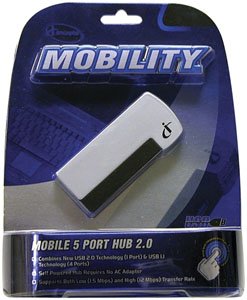
Image of the iConcepts M01517 Mobile 5-Port USB 2.0 Hub, showing its compact design and multiple USB ports ready for connection.
การดำเนินงาน
The iConcepts M01517 hub operates as a standard USB 2.0 hub, providing additional ports for your devices.
- การรับรู้อุปกรณ์: When a device is plugged into the hub, your computer will recognize it as if it were plugged directly into the computer's USB port.
- การถ่ายโอนข้อมูล: The hub supports USB 2.0 data transfer speeds, which are suitable for most peripherals and data storage devices.
- แหล่งจ่ายไฟ: This mobile hub is typically bus-powered, meaning it draws power directly from the computer's USB port. For high-power consumption devices, ensure your computer's USB port can supply sufficient power.
การซ่อมบำรุง
To ensure the longevity and optimal performance of your iConcepts M01517 USB hub, follow these maintenance guidelines:
- การทำความสะอาด: ใช้ผ้าแห้งเนื้อนุ่มเช็ดทำความสะอาดภายนอกของฮับ หลีกเลี่ยงการใช้น้ำยาทำความสะอาดหรือสารละลาย เพราะอาจทำให้ตัวอุปกรณ์เสียหายได้
- พื้นที่จัดเก็บ: เมื่อไม่ได้ใช้งาน ให้เก็บฮับไว้ในที่แห้งและเย็น หลีกเลี่ยงแสงแดดโดยตรงและอุณหภูมิที่สูงหรือต่ำเกินไป
- การจัดการ: Avoid dropping the hub or subjecting it to strong impacts. Do not attempt to disassemble the unit.
การแก้ไขปัญหา
If you encounter issues with your iConcepts M01517 USB hub, refer to the following common problems and solutions:
- ปัญหา: Connected device is not recognized.
สารละลาย:- ตรวจสอบให้แน่ใจว่าฮับเชื่อมต่อกับพอร์ต USB ของคอมพิวเตอร์อย่างแน่นหนาแล้ว
- ลองเสียบอุปกรณ์เข้ากับพอร์ตอื่นบนฮับดู
- ลองเชื่อมต่ออุปกรณ์เข้ากับพอร์ต USB ของคอมพิวเตอร์โดยตรงเพื่อตรวจสอบว่าอุปกรณ์ทำงานได้ปกติหรือไม่
- รีสตาร์ทเครื่องคอมพิวเตอร์ของคุณ
- ปัญหา: ความเร็วในการถ่ายโอนข้อมูลช้า
สารละลาย:- โปรดตรวจสอบให้แน่ใจว่าทั้งฮับและอุปกรณ์ที่เชื่อมต่อรองรับ USB 2.0 เพื่อความเร็วสูงสุด
- ควรหลีกเลี่ยงการเชื่อมต่ออุปกรณ์ที่ใช้แบนด์วิดท์สูงจำนวนมากเข้ากับฮับพร้อมกัน
- ปัญหา: Hub or connected devices are not receiving power.
สารละลาย:- Verify the hub's connection to the computer's USB port is firm.
- Try connecting the hub to a different USB port on your computer, as some ports may provide more power.
- If connecting high-power devices, consider using a self-powered hub (if available for this model) or connecting high-power devices directly to the computer.
ข้อมูลจำเพาะ
| ยี่ห้อ | iConcepts |
| แบบอย่าง | M01517 |
| ฮาร์ดแวร์อินเตอร์เฟซ | ยูเอสบี |
| พอร์ต USB รวม | 5 |
| จำนวนพอร์ต | 5 |
| น้ำหนักสินค้า | 5 ปอนด์ |
| วันที่พร้อมใช้งานครั้งแรก | 7 กุมภาพันธ์ 2007 |
การรับประกันและการสนับสนุน
Specific warranty details and direct support contact information are not provided in this manual. For warranty claims, technical support, or further assistance, please refer to the official iConcepts webหรือติดต่อผู้ค้าปลีกของคุณ เก็บใบเสร็จรับเงินไว้เป็นหลักฐานการซื้อ