
1. สินค้าหมดview
The D-Link DGS-105 is a 5-port Gigabit Ethernet unmanaged switch designed to provide high-speed wired network connectivity. Its compact metal housing ensures durability and quiet operation, making it suitable for various environments including homes, small offices, and creative workspaces. This switch offers plug-and-play functionality, requiring no complex configuration for immediate use.
คุณสมบัติที่สำคัญ ได้แก่:
- 5 Auto-Negotiating Gigabit Ports: Supports full/half duplex operation with up to 2Gbps per port, connecting PCs, consoles, NAS, printers, and other network devices.
- Plug & Play Expansion: Automatic MDI/MDIX eliminates the need for crossover cables, supporting Cat5e, Cat6, and Cat6A UTP cables up to 100m.
- Silent Fanless Metal Housing: The all-steel chassis naturally dissipates heat, ensuring quiet operation.
- Desktop or Wall Mount Flexibility: Includes rubber feet and keyhole slots for versatile placement.
- Smart QoS Prioritization: 802.1p traffic classes ensure smooth delivery of voice, video, and gaming data.
- การสอดแนม IGMP: Efficiently streams 4K/8K video and multicast traffic without network flooding.
- อีเธอร์เน็ตประหยัดพลังงาน (IEEE 802.3az): Reduces power consumption by up to 80% by managing idle ports and cable length.
- Built-in Surge & ESD Protection: Provides ±4 kV safeguards against power spikes.
- Jumbo Frame Support (9KB): Enhances throughput for large data transfers.

ด้านหน้า view of the D-Link DGS-105 5-Port Gigabit Unmanaged Switch, showing the five RJ45 Ethernet ports and individual Link/Act LEDs.
2. เนื้อหาบรรจุภัณฑ์
ตรวจสอบว่าแพ็คเกจของคุณมีรายการต่อไปนี้:
- D-Link DGS-105 5-Port Gigabit Unmanaged Metal Desktop Switch
- อะแดปเตอร์ไฟฟ้ากระแสสลับ/กระแสตรง
- Mounting kit (2 anchors, 2 screws, 4 rubber feet)
- คู่มือการติดตั้งอย่างรวดเร็ว (QIG)
If any items are missing or damaged, please contact your local D-Link reseller.
3. คำอธิบายทางกายภาพ
The DGS-105 switch features a compact metal chassis with five Gigabit Ethernet ports on the front panel. Each port has an associated LED indicator for link status and activity. The rear panel includes the power input and a security slot.

มุม view of the D-Link DGS-105 switch, highlighting its compact metal design.

Close-up of the rear panel, showing the power input (5V=1A) and the Kensington lock slot for security.
4. การตั้งค่า
4.1 การวาง
The DGS-105 switch can be placed on a desktop or mounted on a wall. Ensure the location allows for proper ventilation and easy access to ports and the power outlet. Use the included rubber feet for desktop placement or the mounting kit for wall installation.
4.2. การเชื่อมต่ออะแดปเตอร์ไฟฟ้า
- Connect the DC output plug of the included AC/DC power adapter to the power input port on the rear panel of the DGS-105 switch.
- Plug the AC input side of the power adapter into a standard wall outlet or power strip.
- Verify that the power LED on the switch illuminates, indicating that the device is receiving power.
4.3 การเชื่อมต่ออุปกรณ์เครือข่าย
The DGS-105 is a plug-and-play device, meaning no software configuration is required. Simply connect your network devices using standard Ethernet cables.
- Connect an Ethernet cable from your router or modem to any of the five Gigabit Ethernet ports on the DGS-105 switch.
- Connect Ethernet cables from your computers, gaming consoles, network-attached storage (NAS) devices, or other network devices to the remaining ports on the DGS-105 switch.
- The Link/Act LED for each connected port will illuminate, indicating an active connection. A blinking LED signifies data activity.
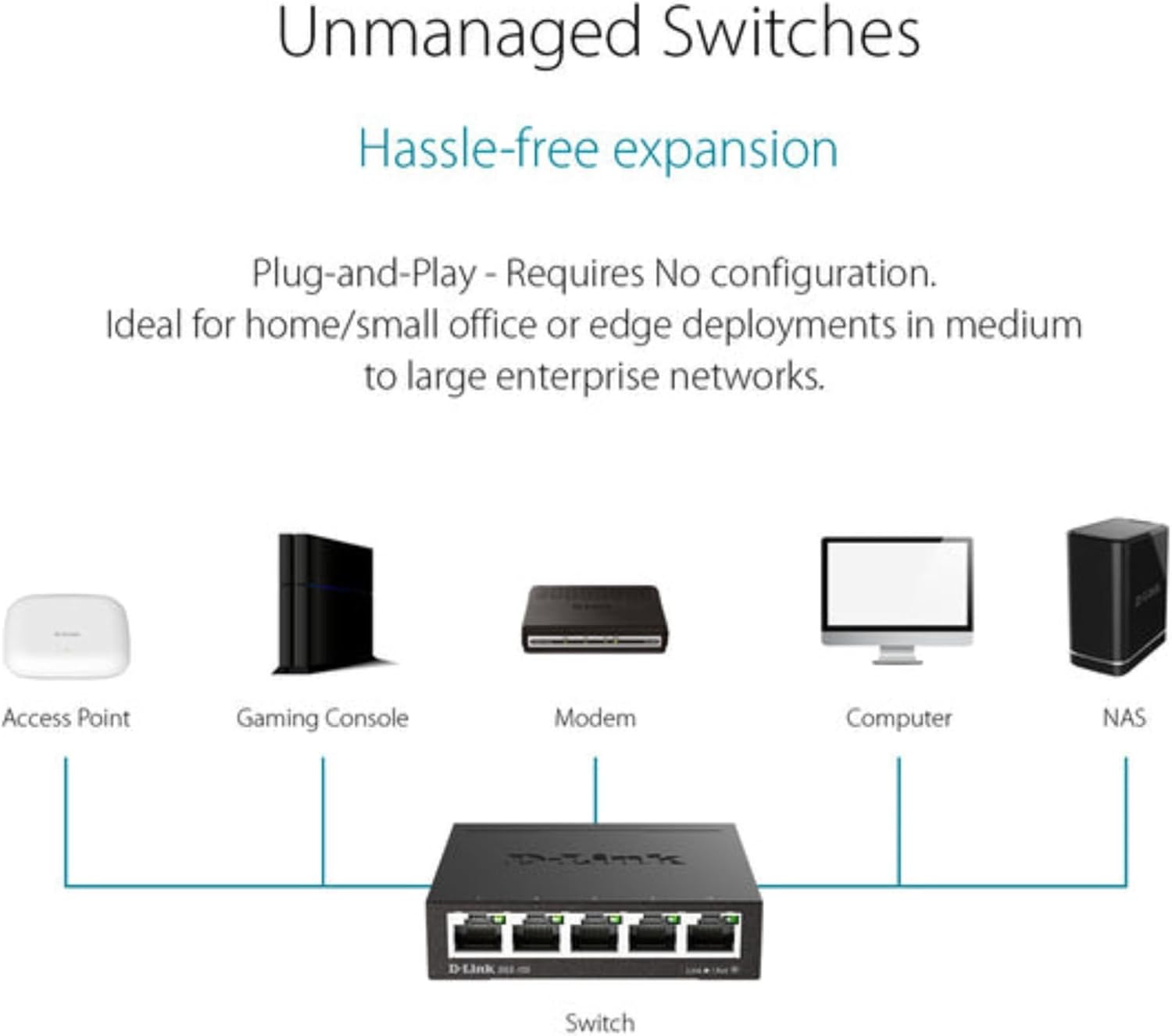
Typical network setup diagram showing the DGS-105 switch connecting multiple devices to a router.
5. ปฏิบัติการ
5.1. ไฟ LED
The DGS-105 switch features LED indicators to provide status information:
- กำลังไฟ LED: จะสว่างขึ้นเมื่อสวิตช์เปิดอยู่
- ไฟ LED แสดงสถานะ Link/Act (ต่อพอร์ต):
- Solid Green: Indicates a stable Gigabit (1000 Mbps) connection.
- Solid Amber: Indicates a stable Fast Ethernet (100 Mbps) connection.
- ไฟกะพริบ: ระบุกิจกรรมข้อมูลบนพอร์ต
- Off: No device is connected, or the connected device is powered off.
5.2. การโอนข้อมูล
The DGS-105 supports Gigabit Ethernet speeds, allowing for fast data transfer rates of up to 2000 Mbps (full-duplex) per port. Quality of Service (QoS) prioritizes time-sensitive data, ensuring smooth performance for applications like video streaming, VoIP, and online gaming. Jumbo Frame support (9KB) further optimizes throughput for large file การถ่ายโอนและการสำรองข้อมูล
5.3. Green Ethernet Features
The switch incorporates Energy Efficient Ethernet (IEEE 802.3az) technology, which automatically detects cable length and link status to adjust power usage. This feature can significantly reduce power consumption by up to 80% when ports are idle or connected to shorter cables, contributing to energy savings without compromising performance.

Illustration of D-Link Green technology's energy saving capabilities.
6. การบำรุงรักษา
To ensure optimal performance and longevity of your DGS-105 switch, follow these maintenance guidelines:
- การทำความสะอาด: Use a soft, dry cloth to clean the exterior of the switch. Avoid using liquid or aerosol cleaners directly on the device.
- การระบายอากาศ : Ensure that the switch's ventilation openings are not blocked. Maintain adequate space around the device for proper airflow.
- สิ่งแวดล้อม: Operate the switch within its specified temperature and humidity ranges (refer to specifications). Avoid exposing the device to direct sunlight, excessive heat, or moisture.
- การจัดการสายเคเบิล: จัดระเบียบสายเคเบิลเครือข่ายเพื่อป้องกันความเครียดบนพอร์ตและเพื่อรักษาการตั้งค่าให้เป็นระเบียบ
7 การแก้ไขปัญหา
If you encounter issues with your DGS-105 switch, refer to the following common troubleshooting steps:
ไม่มีไฟฟ้า
- ตรวจสอบให้แน่ใจว่าได้เสียบอะแดปเตอร์แปลงไฟเข้ากับสวิตช์และเต้ารับไฟฟ้าที่ใช้งานได้สนิทแล้ว
- ตรวจสอบว่าเต้ารับไฟฟ้าใช้งานได้โดยเสียบอุปกรณ์อื่น
- Check the power LED on the switch. If it is off, try a different power adapter (if available and compatible).
ไม่มีลิงค์/กิจกรรมบนพอร์ต
- ตรวจสอบให้แน่ใจว่าเสียบสายอีเธอร์เน็ตเข้ากับพอร์ตของสวิตช์และอุปกรณ์ที่เชื่อมต่ออย่างแน่นหนาแล้ว
- Ensure the connected device is powered on and its network adapter is enabled.
- ลองใช้สายอีเทอร์เน็ตอื่น
- เชื่อมต่ออุปกรณ์เข้ากับพอร์ตอื่นบนสวิตช์
- Check the status of the connected device's network adapter.
ความเร็วเครือข่ายช้า
- โปรดตรวจสอบให้แน่ใจว่าอุปกรณ์และสายเคเบิลที่เชื่อมต่อทั้งหมดรองรับ Gigabit Ethernet เพื่อประสิทธิภาพสูงสุด
- ตรวจสอบปริมาณการรับส่งข้อมูลเครือข่ายที่มากเกินไป หรือแอปพลิเคชันที่ใช้แบนด์วิธสูงบนอุปกรณ์ที่เชื่อมต่ออยู่
- Verify that the Ethernet cables are not damaged and are of appropriate quality (e.g., Cat5e or Cat6).
- รีสตาร์ทสวิตช์และอุปกรณ์ที่เชื่อมต่อ
8. ข้อมูลจำเพาะ
| คุณสมบัติ | ข้อมูลจำเพาะ |
|---|---|
| ขนาดสินค้า (กว้าง x ยาว x สูง) | 3.95" x 3.85" x 1.1" |
| น้ำหนักสินค้า | 9.6 ออนซ์ |
| เล่มที่tage | 5 โวลต์ (กระแสตรง) |
| คะแนนปัจจุบัน | 1 Amps |
| วัสดุตัวเรือน | โลหะ |
| ประเภทอินเทอร์เฟซ | RJ45 |
| อัตราการถ่ายโอนข้อมูล | 2000 เมกะบิตต่อวินาที (ฟูลดูเพล็กซ์) |
| จำนวนพอร์ต | 5 |
| หมายเลขรุ่น | 124889 |
| ASIN | B000BC7QMM |
| สี | สีดำ |
| อุปกรณ์ที่รองรับ | เดสก์ท็อป |
| วันที่พร้อมใช้งานครั้งแรก | วันที่ 9 กันยายน 2005 |
9. การรับประกันและการสนับสนุน
The D-Link DGS-105 switch comes with Limited Lifetime Protection, ensuring long-term reliability. D-Link also provides US-based technical support to assist with any product-related inquiries or issues.
For detailed warranty information, technical support resources, and contact options, please refer to the official D-Link webไซต์หรือเอกสารที่รวมอยู่กับผลิตภัณฑ์ของคุณ
โดยทั่วไปคุณสามารถค้นหาข้อมูลการสนับสนุนได้ที่ us.dlink.com/support.