
1. สูงกว่าview
The Canon PowerShot SD450 Digital ELPH camera is a compact digital camera designed for ease of use and high-quality imaging. It features a 5.0-megapixel sensor, a 3x optical zoom lens, and a 2.5-inch LCD display. The camera incorporates Canon's DIGIC II processor for efficient image processing and offers various shooting modes to suit different photographic situations.

รูปที่ 1.1 : ด้านหน้า view of the Canon PowerShot SD450 Digital ELPH camera with its lens retracted.
2. อะไรอยู่ในกล่อง
ตรวจสอบว่ามีรายการทั้งหมดต่อไปนี้รวมอยู่ในแพ็คเกจของคุณ:
- PowerShot SD450 body
- Lithium battery pack NB-4L
- Battery charger CB-2LV
- 16 MB SD memory card SDC-16M
- Wrist strap WS-600
- ซีดีรอมโซลูชันกล้องดิจิทัล
- USB interface cable IFC-400PCU
- Audio-video cable AVC-DC300
3. การตั้งค่า
3.1. การชาร์จแบตเตอรี่
- Insert the Lithium battery pack NB-4L into the battery charger CB-2LV.
- เสียบที่ชาร์จเข้ากับเต้ารับไฟฟ้า ไฟแสดงสถานะการชาร์จจะสว่างขึ้น
- Once charging is complete, the indicator light will change or turn off. Remove the battery.
3.2 การใส่แบตเตอรี่และการ์ด SD
- เปิดฝาช่องใส่แบตเตอรี่/การ์ดที่อยู่ด้านล่างของกล้อง
- Insert the charged battery pack into the compartment, ensuring correct orientation.
- Insert the SD memory card into the card slot until it clicks into place.
- ปิดฝาปิดช่องใส่ให้แน่น
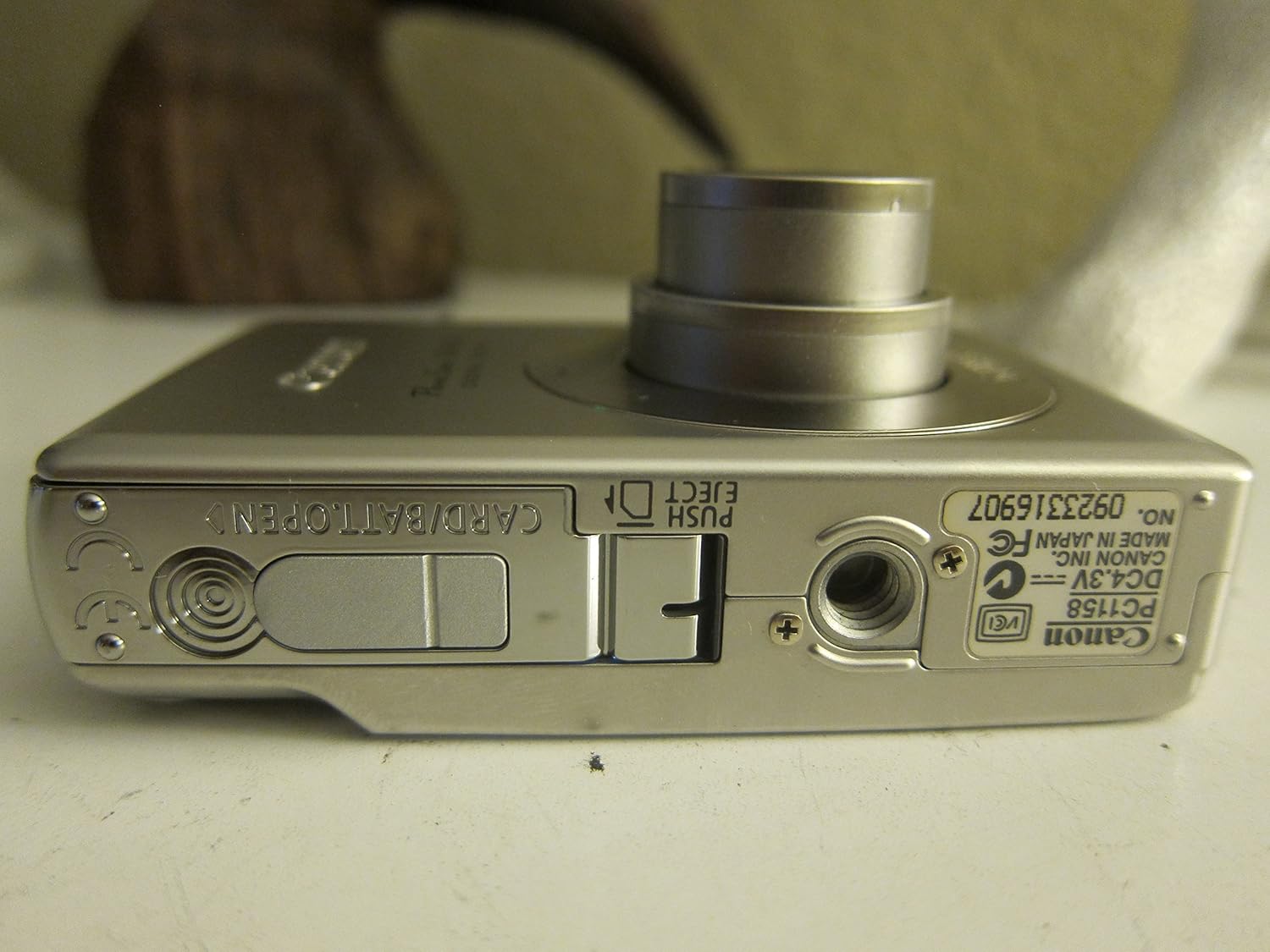
รูปที่ 3.1: ด้านล่าง view of the camera, illustrating the battery and SD card compartment.
3.3. การเปิดเครื่องครั้งแรกและการตั้งค่าพื้นฐาน
- กดปุ่ม เปิด/ปิด ปุ่มเพื่อเปิดกล้อง
- ทำตามคำแนะนำบนหน้าจอเพื่อตั้งค่าวันที่ เวลา และภาษา

รูปที่ 3.2: ด้านบน view ของกล้อง โดยเน้นที่ปุ่มเปิดปิดและปุ่มชัตเตอร์
4. การใช้งานกล้อง
4.1. การถ่ายภาพขั้นพื้นฐาน
- เปิด/ปิดเครื่อง: กดปุ่ม เปิด/ปิด ปุ่ม.
- การถ่ายภาพ: กดปุ่มชัตเตอร์ครึ่งหนึ่งเพื่อโฟกัส จากนั้นกดจนสุดเพื่อถ่ายภาพ
- ซูม: ใช้คันโยกซูมรอบปุ่มชัตเตอร์เพื่อปรับการซูมแบบออปติคอล 3 เท่า

รูปที่ 4.1 : ด้านหน้า view of the camera with the optical zoom lens extended.
4.2. โหมดถ่ายภาพ
The PowerShot SD450 offers various shooting modes to optimize settings for different scenes. Rotate the mode dial to select:
- อัตโนมัติ: Camera automatically sets optimal exposure and focus.
- คู่มือ: Allows for more control over settings like white balance and color tones (black and white, sepia, vivid, neutral).
- ภาพเหมือน: Blurs the background to emphasize the subject.
- ภูมิประเทศ: Ensures sharp focus on distant subjects.
- Night Snapshot: For shooting in low light conditions.
- โหมดฉาก: Includes specific settings for Kids & Pets, Foliage, Fireworks, Snow, Underwater, Beach, and Indoor.
- สีของฉัน: Apply special effects like Color Swap or Custom Color directly in-camera.
4.3. Focusing and Exposure
- AiAF: The 9-point Artificial Intelligence Auto Focus system automatically focuses on subjects, even if off-center.
- การควบคุมการเปิดรับแสง: Select from Evaluative, Center-weighted, or Spot metering.
- ความไวแสง ISO: Adjustable to Auto, 50, 100, 200, or 400 to control light sensitivity.
4.4. การบันทึกวิดีโอ
The camera can record high-quality movies:
- มติ: VGA (640x480) or QVGA (320x240) at 30 or 15 frames per second.
- Fast Frame Rate Movie Mode: Records at 60 frames per second for slow-motion playback.
- Compact Movie Mode (QQVGA): 160x120 at 15 frames per second, suitable for email sharing.
- Continuous filming is available until the file size reaches 1 GB or 60 minutes.
4.5. การเล่นซ้ำและการview
เพื่อview รูปภาพและวิดีโอของคุณ:
- กดปุ่ม การเล่นซ้ำ ปุ่ม.
- Use the directional pad to navigate through images and videos.
- Intelligent Orientation Sensor: Automatically rotates stored images for correct playback when the camera is rotated.
- Slideshow Functions: Create impressive slideshows with transition effects directly on the camera.

รูปที่ 4.2: ด้านหลัง view of the camera, showing the LCD display during image playback.
4.6. การพิมพ์รูปภาพ
The PowerShot SD450 supports direct printing:
- PictBridge: Connect directly to PictBridge-compatible printers (e.g., Canon PIXMA printers) for printing without a PC.
- ปุ่มพิมพ์/แชร์: Simplifies direct printing and image uploading to Windows XP or Mac OS X.
5. การบำรุงรักษา
5.1. การทำความสะอาดกล้อง
- ใช้ผ้าแห้งนุ่มๆ เช็ดทำความสะอาดตัวกล้อง
- For the lens and LCD screen, use a lens cleaning cloth and specialized cleaning solution if necessary. Avoid harsh chemicals.
5.2. การดูแลแบตเตอรี่
- เก็บแบตเตอรี่ไว้ในที่เย็นและแห้งเมื่อไม่ได้ใช้งาน
- หลีกเลี่ยงการปล่อยแบตเตอรี่จนหมดบ่อยครั้งเพื่อยืดอายุการใช้งาน
- Recharge the battery using only the provided Canon charger.
5.3. การจัดเก็บ
- เมื่อเก็บกล้องไว้เป็นเวลานาน ควรถอดแบตเตอรี่ออก
- Store the camera in a protective case to prevent dust and scratches.
6 การแก้ไขปัญหา
| ปัญหา | สารละลาย |
|---|---|
| "Memory Error" message appears. |
|
| ภาพมีความเบลอ |
|
| Flash is too strong or washes out subjects. |
|
| แบตเตอรี่หมดเร็วมาก |
|
| กล้องไม่สามารถเปิดได้ |
|
7. ข้อมูลจำเพาะ
| ยี่ห้อ | แคนนอน |
| ชื่อรุ่น | แคนนอน พาวเวอร์ช็อต SD450 |
| ความละเอียดของภาพนิ่งที่มีประสิทธิภาพ | 5 ล้านพิกเซล |
| ซูมออปติคอล | 3x |
| ขนาดหน้าจอ | 2.5 นิ้ว |
| ระบบป้องกันภาพสั่นไหว | ดิจิตอล, ออปติคัล |
| ช่วง ISO | อัตโนมัติ, 50, 100, 200, 400 |
| ความเร็วชัตเตอร์ต่ำสุด | 15 วินาที |
| ความเร็วชัตเตอร์สูงสุด | 1/1500 วินาที |
| ความละเอียดในการจับภาพวิดีโอ | SD VGA 480p |
| รูปแบบการจับภาพวิดีโอ | เอวีไอ |
| File รูปแบบ | เจเพ็ก, ดิบ |
| ขนาด (กว้าง x ยาว x สูง) | 3.39 x 0.87 x 2.13 นิ้ว |
| น้ำหนักสินค้า | 5.44 ออนซ์ |
| สี | เงิน |
| มีตัวตั้งเวลา | ใช่ |
| ระดับความต้านทานต่อน้ำ | ไม่ทนน้ำ |
8. การรับประกันและการสนับสนุน
For detailed warranty information, please refer to the warranty card included with your product or visit the official Canon website. The camera comes bundled with Canon software (ZoomBrowser EX 5.5, PhotoRecord 2.2, ImageBrowser 5.5, PhotoStitch 3.1, Movie Edit Task) for image management and editing. Purchasers are also eligible for membership to Canon iMAGE Gateway for additional support and services.
For technical support, driver downloads, or service inquiries, please visit the official Canon support webเข้าชมเว็บไซต์หรือติดต่อฝ่ายบริการลูกค้าของ Canon