
การแนะนำ
The HM Digital TDS-4 is a compact and convenient digital tool designed to measure the Total Dissolved Solids (TDS) in water. TDS refers to any salts, metals, or minerals dissolved in water. This meter provides an instant reading of your water's purity level, displayed in parts per million (ppm). It is suitable for various applications including drinking water quality checks, water filtration and purification systems, hydroponics, aquariums, and more.
คุณสมบัติหลัก
- Measures Total Dissolved Solids (TDS) in parts per million (ppm).
- Equipped with Automatic Temperature Compensation (ATC) for accurate readings.
- Features a Hold Function to freeze measurements for easy viewการไอเอ็นจี
- Automatic shut-off after 10 minutes of non-use to conserve battery life.
- Compact, pen-style design for portability.
สินค้าเกินview
The HM Digital TDS-4 meter is designed for ease of use and portability. It features a digital display, ON/OFF button, and a HOLD button. The electrodes are protected by a removable cap.
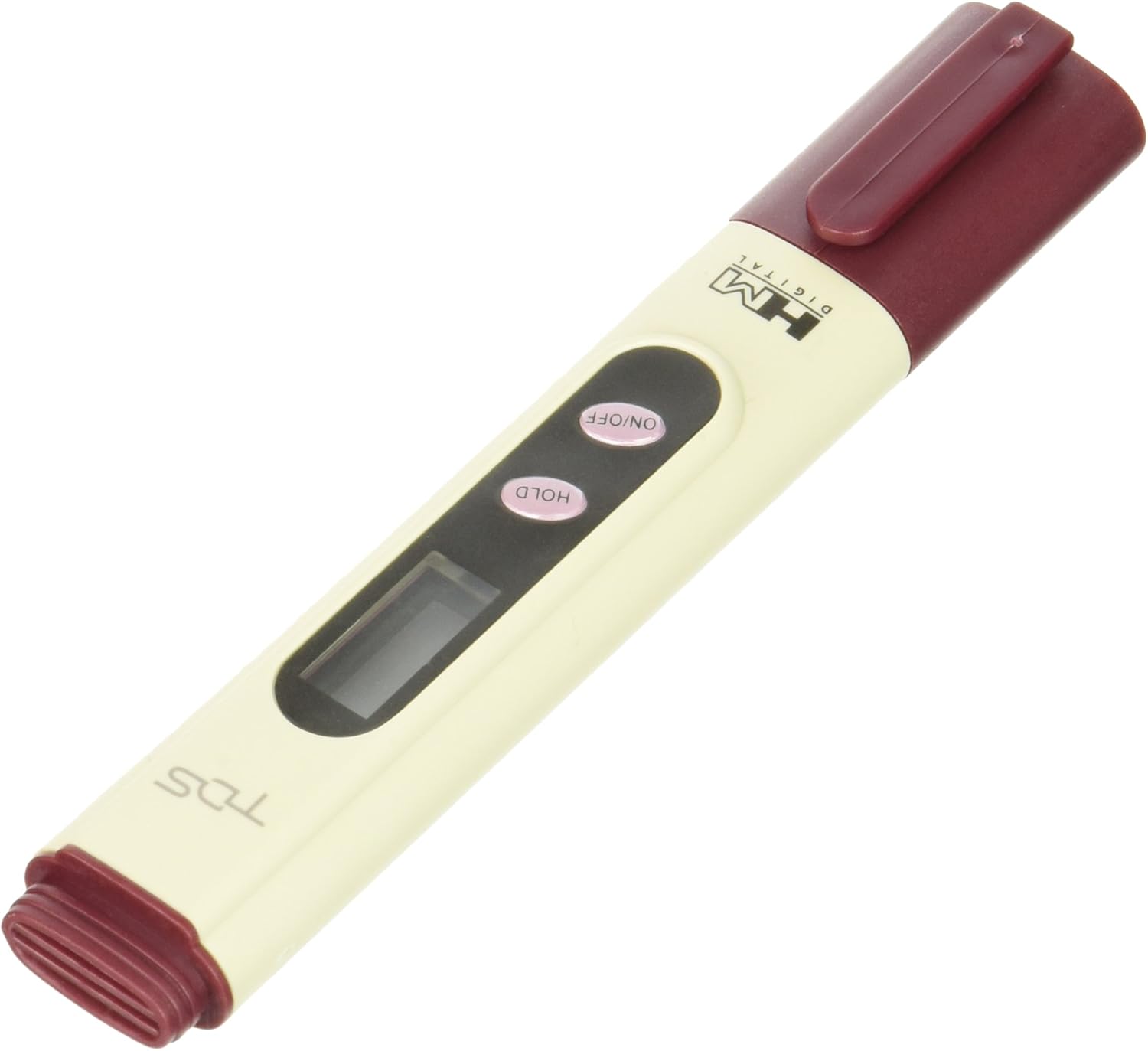
Figure 1: HM Digital TDS-4 Pocket Water Quality Tester with its protective cap in place.

Figure 2: HM Digital TDS-4 Pocket Water Quality Tester with the protective cap removed, revealing the measurement electrodes.
การตั้งค่า
การติดตั้งแบตเตอรี่
The HM Digital TDS-4 requires two LR44 batteries, which are included with the device. To install or replace batteries:
- คลายเกลียวฝาครอบด้านบนของมิเตอร์ออก
- Carefully remove the old batteries (if replacing).
- Insert two new LR44 batteries, ensuring correct polarity.
- ขันฝาปิดด้านบนให้แน่นสนิท
การตรวจสอบเบื้องต้น
Before first use, inspect the meter for any visible damage. Ensure the protective cap is present and fits securely over the electrodes.
คำแนะนำการใช้งาน
ขั้นตอนการวัดพื้นฐาน
Follow these steps to obtain an accurate TDS reading:
- ถอดฝาครอบป้องกันออก: Gently pull off the cap covering the electrodes at the bottom of the meter.
- Turn On the Meter: กดปุ่ม เปิด/ปิด กดปุ่ม หน้าจอจะสว่างขึ้น
- Immerse the Meter: Dip the electrode end of the meter into the water sample. Ensure the water level does not exceed the maximum immersion line (approximately 2 inches from the bottom).
- Stabilize Reading: Wait for the reading on the digital display to stabilize. This typically takes 10-30 seconds. Gently swirl the meter to dislodge any air bubbles that may be trapped around the electrodes, as these can affect accuracy.
- Hold Reading (Optional): If you need to remove the meter from the water to view the reading, press the ถือ button. The display will freeze the current measurement. Press ถือ อีกครั้งเพื่อปล่อยอ่าน
- การอ่านบันทึก: Note the TDS value displayed in ppm.
- Turn Off the Meter: กดปุ่ม เปิด/ปิด ปุ่มเพื่อปิดมิเตอร์
- เปลี่ยนฝาครอบ: ควรปิดฝาครอบป้องกันทุกครั้งหลังใช้งาน เพื่อป้องกันความเสียหายต่อขั้วไฟฟ้า
Understanding TDS Readings
TDS is measured in parts per million (ppm). A lower TDS value generally indicates purer water, as it contains fewer dissolved impurities. For example, distilled water typically reads 0 ppm, while tap water can vary significantly. The ideal TDS level depends on the specific application (e.g., drinking water, hydroponics, aquariums).
การซ่อมบำรุง
การทำความสะอาดขั้วไฟฟ้า
To ensure accurate readings, it is important to keep the electrodes clean. After each use, rinse the electrode area with clean, distilled water. Avoid touching the electrodes with your fingers, as oils and dirt can affect performance. If significant buildup occurs, gently clean with a soft brush and a mild detergent solution, then rinse thoroughly with distilled water.
พื้นที่จัดเก็บ
Store the TDS-4 meter in a cool, dry place with the protective cap securely in place. Avoid exposing the meter to extreme temperatures or direct sunlight for prolonged periods.
การสอบเทียบ
While the TDS-4 is factory-calibrated, periodic recalibration may be necessary to maintain accuracy, especially after extended use or if readings appear inconsistent. Calibration typically involves using a known TDS calibration solution (e.g., 342 ppm NaCl solution). Refer to the specific calibration instructions provided with your calibration solution or contact HM Digital support for guidance.
การแก้ไขปัญหา
ปัญหาทั่วไปและแนวทางแก้ไข
- มิเตอร์ไม่ทำงาน:
ตรวจสอบว่าติดตั้งแบตเตอรี่อย่างถูกต้องและมีประจุเพียงพอ เปลี่ยนแบตเตอรี่หากจำเป็น - Inconsistent or Erratic Readings:
Ensure the electrodes are clean. Rinse them with distilled water. Check for air bubbles around the electrodes during measurement and gently swirl to remove them. Recalibrate the meter if the issue persists. - Reading Does Not Stabilize:
Allow sufficient time (10-30 seconds) for the reading to stabilize. Ensure the meter is fully immersed up to the recommended level. - Meter Dropped:
If the meter has been dropped, it may require recalibration to ensure continued accuracy.
For issues not listed here, or if troubleshooting steps do not resolve the problem, please contact HM Digital customer support.
ข้อมูลจำเพาะ
| ข้อมูลจำเพาะ | รายละเอียด |
|---|---|
| ผู้ผลิต | เอชเอ็ม ดิจิตอล อิงค์ |
| หมายเลขชิ้นส่วน | ทีดีเอส-4 |
| น้ำหนักสินค้า | 1.76 ออนซ์ |
| ขนาดสินค้า | 0.55 x 0.9 x 5.5 นิ้ว |
| หมายเลขรุ่นสินค้า | ทีดีเอส-4 |
| แบตเตอรี่ | ต้องใช้แบตเตอรี่ LR2 จำนวน 44 ก้อน (รวมอยู่ด้วย) |
| วัสดุ | Plastic, Silver electrodes |
| รูปแบบการแสดงผล | จอแอลซีดี |
| ช่วงอุณหภูมิ | 1-50 Degrees Celsius (Automatic Temperature Compensation) |
| อายุการใช้งานแบตเตอรี่โดยเฉลี่ย | 1000 ชั่วโมง |
การรับประกันและการสนับสนุน
For information regarding product warranty, technical support, or service, please contact HM Digital customer service directly. Details can typically be found on the HM Digital official webบรรจุภัณฑ์ไซต์หรือผลิตภัณฑ์