
1. สินค้าหมดview
The OMRON HEM-1000 is an automatic digital blood pressure monitor designed for easy and accurate blood pressure measurement. Its arm-in design simplifies the process, making it suitable for regular health monitoring at home.
This device non-invasively measures systolic and diastolic blood pressure for health management purposes. It is classified as a Specified Controlled Medical Device with certification number 218AGBZX00030A01.
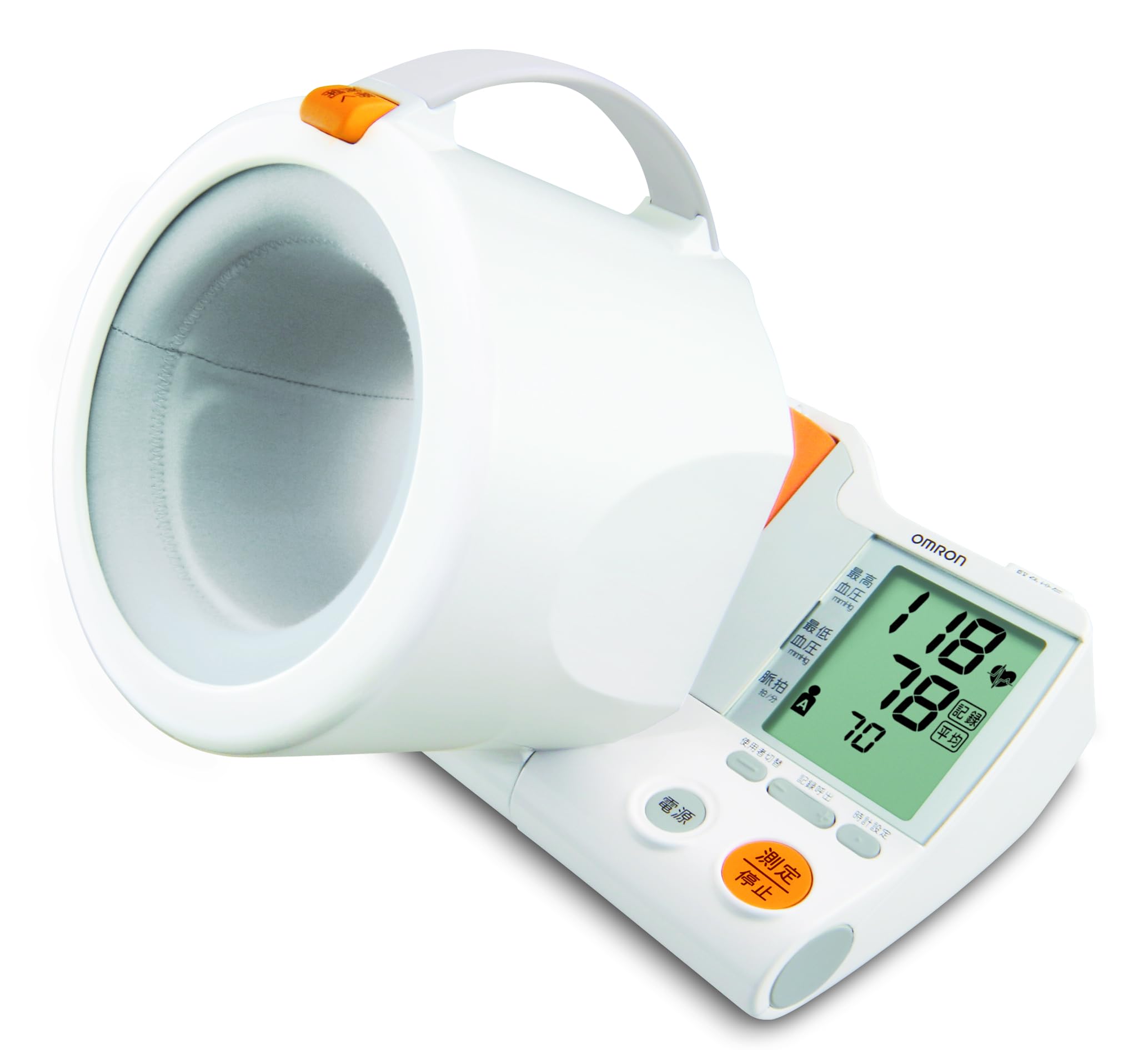
Image: The OMRON HEM-1000 blood pressure monitor with a user's arm correctly inserted into the cuff for measurement.
2. ข้อมูลด้านความปลอดภัยและข้อควรระวัง
Please read this section carefully before using the blood pressure monitor to ensure proper and safe operation.
2.1. ข้อห้ามและข้อควรระวัง
- Self-diagnosis or self-treatment based on measurement results: This may lead to worsening of symptoms. Always consult a medical professional for diagnosis and treatment.
- การวัดขนาดบริเวณแขนที่ได้รับบาดเจ็บหรือได้รับการรักษา: This may lead to worsening of symptoms.
- Measurement on an arm receiving intravenous drip or blood transfusion: This may lead to worsening of symptoms.
- Use near flammable or combustion-supporting gases: สิ่งนี้อาจทำให้เกิดการลุกไหม้ ไฟไหม้ หรือการระเบิดได้
- Use beyond the specified service life: The device may not measure correctly.
- มีการใช้งานโดยบุคคลจำนวนไม่ระบุในสถานพยาบาลหรือสถานที่สาธารณะ: This may cause accidents or operational issues.
2.2. General Precautions for Use
- ผู้ที่มีภาวะเลือดผิดปกติรุนแรงหรือเป็นโรคเกี่ยวกับเลือด ควรใช้อุปกรณ์นี้ภายใต้คำแนะนำของแพทย์เท่านั้น
- If any abnormality occurs during measurement, immediately remove your arm from the cuff.
- Do not use this device on infants or individuals who cannot express themselves.
- Do not apply pressure above 300 mmHg.
- Do not use this device for any purpose other than blood pressure measurement.
- Avoid using mobile phones or smartphones near the blood pressure monitor during operation.
- Do not disassemble or modify the main unit.
- ตรวจสอบให้แน่ใจว่าใส่แบตเตอรี่ในขั้วที่ถูกต้อง (+/-)
- ใช้แบตเตอรี่ตามประเภทที่ระบุเท่านั้น
- ถอดแบตเตอรี่ออกหากจะไม่ได้ใช้งานอุปกรณ์เป็นเวลานาน
3. คำแนะนำในการตั้งค่า
3.1. การแกะกล่องและการตรวจสอบเบื้องต้น
Carefully remove the blood pressure monitor and all accessories from the packaging. Check for any visible damage. The package should include the main unit, AC adapter, 4 AA alkaline batteries (for trial use), and this instruction manual (with quality guarantee).
3.2. การติดตั้งพาวเวอร์ซัพพลาย
The HEM-1000 can be powered by either the included AC adapter or batteries.
- การใช้อะแดปเตอร์ AC: Connect the AC adapter to the power input port on the device and then plug it into a standard electrical outlet.
- การใช้แบตเตอรี่: Open the battery compartment cover. Insert the 4 AA alkaline batteries, ensuring correct polarity (+/-) as indicated inside the compartment. Close the cover securely.
3.3. ตำแหน่งอุปกรณ์
Place the blood pressure monitor on a stable, flat surface such as a table. Ensure there is enough space for your arm to be comfortably inserted and rested.
4. คู่มือการใช้งาน
ทำตามขั้นตอนเหล่านี้เพื่อการวัดความดันโลหิตที่แม่นยำ:
4.1. การเตรียมการวัด
- Rest for 5 minutes before measurement.
- นั่งตัวตรงโดยให้หลังได้รับการรองรับและวางเท้าราบกับพื้น
- Ensure your arm is bare or has thin clothing that does not constrict.
4.2. ขั้นตอนการวัด
- Step 1: Insert Your Arm. Open the movable arm cuff and gently slide your arm into the cuff until it is comfortably positioned. The cuff is designed to guide your arm into the correct position automatically.

Image: Step 1 - Insert your arm into the cuff.
- Step 2: Ensure Correct Posture. The movable arm cuff helps you achieve the correct measurement posture. Your arm should be relaxed, and the cuff should be at heart level. Avoid leaning forward or having your arm at an incorrect angle.

Image: Step 2 - Correct posture for measurement (arm at heart level, relaxed).
- Step 3: Start Measurement. Press the 'Measurement/Stop' button. The cuff will automatically inflate to the optimal pressure for your arm. Remain still and silent during the measurement.

Image: Step 3 - Press the 'Measurement/Stop' button to begin.
- View ผลลัพธ์. Once the measurement is complete, your systolic blood pressure, diastolic blood pressure, and pulse rate will be displayed on the large LCD screen. The device also features an 'Irregular Heartbeat' detection function and a 'Body Movement' indicator.

Image: The display shows systolic and diastolic pressure, user, time, and indicators for body movement and irregular pulse wave.
- ฟังก์ชั่นหน่วยความจำ The device stores up to 90 readings for two users, allowing for long-term tracking of blood pressure trends.

Image: The device stores 90 readings for each of two users.
5. การบำรุงรักษา
Proper maintenance ensures the longevity and accuracy of your blood pressure monitor.
5.1. การทำความสะอาดตัวเครื่อง
- Always keep the blood pressure monitor clean.
- Wipe the main unit with a dry, soft cloth.
- If the unit is heavily soiled, dampen a soft cloth with water or a neutral detergent, wring it out thoroughly, wipe the dirt, and then wipe again with a dry cloth.
- Do not use alcohol, benzene, thinner, or other harsh chemicals to clean the unit, as this may cause damage.
5.2. การจัดเก็บ
- Store the device in a clean, dry place away from direct sunlight, extreme temperatures, and high humidity.
- If not using the device for a long period, remove the batteries to prevent leakage and damage.
6 การแก้ไขปัญหา
This section provides solutions to common issues you might encounter with your OMRON HEM-1000 blood pressure monitor.
| ปัญหา | สาเหตุที่เป็นไปได้ | สารละลาย |
|---|---|---|
| อุปกรณ์ไม่เปิดเครื่อง | Batteries are depleted or inserted incorrectly. AC adapter is not properly connected. | Replace batteries with new ones, ensuring correct polarity. Check AC adapter connection to both the device and the power outlet. |
| Measurement results are inconsistent or appear inaccurate. | Incorrect arm position or posture. Movement or talking during measurement. Cuff not properly applied. | Ensure arm is correctly inserted and at heart level. Remain still and silent during measurement. Ensure the cuff is snug but not too tight. Rest for 5 minutes before re-measuring. |
| ปลอกรัดแขนไม่พองตัว หรือพองตัวน้อยเกินไป/มากเกินไป | Air tube blockage or leak. Cuff not properly connected. Device malfunction. | Check for any kinks or damage in the air tube. Ensure the cuff is securely connected to the main unit. If the problem persists, contact customer service. |
| มีข้อความแสดงข้อผิดพลาดปรากฏขึ้น | Specific error condition (e.g., excessive movement, irregular pulse, cuff pressure error). | Refer to the specific error code in the full instruction manual for detailed troubleshooting. Generally, re-measure after resting and ensuring correct procedure. |
If you encounter issues not listed here or if problems persist after attempting these solutions, please contact OMRON Customer Service.
7. ข้อมูลจำเพาะผลิตภัณฑ์
| คุณสมบัติ | ข้อมูลจำเพาะ |
|---|---|
| หมายเลขรุ่น | HEM-1000 |
| ขนาดภายนอก (กว้าง x สูง x ลึก) | 230 มม. x 217 มม. x 228 มม. |
| น้ำหนัก | น้ำหนักประมาณ 1600 กรัม (ไม่รวมแบตเตอรี่) |
| ขนาดเส้นรอบวงแขนที่เหมาะสม | 170 มม. ถึง 320 มม. |
| แหล่งพลังงาน | AC Adapter or 4 x AA Alkaline Batteries |
| ประเภทจอภาพ | จอ LCD ระบบดิจิตอล |
| สภาพแวดล้อมในการทำงาน | +10 to +40°C, 15 to 85% RH (non-condensing), 800 to 1060 hPa |
| การจำแนกอุปกรณ์ทางการแพทย์ | Specified Controlled Medical Device |
| หมายเลขรับรองอุปกรณ์ทางการแพทย์ | 218AGBZX00030A01 |

Image: Device dimensions (Width: approx. 230mm, Height: approx. 217mm, Depth: approx. 228mm).
8. การรับประกันและการสนับสนุน
8.1. การรับประกันของผู้ผลิต
OMRON Healthcare provides a warranty for this product under the following conditions:
- If the product malfunctions within 1 year from the date of purchase under normal use, as described in the instruction manual and product labels, it will be repaired or replaced free of charge.
- To receive repair service under warranty, please contact the OMRON Customer Service Center.
- Repairs will be charged, even within the warranty period, in the following cases:
- Malfunctions or damages due to incorrect use, improper repair, or modification.
- Malfunctions or damages due to drops or impacts after purchase.
- Malfunctions or damages due to fire, earthquake, flood, lightning, other natural disasters, pollution, abnormal power supply voltage, or use of unspecified power sources (voltagจ ความถี่)
- If this warranty document is not presented.
- If the purchase date, customer name, or store name is not filled in this document, or if the text has been altered.
- ชิ้นส่วนสิ้นเปลือง
- If the cause of malfunction originates from something other than this product.
- Other malfunctions or damages due to usage methods not described in this instruction manual.
- This warranty document will not be reissued, so please keep it carefully.
- This warranty promises free service under the period and conditions specified herein and does not limit the customer's legal rights.
- Repair parts are maintained for a minimum of 6 years after production discontinuation.
8.2. การสนับสนุนลูกค้า
For any inquiries, support, or service requests, please contact:
บริษัท โอมรอน เฮลท์แคร์ จำกัด
ศูนย์บริการลูกค้า
โทรศัพท์: 0120-30-6606