
1. สินค้าหมดview
The iConcepts Wireless Optical Mouse and Keyboard Combo 62150N provides a convenient and efficient input solution for your personal computer. This combo features wireless radio frequency technology for a clutter-free workspace, an optical mouse for precise tracking, and a keyboard with multimedia hotkeys and spill-resistant design.
คุณสมบัติหลัก:
- New wireless radio frequency technology for reliable connection.
- 11 internet and multimedia hot keys for quick access to common functions.
- New optical sensor technology in the mouse, eliminating the need for a mouse ball.
- Precise and accurate cursor control.
- Spill-resistant keyboard design for enhanced durability.
- Compatible with Windows 98SE, 2000, ME, NT, XP, and Vista operating systems.
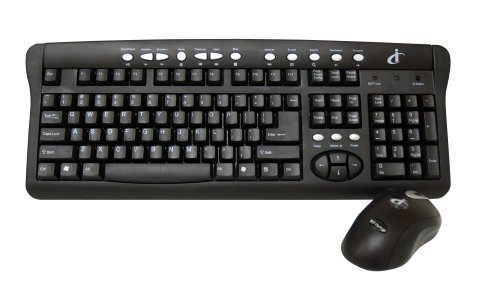
รูปที่ 1: iConcepts Wireless Keyboard and Optical Mouse Combo 62150N. This image displays the full product, including the wireless keyboard with 11 one-touch internet and multimedia function keys, and the wireless optical 4D mouse. The USB receiver is also indicated.
2. คำแนะนำในการตั้งค่า
2.1. การติดตั้งแบตเตอรี่
The keyboard and mouse require batteries for operation. Please follow the steps below:
- สำหรับคีย์บอร์ด: Locate the battery compartment on the underside of the keyboard. Open the cover and insert two (2) AA batteries, ensuring correct polarity (+/-). Close the battery compartment cover securely.
- สำหรับเมาส์: Locate the battery compartment on the underside of the mouse. Open the cover and insert two (2) AA batteries, ensuring correct polarity (+/-). Close the battery compartment cover securely.
Note: A total of four (4) AA batteries are required for the combo. Ensure batteries are fresh for optimal performance.
2.2. การเชื่อมต่อตัวรับสัญญาณ USB
The wireless combo uses a single USB receiver to connect both the keyboard and mouse to your computer.
- ค้นหาพอร์ต USB ที่มีอยู่ในคอมพิวเตอร์ของคุณ
- เสียบตัวรับสัญญาณ USB เข้ากับพอร์ต USB ให้แน่นสนิท
- ระบบปฏิบัติการของคุณควรตรวจจับและติดตั้งไดรเวอร์ที่จำเป็นโดยอัตโนมัติ กระบวนการนี้อาจใช้เวลาสักครู่
- เมื่อติดตั้งไดรเวอร์เสร็จแล้ว คีย์บอร์ดและเมาส์ก็พร้อมใช้งานได้ทันที
Note: For best wireless performance, ensure the USB receiver is not obstructed and is placed within a reasonable range of the keyboard and mouse.
2.3. ข้อกำหนดของระบบ
- Operating System: Windows 98SE, 2000, ME, NT, XP, or Vista.
- มีพอร์ต USB ให้ใช้งาน
3. คู่มือการใช้งาน
3.1. ฟังก์ชันแป้นพิมพ์
The keyboard operates like a standard QWERTY keyboard. In addition, it features dedicated hotkeys for enhanced functionality.
- ปุ่มมาตรฐาน: Use for typing text, numbers, and symbols.
- ปุ่มฟังก์ชั่น (F1-F12): Perform specific tasks depending on the application.
- 11 Internet & Multimedia Hot Keys: These keys provide one-touch access to common internet and multimedia functions such as volume control, play/pause, stop, next/previous track, web browser, email, and more. Refer to the icons on the keys for their specific functions.
3.2. ฟังก์ชันของเมาส์
The optical mouse provides precise cursor control without a mouse ball.
- ปุ่มซ้าย: Primary click function (e.g., selecting items, opening links).
- ปุ่มขวา: ฟังก์ชันการคลิกแบบรอง (เช่น การเปิดเมนูบริบท)
- ล้อเลื่อน: เลื่อนดูเอกสารในแนวตั้งและ web pages. The mouse also supports 4D vertical and horizontal scroll, tune scroll, and zoom control.
- การติดตามด้วยแสง: The mouse uses an optical sensor for movement detection, providing smooth and accurate cursor movement on most surfaces.
4. การบำรุงรักษา
4.1. การทำความสะอาด
To maintain the performance and appearance of your wireless combo:
- เช็ดพื้นผิวของแป้นพิมพ์และเมาส์ด้วยผ้าเนื้อนุ่มและแห้งamp ผ้า.
- หลีกเลี่ยงการใช้สารเคมีรุนแรง น้ำยาทำความสะอาดที่มีฤทธิ์กัดกร่อน หรือตัวทำละลาย
- The keyboard features a spill-resistant design, but it is not waterproof. In case of spills, immediately disconnect the device and allow it to dry completely before reuse.
4.2. การเปลี่ยนแบตเตอรี่
When the keyboard or mouse performance degrades (e.g., lag, unresponsiveness), it may be time to replace the batteries.
- ปฏิบัติตามขั้นตอนการติดตั้งแบตเตอรี่ที่ระบุไว้ในหัวข้อ 2.1
- ทิ้งแบตเตอรี่ที่ใช้แล้วตามระเบียบข้อบังคับของท้องถิ่น
5 การแก้ไขปัญหา
If you encounter issues with your iConcepts Wireless Optical Mouse and Keyboard Combo, refer to the following common solutions:
| ปัญหา | สาเหตุที่เป็นไปได้ | สารละลาย |
|---|---|---|
| แป้นพิมพ์หรือเมาส์ไม่ตอบสนอง | แบตเตอรี่เหลือน้อยหรือหมด | Replace batteries in the keyboard and/or mouse. |
| แป้นพิมพ์หรือเมาส์ไม่ตอบสนอง | ตัวรับสัญญาณ USB ไม่ได้เชื่อมต่ออย่างถูกต้อง | ตรวจสอบให้แน่ใจว่าตัวรับสัญญาณ USB เสียบเข้ากับพอร์ต USB ที่ใช้งานได้แน่นสนิทแล้ว ลองใช้พอร์ต USB อื่นดู |
| การเชื่อมต่อล่าช้าหรือขาดๆ หายๆ | สัญญาณรบกวนหรือระยะห่างจากเครื่องรับสัญญาณ | Move the keyboard and mouse closer to the USB receiver. Ensure no large metal objects are between the devices and the receiver. Avoid placing the receiver near other wireless devices. |
| การเคลื่อนที่ของเคอร์เซอร์ไม่คงที่ | Mouse sensor obstructed or dirty. | Clean the optical sensor on the underside of the mouse with a soft, dry cloth. Ensure you are using the mouse on a suitable surface. |
| ปุ่มลัดไม่ทำงาน | Driver issue or application incompatibility. | Ensure your operating system is up to date. Some hotkeys may require specific software or may not be fully supported by all applications. |
6. ข้อมูลจำเพาะ
| ยี่ห้อ | iConcepts |
| หมายเลขรุ่น | 62150น. |
| เทคโนโลยีการเชื่อมต่อ | Radio Frequency, USB |
| สี | สีดำ |
| คุณสมบัติพิเศษ | Wireless RF Connectivity, Optical Tracking, Extra Multimedia Hot Keys, Spill Resistant Keyboard |
| อุปกรณ์ที่รองรับ | เครื่องคอมพิวเตอร์ส่วนบุคคล |
| เทคโนโลยีตรวจจับการเคลื่อนไหว | ออฟติคอล |
| ความเข้ากันได้ของระบบปฏิบัติการ | Windows 98SE, 2000, ME, NT, XP, Vista |
| จำนวนปุ่ม (คีย์บอร์ด) | Standard QWERTY layout with 11 multimedia hotkeys |
| แหล่งพลังงาน | ใช้พลังงานจากแบตเตอรี่ |
| แบตเตอรี่ที่จำเป็น | 4 AA batteries (2 for keyboard, 2 for mouse) |
| น้ำหนักสินค้า | 2.95 ปอนด์ (ประมาณ 1.34 กก.) |
7. การรับประกันและการสนับสนุน
For information regarding warranty coverage, technical support, or service inquiries, please refer to the documentation included with your purchase or contact iConcepts customer support directly.
โปรดเก็บหลักฐานการซื้อของคุณไว้เพื่อเรียกร้องการรับประกัน