
เบห์ริงเกอร์ FBQ1502
Behringer ULTRAGRAPH PRO FBQ1502 User Manual
Model: FBQ1502 | Brand: Behringer
1. บทนำ
1.1 ผลิตภัณฑ์เกินview
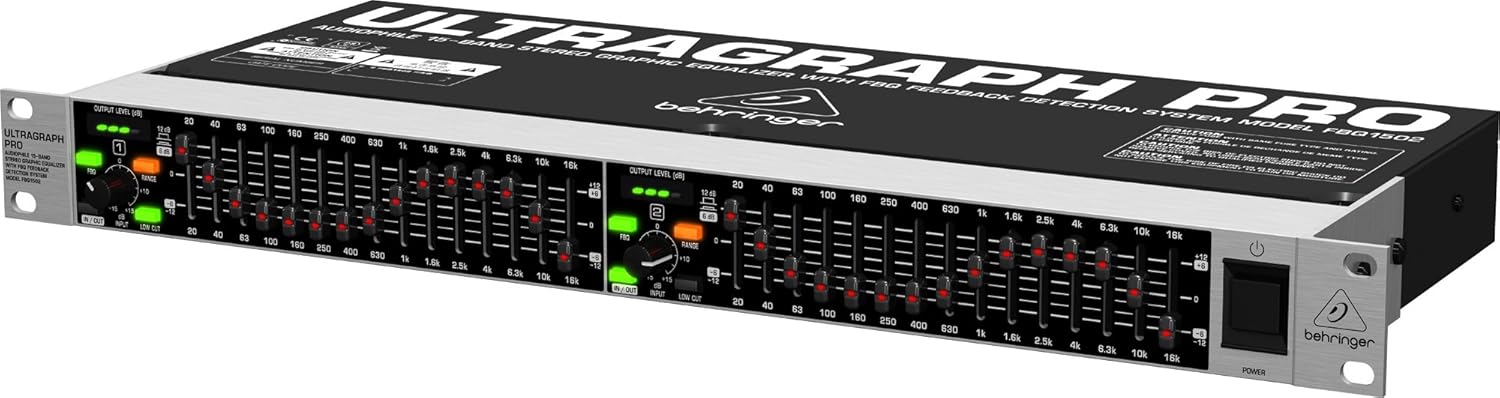
The Behringer ULTRAGRAPH PRO FBQ1502 is a professional, ultra-musical 15-band stereo graphic equalizer designed for both live and studio applications. It enhances audio quality by bringing out the best parts of your sound and effectively eliminating feedback. This unit integrates advanced features such as the FBQ Feedback Detection System and a dedicated mono subwoofer output.
1.2 คุณสมบัติหลัก
- Professional 15-band stereo Graphic Equalizer for both live and studio applications.
- Revolutionary FBQ Feedback Detection System instantly reveals critical frequencies and can also be used as an Audio Analyzer.
- ช่องต่อซับวูฟเฟอร์แบบโมโนโดยเฉพาะ พร้อมความถี่ครอสโอเวอร์ที่ปรับได้
- การทำงานของระบบเสียงที่มีเสียงรบกวนต่ำมาก ampเครื่องขยายเสียงเพื่อประสิทธิภาพเสียงที่ยอดเยี่ยม
- Shielded toroidal power transformer for ultra low-noise performance.
2. คู่มือการติดตั้ง
2.1 การแกะกล่อง
Carefully remove the ULTRAGRAPH PRO FBQ1502 from its packaging. Retain all packaging materials for future transport or storage. Inspect the unit for any signs of damage that may have occurred during shipping. If damage is present, contact your dealer immediately.
2.2 การเชื่อมต่อ
The FBQ1502 features electronic servo-balanced inputs and outputs, supporting both 1/4" TRS and gold-plated XLR connectors. The servo function automatically adjusts for unbalanced signals, ensuring consistent signal levels. Connect your audio source (e.g., mixer, preamplifier) to the inputs and your audio destination (e.g., power amplifier, active speakers) to the outputs.
- Main Inputs: Connect your stereo audio source to the main left and right inputs using balanced XLR or 1/4" TRS cables.
- ผลลัพธ์หลัก: Connect the main left and right outputs to your ampเครื่องขยายเสียงหรือลำโพงที่มีกำลังขยาย
- เอาต์พุตซับวูฟเฟอร์: Use the dedicated mono subwoofer output to connect to your subwoofer's input. This output has an adjustable crossover frequency.
- การเชื่อมต่อไฟฟ้า: Connect the supplied power cable to the unit and a suitable AC power outlet. Ensure the correct voltage is used as specified on the unit.
3. คู่มือการใช้งาน
3.1 การเปิด/ปิดเครื่อง
Locate the power switch on the front panel, typically on the right side. Press the switch to turn the unit ON. The power indicator will illuminate. To turn OFF the unit, press the switch again.
3.2 Graphic Equalization
The FBQ1502 features two 15-band graphic equalizer sections, one for each stereo channel. Each band corresponds to a specific frequency, allowing you to boost or cut that frequency's level. The faders provide precise control over the audio spectrum.
- ตัวปรับความถี่: Adjust individual faders to boost (move up) or cut (move down) specific frequencies.
- สวิตช์ช่วง: Select between +/-6dB or +/-12dB equalization range using the RANGE switch. The +/-12dB setting provides a wider range of adjustment.
- In/Out Switch: Use the IN/OUT switch to bypass the equalizer section, allowing for A/B comparison of the processed and unprocessed signal.
3.3 ระบบตรวจจับคำติชม FBQ
The patented FBQ Feedback Detection System is a key feature of the FBQ1502. When activated, the LEDs on the frequency faders illuminate to indicate frequencies that are causing feedback. This allows for quick identification and elimination of problematic frequencies.
- FBQ Button: Press the FBQ button to activate the feedback detection system.
- Feedback Indication: The brightest LED on a fader indicates the most critical feedback frequency. Lower the fader for that frequency to reduce or eliminate feedback.
- Audio Analyzer Mode: In normal operation (FBQ not active), the fader LEDs can also indicate frequency ranges with the highest energy levels, effectively functioning as an audio analyzer.
3.4 เอาต์พุตซับวูฟเฟอร์
The dedicated mono subwoofer output allows for easy integration of a subwoofer into your audio system. The adjustable crossover frequency control enables you to set the upper frequency limit for the subwoofer output.
- ปุ่มปรับความถี่ครอสโอเวอร์: Rotate this knob to adjust the crossover point for the subwoofer output, ensuring optimal bass management.
3.5 ฟิลเตอร์ตัดต่ำ
The low cut filter removes unwanted low frequencies, such as floor rumble or hum, that can degrade audio quality. This helps to clean up the signal and improve clarity.
- ปุ่มแบบคอต่ำ: Press this button to engage the low cut filter.
3.6 Input Gain and Output Level
The FBQ1502 provides controls for adjusting input gain and monitoring output levels to ensure proper signal flow and prevent clipping.
- INPUT Gain Knob: Adjust this knob to set the input level of the signal entering the equalizer.
- OUTPUT LEVEL (dB) Meters: The 4-digit LED meters provide visual indication of the output signal level for each channel. Aim for levels that are strong but do not consistently peak into the red.
4. การบำรุงรักษา
To ensure the longevity and optimal performance of your Behringer ULTRAGRAPH PRO FBQ1502, follow these maintenance guidelines:
- การทำความสะอาด: Regularly wipe the unit with a soft, dry cloth. Avoid using abrasive cleaners or solvents, as they may damage the finish or internal components.
- การระบายอากาศ : Ensure adequate ventilation around the unit. Do not block the ventilation openings. Operating the unit in a well-ventilated area helps dissipate heat and prevents overheating, which can affect performance and lifespan.
- พื้นที่จัดเก็บ: เมื่อไม่ได้ใช้งานเป็นเวลานาน ควรเก็บเครื่องไว้ในที่แห้งและเย็น โดยควรเก็บไว้ในบรรจุภัณฑ์เดิมหรือกล่องป้องกัน
- สายไฟ: Periodically check the power cable for any signs of damage. Do not use a damaged power cable.
5 การแก้ไขปัญหา
This section addresses common issues you might encounter with your ULTRAGRAPH PRO FBQ1502.
| ปัญหา | สาเหตุที่เป็นไปได้ | สารละลาย |
|---|---|---|
| No sound or low output level | Incorrect connections; Input gain too low; EQ bypass engaged; Faulty cables. | Check all audio cable connections; Increase INPUT gain; Ensure IN/OUT switch is disengaged (EQ active); Test with different cables. |
| เสียงสะท้อน (เสียงหอน) | Microphone too close to speakers; Specific frequencies are resonating. | Activate FBQ Feedback Detection System and lower the faders indicated by illuminated LEDs; Reposition microphones or speakers. |
| เสียงบิดเบี้ยว | Input or output levels too high (clipping); Faders set too high. | Reduce INPUT gain or OUTPUT level; Adjust faders to avoid excessive boosting; Check signal chain for other clipping points. |
| หน่วยรู้สึกร้อน | Normal operation; Insufficient ventilation. | Ensure adequate airflow around the unit; Do not stack other equipment directly on top of it; This unit is designed to run warm. |
| One or more fader LEDs not illuminating | ไฟ LED ล้มเหลว | This is typically a cosmetic issue and does not affect the unit's audio performance. If it impacts functionality, contact support. |
6. ข้อมูลจำเพาะทางเทคนิค
| คุณสมบัติ | ข้อมูลจำเพาะ |
|---|---|
| น้ำหนักสินค้า | 1.32 ปอนด์ (0.6 กก.) |
| ขนาดสินค้า | 20.87 x 4.21 x 12.01 นิ้ว (53 x 10.7 x 30.5 ซม.) |
| หมายเลขรุ่น | FBQ1502 (also referred to as FBQ150) |
| สี | สีเงิน/สีดำ |
| วัสดุตัวเครื่อง | โลหะ |
| วงอีควอไลเซอร์ | 15 bands per channel (stereo) |
| ตัวเชื่อมต่อ Input / Output | 1/4" TRS and Gold-plated XLR (servo-balanced) |
| คุณสมบัติพิเศษ | FBQ Feedback Detection System, Dedicated Mono Subwoofer Output with Adjustable Crossover, Low Cut Filter |
| วันที่พร้อมใช้งานครั้งแรก | 2 ตุลาคม 2001 |
| ยูพีซี | 750408387103, 723856367287, 705105159782, 033172750831 |
7. การรับประกันและการสนับสนุน
Behringer products are designed and manufactured to high standards. For detailed information regarding the warranty period and terms for your ULTRAGRAPH PRO FBQ1502, please refer to the warranty card included with your product or visit the official Behringer webเว็บไซต์.
หากต้องการความช่วยเหลือด้านเทคนิค บริการ หรืออะไหล่ โปรดติดต่อฝ่ายบริการลูกค้าของ Behringer ผ่านช่องทางอย่างเป็นทางการ website or authorized service centers. Ensure you have your product model number and serial number available when seeking support.
คุณสามารถค้นหาข้อมูลเพิ่มเติมและทรัพยากรสนับสนุนได้ที่ ร้านค้า Behringer บน Amazon or the official Behringer webเว็บไซต์.
Ask a question about this manual
Ask about setup, troubleshooting, compatibility, parts, safety, or missing instructions. Manuals+ will review the question and use this page’s manual context to help answer it.