
1. บทนำ
The PreSonus HP4 is a compact, high-quality 4-channel headphone amplifier designed to deliver clear and powerful audio monitoring for studio and live applications. This manual provides comprehensive instructions for setting up, operating, and maintaining your HP4 ampชีวิต.
2. คุณสมบัติหลัก
- Four Stereo Headphone Ampเครื่องฟอก: Provides four independent, high-output (130 mW per channel) stereo headphone outputs.
- Individual Level Controls: Each headphone channel features its own volume control for personalized listening levels.
- Monitor Level Control: A dedicated control for the overall monitor output level.
- Monitor Mute Button: Allows for quick muting of the monitor outputs.
- Mono Summing Switch: Converts the stereo input signal to mono for specific monitoring needs.
- Balanced Line Inputs: Two balanced 1/4-inch line inputs (Left/Right) for connecting audio sources.
- Balanced Monitor Outputs: Two balanced 1/4-inch monitor outputs (Left/Right) for daisy-chaining multiple HP4 units or connecting to other monitoring systems.
- ช่วงไดนามิกกว้าง: Ensures clear audio reproduction across a broad spectrum.
- พื้นเสียงรบกวนต่ำ: Operates with a super-quiet -98dB noise floor for pristine sound.
- การออกแบบที่กะทัดรัดและทนทาน: Housed in a robust 1/3U rack-mount chassis, designed for longevity and portability.
3. คู่มือการติดตั้ง
3.1. การแกะกล่อง
Carefully remove the PreSonus HP4 from its packaging. Ensure all components, including the HP4 unit and its power supply, are present and undamaged. Retain the packaging for future transport or storage.
3.2. แผงด้านหน้ามากกว่าview

The front panel features four 1/4-inch headphone outputs, each with an independent volume control knob. Additionally, there is a Mono summing switch and a Monitor Mute button, along with a master Monitor Level control.
3.3. การเชื่อมต่อแผงด้านหลัง
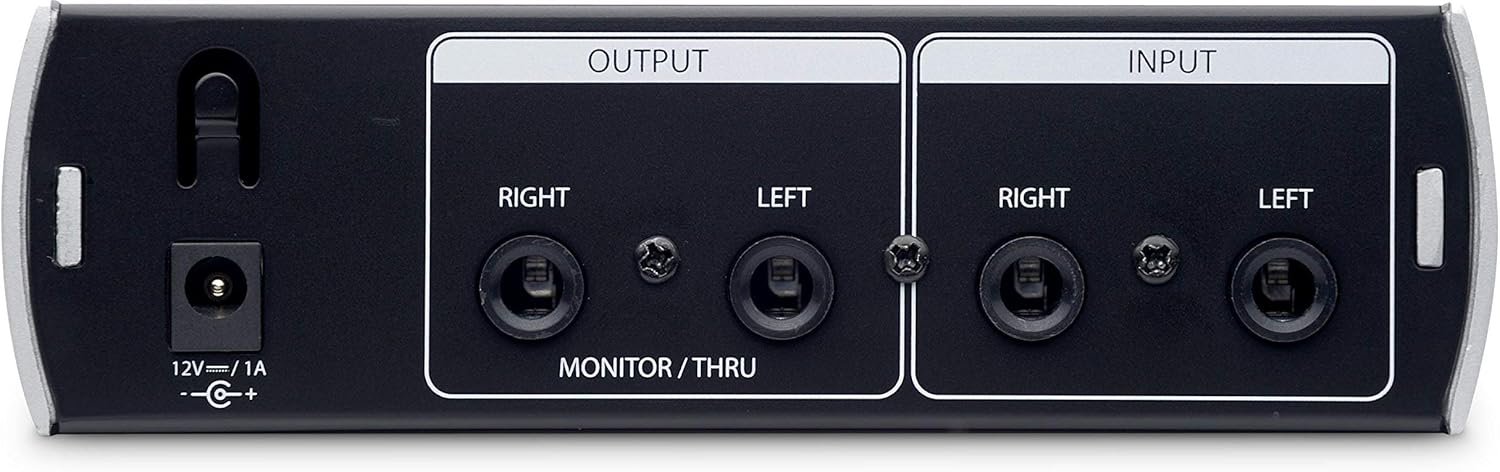
The rear panel includes the 12V DC power input, two balanced 1/4-inch Left and Right inputs for your audio source, and two balanced 1/4-inch Left and Right monitor/thru outputs. These outputs allow for daisy-chaining to another HP4 unit or connecting to studio monitors.
3.4. Connecting Your HP4
- การเชื่อมต่อไฟฟ้า: Connect the included 12V DC power supply to the HP4's power input on the rear panel. Plug the power supply into an appropriate AC outlet.
- อินพุตเสียง: Connect the Left and Right outputs from your audio interface, mixer, or other audio source to the HP4's balanced 1/4-inch Left and Right inputs on the rear panel.
- การเชื่อมต่อหูฟัง: Plug your headphones into any of the four 1/4-inch headphone outputs on the front panel.
- Monitor Output (Optional): If you wish to daisy-chain another HP4 or connect to studio monitors, use balanced 1/4-inch cables to connect the HP4's monitor/thru outputs to the inputs of the next device.
4. คู่มือการใช้งาน
4.1. การเปิด/ปิดเครื่อง
Once all connections are made, ensure the master Monitor Level knob is turned down before powering on. The HP4 does not have a dedicated power switch on the unit itself; it powers on when connected to the power supply and off when disconnected. Some power supplies may include an inline switch.
4.2. Adjusting Headphone Levels
Each of the four headphone outputs has an independent volume knob. Rotate the knob clockwise to increase the volume and counter-clockwise to decrease it. Advise users to start with low volume and gradually increase to a comfortable listening level.
4.3. Using the Mono Switch
การ โมโน switch on the front panel sums the stereo input signal to mono. This can be useful for checking phase compatibility or for monitoring a mono source across both ears of the headphones.
4.4. Monitor Level and Mute
การ ระดับการตรวจสอบ knob controls the overall output level of the balanced monitor/thru outputs on the rear panel. The ปิดเสียงมอนิเตอร์ button silences these outputs without affecting the headphone outputs. This is useful for quickly cutting monitor sound while maintaining headphone mixes.
5. การบำรุงรักษา
- การทำความสะอาด: Use a soft, dry cloth to clean the exterior of the HP4. Avoid using abrasive cleaners or solvents, as these can damage the finish.
- พื้นที่จัดเก็บ: When not in use for extended periods, store the HP4 in a cool, dry place, away from direct sunlight and extreme temperatures.
- การจัดการสายเคเบิล: ตรวจสอบให้แน่ใจว่าสายเคเบิลทั้งหมดจัดเรียงอย่างเป็นระเบียบและไม่ตึงเกินไป เพื่อป้องกันความเสียหายต่อขั้วต่อหรือตัวเครื่อง
6 การแก้ไขปัญหา
| ปัญหา | สาเหตุที่เป็นไปได้ | สารละลาย |
|---|---|---|
| ไม่มีเสียงจากหูฟัง |
|
|
| No sound from monitor outputs. |
|
|
| เสียงผิดเพี้ยนหรือมีเสียงรบกวน |
|
|
7. ข้อมูลจำเพาะ
- ช่องทางการรับชม: 4 stereo headphone outputs
- กำลังขับ: 130 mW ต่อช่องสัญญาณ
- ข้อมูลอินพุต: 2 x 1/4" TRS Balanced Line Inputs (Left/Right)
- เอาท์พุต: 2 x 1/4" TRS Balanced Monitor/Thru Outputs (Left/Right)
- เอาท์พุตหูฟัง: 4 x 1/4" TRS Stereo
- การควบคุม: 4 x Headphone Level, 1 x Monitor Level, Mono Switch, Monitor Mute Button
- ชั้นเสียง: -98 เดซิเบล
- พลัง: 12V DC / 1A (external power supply included)
- น้ำหนัก: 907 กรัม (ประมาณ 2 ปอนด์)
- ตัวถัง: Compact 1/3U rack-mount design
8. วิดีโอผลิตภัณฑ์
8.1. PreSonus HP4 Compact Headphone Ampไลเออร์โอเวอร์view
วิดีโอนี้ให้คำอธิบายที่กระชับview of the PreSonus HP4 Compact Headphone Amplifier, highlighting its features and typical use cases in a studio environment. It demonstrates the physical unit and its various controls and connections.
8.2. PreSonus HP4 4-Channel Compact Headphone Amplifier - Review
This video offers a detailed review of the PreSonus HP4, showcasing its build quality, functionality, and how it integrates into a professional audio setup. It covers the front and rear panel features and discusses its performance.
9. การรับประกันและการสนับสนุน
9.1. ข้อมูลการรับประกัน
The PreSonus HP4 comes with a one-year warranty from the date of purchase from an authorized dealer, applicable to the original purchaser only. Please retain your proof of purchase for warranty claims.
9.2. การสนับสนุนลูกค้า
For technical support, product registration, or additional information, please visit the official PreSonus webเว็บไซต์: www.presonus.com/supportคุณยังสามารถค้นหาคำถามที่พบบ่อยและฟอรัมชุมชนได้ที่นั่น