
1. บทนำ
The Extech Instruments HW30 HeatWatch is a multi-function stopwatch designed to provide essential environmental data alongside precise timing capabilities. This device displays digital up/down timer functions, current temperature, humidity, and calculates the heat index, which indicates how hot it feels when humidity is combined with the actual temperature. It is an ideal tool for monitoring conditions in various environments, particularly those with hot weather. Additional features include a 12/24-hour clock, a standard stopwatch, 30 lap/split memory, and a programmable alarm.
2. คุณสมบัติหลัก
- Multi-function stopwatch with digital display.
- Integrated up/down timer.
- แสดงอุณหภูมิแบบเรียลไทม์
- Real-time humidity display.
- Heat Index calculation for perceived temperature.
- 12/24-hour clock display.
- Stopwatch function with 30 lap/split memory.
- ฟังก์ชันตั้งโปรแกรมสัญญาณเตือน
3. เนื้อหาบรรจุภัณฑ์
ตรวจสอบว่าสินค้าทั้งหมดมีอยู่และอยู่ในสภาพดีเมื่อเปิดบรรจุภัณฑ์:
- HW30 HeatWatch Humidity and Temperature Stopwatch
- สายคล้องคอ
- 1 x Lithium Metal Battery (installed or separate)
- คู่มือการใช้งาน (คู่มือนี้)
4. สินค้าหมดview
The HW30 HeatWatch features a robust design with clearly labeled buttons for easy operation and a large LCD for clear readings.

รูปที่ 4.1 : ด้านหน้า view of the Extech HW30 HeatWatch, showing the display and control buttons.

รูปที่ 4.2: รายละเอียด view of the HW30 display, indicating humidity (50%), temperature (86°F), and heat index (88°).
4.1. การควบคุมและการแสดงผล
- ปุ่ม START/STOP: เริ่มและหยุดฟังก์ชันจับเวลา
- ปุ่มโหมด: Cycles through different operating modes (Time, Stopwatch, Humidity/Temperature/Heat Index, Alarm).
- ปุ่ม LAP/SPLIT/RESET: Records lap/split times or resets the stopwatch.
- ปุ่มเรียกคืน: Accesses stored lap/split memory.
- จอแสดงผล LCD: Shows time, measurements, and function indicators.
5. การตั้งค่า
5.1. การติดตั้งแบตเตอรี่
The HW30 HeatWatch requires one Lithium Metal battery for operation. The battery is typically included with the device.
- ค้นหาฝาครอบช่องใส่แบตเตอรี่ที่ด้านหลังของเครื่อง
- ใช้ไขควงขนาดเล็กหรือเหรียญเพื่อเปิดช่องใส่แบตเตอรี่
- Insert the Lithium Metal battery, ensuring correct polarity (+/-) as indicated inside the compartment.
- ปิดฝาช่องใส่แบตเตอรี่กลับเข้าที่และขันให้แน่น
บันทึก: ทิ้งแบตเตอรี่ที่ใช้แล้วอย่างรับผิดชอบตามข้อบังคับท้องถิ่น
6. คู่มือการใช้งาน
This section details the various functions and modes of the HW30 HeatWatch.
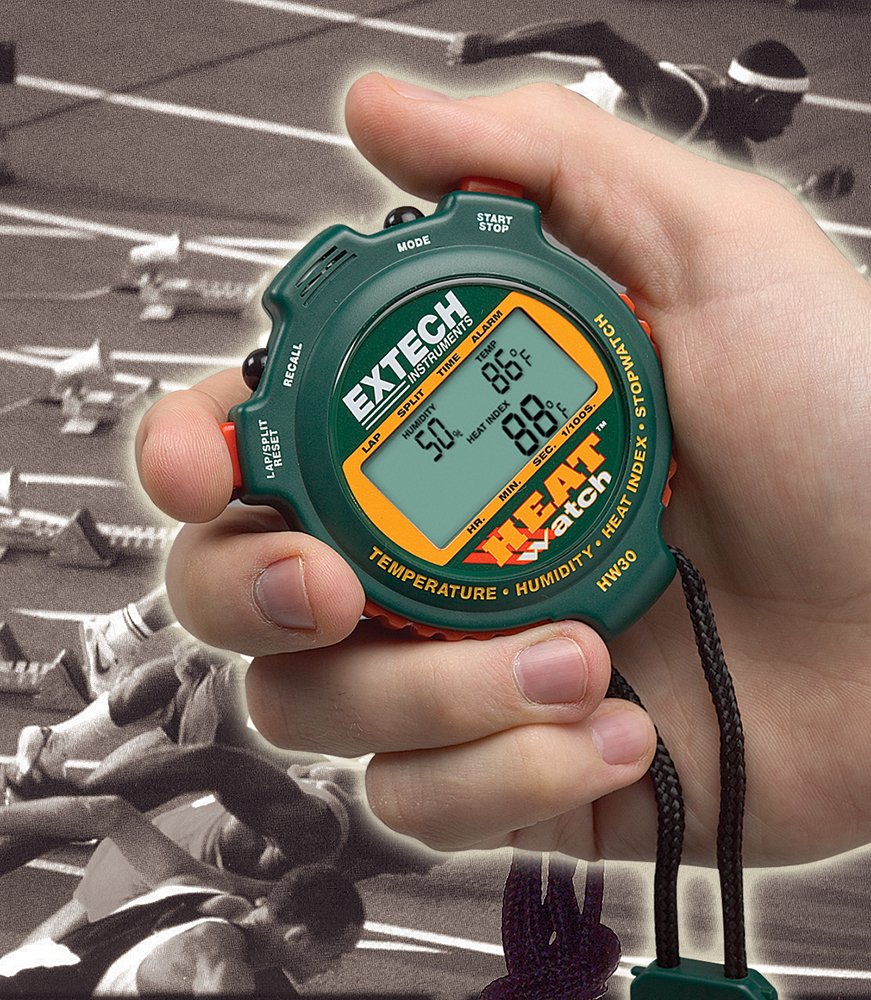
Figure 6.1: The HW30 HeatWatch being held, demonstrating its portable and ergonomic design for active use.
6.1. การใช้งานพื้นฐานและการเลือกโหมด
กดปุ่ม โหมด ปุ่มสำหรับสลับโหมดการแสดงผลต่อไปนี้:
- โหมดเวลา: Displays the current time (12 or 24-hour format).
- โหมดนาฬิกาจับเวลา: For timing events, including lap/split functions.
- Humidity/Temperature/Heat Index Mode: Shows environmental readings.
- โหมดปลุก: For setting and activating the programmable alarm.
6.2. การตั้งเวลาและวันที่
- ในโหมดเวลา ให้กดปุ่มค้างไว้ โหมด กดปุ่มค้างไว้จนกว่าตัวเลขบอกเวลาจะเริ่มกะพริบ
- ใช้ เริ่ม/หยุด ปุ่มสำหรับปรับการแสดงผลตัวเลขกระพริบ (ชั่วโมง นาที วินาที)
- กดปุ่ม รอบ/แยก/รีเซ็ต button to move to the next digit or setting (e.g., 12/24-hour format, date).
- เมื่อกำหนดค่าการตั้งค่าทั้งหมดแล้ว ให้กด โหมด button to exit setup.
6.3. Using the Stopwatch Functions
- Switch to Stopwatch Mode using the โหมด ปุ่ม.
- กด เริ่ม/หยุด เพื่อเริ่มจับเวลา
- กด รอบ/แยก/รีเซ็ต to record a lap or split time. The display will momentarily show the recorded time while the stopwatch continues to run in the background.
- กด เริ่ม/หยุด กดอีกครั้งเพื่อหยุดนาฬิกาจับเวลา
- หากต้องการดำเนินการต่อ ให้กด เริ่ม/หยุด. หากต้องการรีเซ็ต ให้กด รอบ/แยก/รีเซ็ต ขณะที่นาฬิกาจับเวลาถูกหยุดชั่วคราว
- To recall stored lap/split times, press the เรียกคืน button in Stopwatch Mode. Use รอบ/แยก/รีเซ็ต to scroll through memory.
6.4. Humidity, Temperature, and Heat Index Measurement
The HW30 automatically measures and displays humidity, temperature, and calculates the heat index in the dedicated mode.
- Switch to Humidity/Temperature/Heat Index Mode using the โหมด ปุ่ม.
- The display will show the current humidity percentage, temperature (in °F or °C), and the calculated heat index.
- Allow a few minutes for the sensors to stabilize and provide accurate readings, especially when moving the device between environments with different conditions.
6.5. การตั้งปลุก
- Switch to Alarm Mode using the โหมด ปุ่ม.
- กดปุ่มค้างไว้ โหมด กดปุ่มค้างไว้จนกว่าตัวเลขแสดงเวลาปลุกจะเริ่มกะพริบ
- ใช้ เริ่ม/หยุด button to adjust the flashing digit (hours, minutes).
- กดปุ่ม รอบ/แยก/รีเซ็ต ปุ่มสำหรับเลื่อนระหว่างชั่วโมงและนาที
- เมื่อตั้งเวลาปลุกที่ต้องการแล้ว ให้กดปุ่ม โหมด ปุ่มเพื่อยืนยัน
- หากต้องการเปิดหรือปิดสัญญาณเตือน ให้กดปุ่ม เริ่ม/หยุด button in Alarm Mode. An alarm icon will appear on the display when activated.
7. การบำรุงรักษา
7.1. การทำความสะอาด
- เช็ดตัวเครื่องด้วยผ้านุ่ม damp ผ้า ห้ามใช้สารทำความสะอาดที่มีฤทธิ์กัดกร่อนหรือตัวทำละลาย
- Ensure the device is dry before storage or further use.
7.2. การจัดเก็บ
- Store the HW30 in a cool, dry place away from direct sunlight and extreme temperatures.
- If storing for extended periods, it is recommended to remove the battery to prevent leakage.
7.3. การเปลี่ยนแบตเตอรี่
Replace the battery when the display becomes dim or the unit ceases to function. Refer to Section 5.1 for battery installation instructions.
8 การแก้ไขปัญหา
This section addresses common issues you might encounter with your HW30 HeatWatch.
| ปัญหา | สาเหตุที่เป็นไปได้ | สารละลาย |
|---|---|---|
| ไม่มีจอแสดงผลหรือจอแสดงผลมืด | Low or dead battery; Incorrect battery installation. | Replace the battery; Ensure battery is installed with correct polarity. |
| การวัดอุณหภูมิ/ความชื้นที่ไม่ถูกต้อง | Sensors not stabilized; Extreme environmental conditions. | Allow several minutes for the unit to acclimate to the environment; Ensure sensors are not obstructed. |
| นาฬิกาจับเวลาไม่ตอบสนอง | Unit in incorrect mode; Buttons stuck. | Cycle through modes to Stopwatch Mode; Check for any physical obstructions on buttons. |
| Heat Index reading seems off | Heat index calculation is based on specific algorithms and can vary slightly; Sensor acclimation. | Ensure temperature and humidity readings are stable; Understand that heat index is a calculated value. |
9. ข้อมูลจำเพาะ
Technical specifications for the Extech HW30 HeatWatch Humidity and Temperature Stopwatch:
| ข้อมูลจำเพาะ | ค่า |
|---|---|
| หมายเลขรุ่น | HW30 |
| ขนาดสินค้า | 3.1 x 2.6 x 0.8 นิ้ว (7.9 x 6.6 x 2.0 ซม.) |
| น้ำหนักสินค้า | 0.71 ออนซ์ (0.02 กิโลกรัม) |
| ประเภทแบตเตอรี่ | แบตเตอรี่ลิเธียมโลหะ 1 ก้อน (รวมอยู่ด้วย) |
| วัสดุ | พลาสติก |
| สี | สีเขียว |
| ผู้ผลิต | เอ็กซ์เทค |
| วันที่พร้อมใช้งานครั้งแรก | 20 เมษายน 2004 |
10. การรับประกันและการสนับสนุน
Extech Instruments products are designed for reliability and performance. For specific warranty information, please refer to the warranty card included with your product or visit the official Extech Instruments website. For technical support, troubleshooting assistance beyond this manual, or to inquire about replacement parts, please contact Extech Instruments customer service through their official channels.
คุณสามารถค้นหาข้อมูลเพิ่มเติมและทรัพยากรสนับสนุนได้ที่ Extech Instruments Brand Store on Amazon.