
D-Link DGS-1005D/B
D-Link DGS-1005D/B 5-Port Gigabit Unmanaged Plastic Desktop Switch
Model: DGS-1005D/B
1. บทนำ
The D-Link DGS-1005D/B is a 5-Port Gigabit Unmanaged Plastic Desktop Switch designed to provide high-speed network connectivity for your home or small office. Its plug-and-play design allows for quick and easy installation, enabling fast file transfers and smooth media streaming across up to five devices. This manual provides detailed instructions for setting up, operating, and maintaining your DGS-1005D/B switch.
2. เนื้อหาบรรจุภัณฑ์
โปรดตรวจสอบว่าแพ็คเกจของคุณมีรายการต่อไปนี้:
- 1x DGS-1005D Switch
- 4x ยางฟุต
- 1x CD-ROM with Product Documentation
- อะแดปเตอร์ไฟฟ้า 1x
- 1x ชุดติดตั้ง
- 1x คู่มือการติดตั้งอย่างรวดเร็ว
3. คุณสมบัติของผลิตภัณฑ์
- Energy Efficient Ethernet: Reduces energy consumption without sacrificing performance, contributing to lower power bills.
- Quiet and Economical Design: Features an innovative design that runs cool and quiet, making it an unobtrusive addition to any workspace.
- ความเร็วกิกะบิต: Creates a blazing fast network with five Gigabit Ethernet ports, providing high-speed wired connections for up to five PCs or other devices.
- การวินิจฉัยสายเคเบิล: Includes a function that notifies users of cable conditions through product LEDs, aiding in troubleshooting.
- การรับประกันตลอดอายุการใช้งานแบบจำกัด: Register and enjoy Limited Lifetime Warranty support from D-Link, a global leader in the industry.
4. สินค้าหมดview
4.1 แผงด้านหน้า

The front panel of the DGS-1005D/B switch features LED indicators for power and each of the five Gigabit Ethernet ports. These LEDs provide visual feedback on the connection status and activity of each port, allowing for quick monitoring of your network.
4.2 แผงด้านหลัง
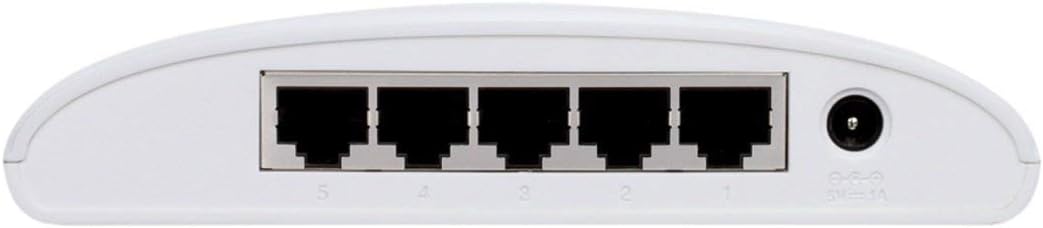
The rear panel houses the five Gigabit Ethernet ports (RJ45) for connecting your network devices and the power input jack. The ports are clearly numbered for easy identification and connection.
4.3 การออกแบบที่กะทัดรัด

The DGS-1005D/B features a compact and lightweight plastic desktop design, making it easy to place on any desk or shelf without taking up much space. Its unobtrusive form factor blends seamlessly into various environments.
5. การตั้งค่า
5.1 ก่อนที่คุณจะเริ่มต้น
- Ensure you have a stable power source available.
- Have standard Ethernet cables (Cat5e or Cat6 recommended for Gigabit speeds) ready for connecting your devices.
5.2 การเชื่อมต่อสวิตช์
- การจัดวาง: วางสวิตช์บนพื้นผิวที่เรียบและมั่นคง
- ติดแผ่นยางรองขา: Attach the four rubber feet to the bottom of the switch to prevent slipping and provide adequate ventilation.
- เชื่อมต่อพลังงาน: Connect the power adapter to the power input jack on the rear of the switch and then plug the adapter into a power outlet. The Power LED on the front panel should illuminate, indicating the switch is receiving power.
- เชื่อมต่ออุปกรณ์: Connect your network devices (e.g., computers, network-attached storage, gaming consoles) to any of the five Gigabit Ethernet ports using standard Ethernet cables. The corresponding port LEDs will illuminate when a connection is established and blink to indicate network activity.
- พร้อมใช้งาน: The switch is now ready for use. No software configuration is required due to its unmanaged design.
6. คู่มือการใช้งาน
The D-Link DGS-1005D/B is an unmanaged switch, meaning it operates on a plug-and-play basis without requiring any software configuration. Once connected to power and network devices, it automatically detects network speeds (10/100/1000 Mbps) and adjusts for compatibility, providing seamless data transfer. The switch intelligently manages traffic flow to ensure optimal performance for all connected devices without user intervention.
7. การบำรุงรักษา
To ensure optimal performance and longevity of your DGS-1005D/B switch, follow these maintenance guidelines:
- สิ่งแวดล้อม: Keep the switch in a well-ventilated area, away from direct sunlight, heat sources, and excessive moisture.
- การทำความสะอาด: ทำความสะอาดภายนอกสวิตช์เป็นระยะด้วยผ้านุ่มและแห้ง ห้ามใช้น้ำยาทำความสะอาดชนิดน้ำหรือสเปรย์
- การระบายอากาศ : Do not block the ventilation slots on the device, as this can lead to overheating.
- ของเหลว: หลีกเลี่ยงการทำของเหลวหกใส่อุปกรณ์
8 การแก้ไขปัญหา
If you encounter issues with your DGS-1005D/B switch, refer to the following common problems and solutions:
- ไม่มีไฟ LED แสดงสถานะ:
- ตรวจสอบให้แน่ใจว่าอะแดปเตอร์ไฟฟ้าเชื่อมต่อกับสวิตช์และเต้ารับไฟฟ้าที่ใช้งานได้แน่นหนา
- ตรวจสอบว่าปลั๊กไฟใช้งานได้หรือไม่ โดยลองเสียบอุปกรณ์อื่นเข้าไป
- Port LED Not Illuminating:
- ตรวจสอบว่าสายอีเธอร์เน็ตเสียบเข้ากับพอร์ตของสวิตช์และอุปกรณ์ที่เชื่อมต่ออย่างแน่นหนาแล้ว
- ตรวจสอบให้แน่ใจว่าอุปกรณ์ที่เชื่อมต่อเปิดอยู่และอะแดปเตอร์เครือข่ายทำงานได้อย่างถูกต้อง
- ลองใช้สายเคเบิลอีเทอร์เน็ตอื่นเพื่อตัดสายเคเบิลที่ผิดปกติออกไป
- Test with a different device to confirm the port's functionality.
- ความเร็วเครือข่ายช้า:
- ตรวจสอบให้แน่ใจว่าอุปกรณ์และสายเคเบิลที่เชื่อมต่อทั้งหมดรองรับ Gigabit Ethernet (แนะนำให้ใช้สาย Cat5e หรือ Cat6 เพื่อความเร็วระดับ Gigabit)
- ตรวจสอบปริมาณการรับส่งข้อมูลเครือข่ายที่มากเกินไป หรือแอปพลิเคชันที่ใช้แบนด์วิธสูงบนอุปกรณ์ที่เชื่อมต่ออยู่
- Verify your internet service provider's speed if the issue is related to internet access.
9. ข้อมูลจำเพาะ
| คุณสมบัติ | คำอธิบาย |
|---|---|
| ยี่ห้อ | ดีลิงค์ |
| หมายเลขรุ่น | DGS-1005D/B |
| จำนวนพอร์ต | 5 |
| ประเภทอินเทอร์เฟซ | RJ45 |
| อัตราการถ่ายโอนข้อมูล | 1000 เมกะไบต์ต่อวินาที (กิกะบิตอีเธอร์เน็ต) |
| วัสดุตัวเรือน | พลาสติก |
| เล่มที่tage | 230 โวลต์ |
| น้ำหนักสินค้า | 0.01 ออนซ์ |
| ขนาดสินค้า (กxยxส) | 4.53 x 5.59 x 1.18 นิ้ว |
| อุปกรณ์ที่รองรับ | เดสก์ท็อป |
| ภาษา | ภาษาอังกฤษ |
| ยูพีซี | 790069252679 |
10. การรับประกันและการสนับสนุน
The D-Link DGS-1005D/B 5-Port Gigabit Unmanaged Plastic Desktop Switch comes with a Limited Lifetime Warranty, providing peace of mind regarding its quality and durability. For technical support, product registration, or warranty claims, please refer to the contact information provided in the included product documentation or visit the official D-Link support webไซต์ โปรดเก็บใบเสร็จรับเงินไว้เพื่อยืนยันการรับประกัน
Ask a question about this manual
Ask about setup, troubleshooting, compatibility, parts, safety, or missing instructions. Manuals+ will review the question and use this page’s manual context to help answer it.