
การแนะนำ
This manual provides detailed instructions for the setup, operation, maintenance, and troubleshooting of your Panasonic DMR-E55S Progressive Scan DVD Recorder / Player. This unit allows for recording, editing, and storage on DVD-RAM and DVD-R discs, as well as playback of DVD, CD, CD-R, and MP3-on-CD formats. It features progressive scan video output for enhanced picture quality.
การตั้งค่า
1. การแกะกล่องและการตรวจสอบส่วนประกอบ
นำส่วนประกอบทั้งหมดออกจากบรรจุภัณฑ์อย่างระมัดระวัง ตรวจสอบให้แน่ใจว่ามีส่วนประกอบต่อไปนี้:
- Panasonic DMR-E55S DVD Recorder / Player unit
- รีโมทคอนโทรล
- สายไฟ
- สายสัญญาณเสียง/วิดีโอ (อาจแตกต่างกันไปตามภูมิภาค)
เก็บวัสดุบรรจุภัณฑ์ทั้งหมดไว้สำหรับการขนส่งหรือบริการในอนาคต
2. การเชื่อมต่อกับโทรทัศน์ของคุณ
The DMR-E55S offers multiple connection options for video and audio output. Choose the best option supported by your television for optimal quality.

รูปที่ 1 : ด้านหน้า view of the Panasonic DMR-E55S unit. This image shows the disc tray, display panel, and front controls.
- เอาท์พุตวิดีโอส่วนประกอบ (Y, Pb, Pr): For the highest quality analog video connection, connect component video cables (green, blue, red) from the DMR-E55S to your TV's component video input.
- เอาต์พุต S-Video: Connect an S-video cable for improved video quality over composite video.
- เอาต์พุตวิดีโอคอมโพสิต (RCA สีเหลือง): Connect a composite video cable for standard video quality.
- สัญญาณเสียงออก (สาย RCA สีแดง/ขาว): Connect red and white RCA cables from the DMR-E55S to your TV's audio input or an audio receiver.
- เอาต์พุตเสียงดิจิตอลออปติคอล: For digital surround sound, connect an optical cable to a compatible audio receiver.
- เอาต์พุตโคแอกเชียล RF: Connect a coaxial cable from the RF OUT jack on the DMR-E55S to your TV's antenna/cable input.

Figure 2: Rear panel of the Panasonic DMR-E55S, illustrating the various audio and video input/output ports for connection to a television or audio system.
3. การเชื่อมต่อไฟฟ้า
Connect the power cord to the AC IN terminal on the rear of the unit, then plug the other end into a standard electrical outlet.
4. การเปิดเครื่องครั้งแรกและการตั้งค่าพื้นฐาน
Press the power button on the unit or remote control. Follow any on-screen prompts for initial setup, such as language selection and automatic channel search if using the RF input.
คำแนะนำการใช้งาน
1. การเล่นแผ่นดิสก์
The DMR-E55S supports playback of DVD-Video, DVD-R, DVD-RAM, CD, CD-R/RW, and MP3-on-CD discs.
- กดปุ่ม OPEN/CLOSE เพื่อเปิดถาดใส่แผ่นดิสก์
- Place a disc on the tray with the label side facing up.
- Press OPEN/CLOSE again to close the tray. Playback will usually begin automatically.
- ใช้รีโมทคอนโทรลสำหรับฟังก์ชั่นการเล่น เช่น เล่น หยุดชั่วคราว หยุด กรอไปข้างหน้า และกรอถอยหลัง

Figure 3: Front panel of the DMR-E55S during operation, showing the illuminated display with disc information.
2. Recording to DVD-RAM and DVD-R
The unit supports recording to both DVD-RAM and DVD-R discs. DVD-RAM discs allow for repeated recording and editing, while DVD-R discs are suitable for permanent recordings.
- Insert a Recordable Disc: Place a blank DVD-RAM or DVD-R disc into the disc tray.
- เลือกแหล่งสัญญาณเข้า: Use the INPUT SELECT button on the remote or front panel to choose the desired input source (e.g., Line 1, Line 2, Tuner).
- การบันทึกด้วยสัมผัสเดียว: Press the RECORD button to start recording immediately. Press it again to stop.
- โหมดการบันทึก: The unit offers 4-mode recording (XP/SP/LP/EP) and Flexible Recording (FR) to optimize recording quality and duration based on available disc space.
- การบันทึกเวลา: Access the timer recording menu to schedule recordings at specific times and channels.
- Finalizing DVD-R Discs: After recording to a DVD-R disc, it must be finalized through the menu system to be playable on other DVD players. DVD-RAM discs do not require finalization.
3. Time Slip Features
The DMR-E55S includes Time Slip functions, primarily for DVD-RAM discs:
- Chasing การเล่น: Begin watching a program from the beginning while it is still being recorded.
- Playlist Playback: Create custom playlists from recorded content on DVD-RAM discs.
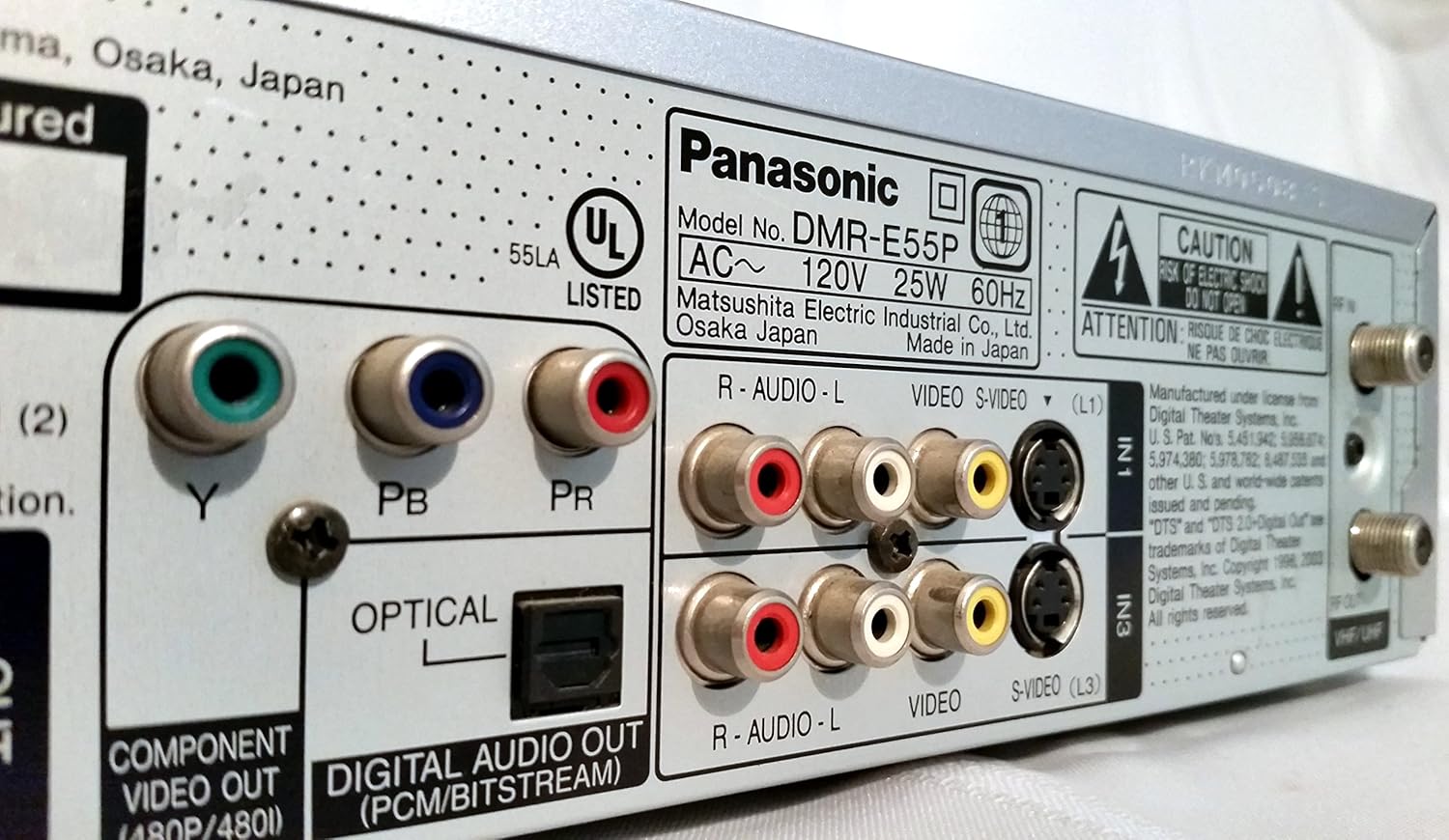
Figure 4: The remote control for the DMR-E55S, showing various buttons for playback, recording, and menu navigation.
การซ่อมบำรุง
1. การทำความสะอาดตัวเครื่อง
เช็ดทำความสะอาดภายนอกตัวเครื่องด้วยผ้าแห้งเนื้อนุ่ม ห้ามใช้น้ำยาทำความสะอาดชนิดเหลวหรือสเปรย์ เพราะอาจทำให้พื้นผิวหรือชิ้นส่วนภายในเสียหายได้
2. การดูแลแผ่นดิสก์
จับแผ่นดิสก์ที่ขอบเพื่อป้องกันรอยนิ้วมือและรอยขีดข่วน เก็บแผ่นดิสก์ไว้ในกล่องเมื่อไม่ได้ใช้งาน ทำความสะอาดแผ่นดิสก์ที่สกปรกด้วยผ้าเนื้อนุ่มที่ไม่เป็นขุย โดยเช็ดจากตรงกลางออกไปด้านนอก
การแก้ไขปัญหา
หากคุณพบปัญหาใดๆ กับวิทยุสื่อสาร DMR-E55S โปรดดูปัญหาและวิธีแก้ไขที่พบบ่อยต่อไปนี้:
| ปัญหา | สาเหตุที่เป็นไปได้ / วิธีแก้ไข |
|---|---|
| ไม่มีไฟฟ้า | ตรวจสอบให้แน่ใจว่าสายไฟเชื่อมต่อกับอุปกรณ์และเต้ารับไฟฟ้าที่ใช้งานได้แน่นหนา |
| ไม่มีภาพหรือเสียง | Verify all audio and video cables are correctly connected between the DMR-E55S and your TV/audio system. Check that your TV is set to the correct input source. |
| แผ่นดิสก์ไม่เล่น | Check if the disc is inserted correctly (label side up). Ensure the disc type is supported by the unit. Clean the disc if it is dirty or scratched. |
| บันทึกไม่ได้ | Ensure a recordable DVD-RAM or DVD-R disc is inserted. Check if the disc has sufficient free space. Verify the input source is correctly selected. |
| Recorded DVD-R disc won't play on other players | The DVD-R disc may not have been finalized. Finalize the disc through the unit's menu system. |
| รีโมตคอนโทรลไม่ทำงาน | ตรวจสอบแบตเตอรี่ในรีโมทคอนโทรลและเปลี่ยนแบตเตอรี่หากจำเป็น ตรวจสอบให้แน่ใจว่าไม่มีสิ่งกีดขวางระหว่างรีโมทและเซ็นเซอร์อินฟราเรดของเครื่อง |
ข้อมูลจำเพาะ
| คุณสมบัติ | คำอธิบาย |
|---|---|
| ยี่ห้อ | พานาโซนิค |
| ชื่อรุ่น | ดีเอ็มอาร์-อี55เอส |
| ประเภทสื่อ | CD, DVD (DVD-RAM, DVD-R, DVD-Video, CD-R/RW, MP3-on-CD) |
| คุณสมบัติพิเศษ | การสแกนแบบก้าวหน้า |
| ปณิธาน | 720 x 480 พิกเซล |
| ความละเอียดเอาท์พุทวิดีโอ | 480p |
| ประเภทขั้วต่อ | RF, A/V (Composite), S-video, Component Video (Y, Pb, Pr), Optical Digital Audio |
| โหมดเอาต์พุตเสียง | Surround (Dolby Digital, DTS compatible via optical output) |
| รูปแบบเสียงที่รองรับ | DVD-Audio (2-channel), DVD-Video with surround play, MP3 |
| การเข้ารหัสวิดีโอ | MPEG-2 (Hybrid Variable Bit Rate) |
| Analog Video Format | กทส. |
| โหมดการบันทึก | XP, SP, LP, EP, FR (Flexible Recording) |
| ขนาด (กว้าง x สูง x ลึก) | 16.9" x 3.13" x 11.2" |
| น้ำหนักสินค้า | 8.58 ปอนด์ |
| อุปกรณ์เสริมที่รวมอยู่ด้วย | รีโมทคอนโทรล |
ข้อมูลการรับประกัน
This Panasonic DMR-E55S unit comes with a one-year warranty covering parts and labor from the date of purchase. Please retain your proof of purchase for warranty claims. For detailed terms and conditions, refer to the warranty card included with your product or contact Panasonic customer support.
สนับสนุน
หากต้องการความช่วยเหลือเพิ่มเติม การสนับสนุนด้านเทคนิค หรือสอบถามบริการ โปรดติดต่อฝ่ายสนับสนุนลูกค้าของ Panasonic คุณสามารถดูข้อมูลติดต่อได้ที่เว็บไซต์อย่างเป็นทางการของ Panasonic webไซต์หรือในเอกสารประกอบที่มาพร้อมกับผลิตภัณฑ์ของคุณ


