
การแนะนำ
The RCA CC9370 AutoShot Digital MiniDV Camcorder is designed for recording high-quality digital video and capturing still images. Featuring a 680,000-pixel CCD for clear resolution, a swiveling 3-inch color LCD monitor for flexible operation, and a 10x optical/250x digital zoom lens, this camcorder is equipped for various recording scenarios. Built-in image stabilization helps maintain steady footage. This manual provides essential information for setting up, operating, maintaining, and troubleshooting your camcorder.
มีอะไรอยู่ในกล่อง
ตรวจสอบว่ามีรายการทั้งหมดอยู่ในแพ็คเกจ:
- RCA CC9370 AutoShot Digital MiniDV Camcorder
- สาย USB
- คู่มือการใช้งาน (เอกสารนี้)
สินค้าเกินview

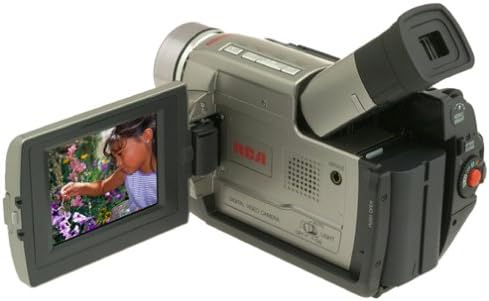
The RCA CC9370 camcorder shown with its 3-inch LCD screen open, displaying a vibrant image. This view highlights the camcorder's compact design and the flexibility of the swiveling screen.
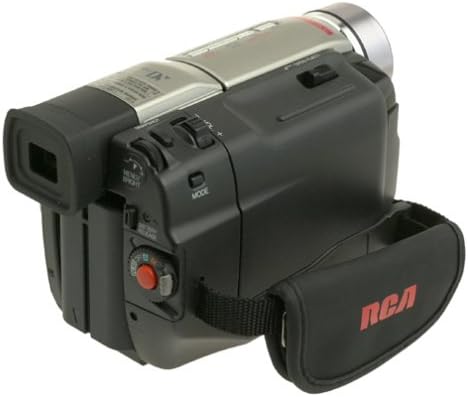
ด้านหนึ่ง view of the RCA CC9370 camcorder, illustrating the ergonomic hand strap for secure gripping and various control buttons for easy access during operation.
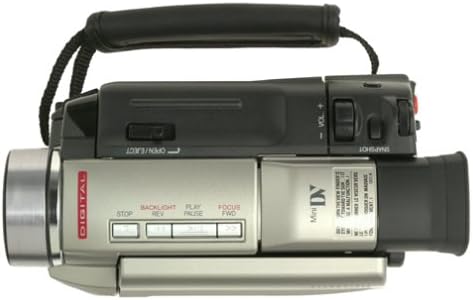
This image provides a top-down perspective of the camcorder, showcasing the lens barrel and the layout of the top-mounted controls, including zoom and recording buttons.
ด้านหน้า view of the RCA CC9370 camcorder, focusing on the lens assembly and the front panel design, which includes the microphone and other indicators.
การตั้งค่า
1. การติดตั้งแบตเตอรี่
- ตรวจสอบให้แน่ใจว่าปิดกล้องถ่ายวิดีโอแล้ว
- ค้นหาช่องใส่แบตเตอรี่ที่ด้านหลังของกล้องวิดีโอ
- ใส่แบตเตอรี่เข้าไปในช่องจนกระทั่งได้ยินเสียงคลิกและเข้าที่อย่างแน่นหนา
- ในการถอด ให้กดคันโยกปลดแบตเตอรี่แล้วเลื่อนแบตเตอรี่ออก
2. MiniDV Tape Insertion
- Open the tape compartment door, typically located on the top or side of the camcorder.
- Insert a MiniDV cassette with the window facing outwards and the tape reel side oriented correctly.
- Gently push the cassette until it seats properly, then close the compartment door.
3. เปิดเครื่องครั้งแรก
- Connect the AC adapter or ensure the battery is charged.
- Set the POWER switch to the 'ON' or 'CAMERA' position.
- เปิดจอ LCD หรือดึงออก viewfinder to activate the display.
การใช้งานกล้องวิดีโอ
การบันทึกวิดีโอ
- เปิดเครื่อง: Turn the camcorder on and select 'CAMERA' mode.
- กรอบ: Use the 3-inch swiveling LCD monitor or viewFinder เพื่อจัดกรอบภาพของคุณ
- ซูม: Use the zoom lever to adjust between 10x optical and 250x digital zoom.
- ระบบป้องกันภาพสั่นไหว: The built-in image stabilization system helps reduce camera shake during recording.
- เริ่ม/หยุดการบันทึก: Press the RECORD button to begin and end recording.
Digital Still Camera Function
The camcorder can capture still images at 640 x 480 resolution. These images are stored directly onto the digital videotape. To transfer them to a PC, use the provided serial cable and compatible software.
Digital Effects and Scene Transitions
Enhance your recordings with various digital effects and scene transitions. Options may include classic film, strobe, slow shutter, and black and white. Refer to the on-screen menu for selection and application.
การเล่นซ้ำ
- โหมดการเล่น: Switch the camcorder to 'VCR' or 'PLAY' mode.
- การควบคุม: Use the PLAY, STOP, REWIND, and FAST FORWARD buttons to navigate your recordings.
- Playback Zoom: Utilize the playback zoom feature for enhanced viewing of recorded footage.
- Random-Assemble Editing: This feature allows you to mark and recall up to eight favorite scenes for review or basic editing.
Connecting to a Computer or TV
การเชื่อมต่อกับคอมพิวเตอร์
- For Still Images: Use the provided serial cable to connect the camcorder to your PC. Install any necessary drivers or software for image transfer.
- สำหรับวิดีโอ: The camcorder includes an IEEE 1394 (FireWire) port and cable for digital video transfer to compatible computers and editing devices.
การเชื่อมต่อกับโทรทัศน์
Connect the camcorder to a television using either standard analog AV connectors (RCA composite) or an S-video connector for video playback on a larger screen.
การซ่อมบำรุง
- การทำความสะอาดเลนส์: Use a soft, lint-free cloth specifically designed for optical lenses to gently clean the camcorder lens. Avoid harsh chemicals.
- ทำความสะอาดร่างกาย: เช็ดตัวกล้องวิดีโอด้วยผ้าแห้งเนื้อนุ่ม ห้ามใช้สารละลายหรือน้ำยาทำความสะอาดที่มีฤทธิ์กัดกร่อน
- การดูแลแบตเตอรี่ Store batteries in a cool, dry place. Fully charge batteries before extended use and discharge them periodically if storing for long periods.
- การเก็บเทป: Store MiniDV tapes in their cases, away from direct sunlight, high temperatures, and strong magnetic fields.
- การจัดเก็บข้อมูลทั่วไป: When not in use, store the camcorder in a protective bag or case to prevent dust and damage.
การแก้ไขปัญหา
| ปัญหา | สาเหตุที่เป็นไปได้ | สารละลาย |
|---|---|---|
| กล้องวิดีโอไม่สามารถเปิดได้ | Battery is discharged or not inserted correctly. AC adapter not connected. | Charge the battery or ensure it is properly seated. Connect the AC adapter. |
| ไม่มีภาพปรากฏบนหน้าจอ LCD/viewตัวค้นหา | จอแอลซีดี/viewfinder not open or activated. Power saving mode. | Open the LCD or pull out the viewfinder. Check power saving settings. |
| คุณภาพวิดีโอไม่ดี | Lens is dirty. Insufficient lighting. Image stabilization off. | Clean the lens. Record in better lighting conditions. Ensure image stabilization is active. |
| Cannot transfer still images to PC. | Incorrect cable connection. Missing drivers/software. | Ensure serial cable is securely connected. Install necessary drivers and software. |
ข้อมูลจำเพาะ
| คุณสมบัติ | รายละเอียด |
|---|---|
| ยี่ห้อ | อาร์ซีเอ |
| หมายเลขรุ่น | ซีซี9370 |
| เทคโนโลยีโฟโต้เซนเซอร์ | ซีซีดี |
| ความละเอียดในการจับภาพวิดีโอ | 480p |
| ความละเอียดภาพนิ่ง | 640 x 480 (stored on videotape) |
| ขนาดหน้าจอ | 3 Inches (swiveling color LCD) |
| ซูมออปติคอล | 10 เท่า |
| ซูมดิจิตอล | 250 เท่า |
| ระบบป้องกันภาพสั่นไหว | ดิจิตอล |
| เทคโนโลยีการเชื่อมต่อ | RCA (Analog AV), S-Video, IEEE 1394 (FireWire), Serial (for still images) |
| อายุการใช้งานแบตเตอรี่โดยเฉลี่ย | 1 ชั่วโมง |
| น้ำหนักสินค้า | 3.18 ปอนด์ |
| สี | สีดำ,สีเงิน |
ข้อมูลการรับประกัน
This RCA CC9370 AutoShot Digital MiniDV Camcorder comes with a warranty covering 1 year for parts and 90 days for labor from the date of purchase. Please retain your proof of purchase for warranty claims. This warranty covers manufacturing defects and does not cover damage caused by misuse, accidents, or unauthorized modifications.
สนับสนุน
For further assistance, technical support, or warranty service, please refer to the contact information provided with your product packaging or visit the official RCA support website. Ensure you have your model number (CC9370) and proof of purchase available when contacting support.