
การแนะนำ
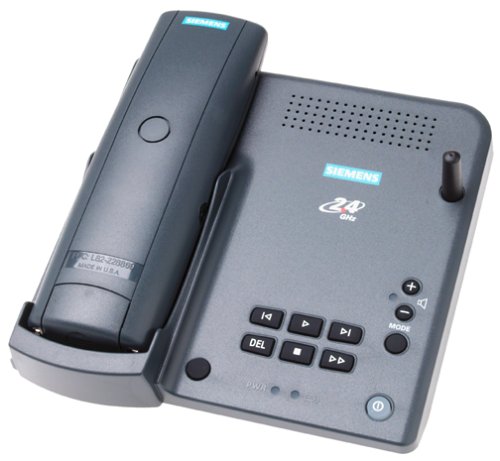
The Siemens Gigaset 2415 is a 2.4 GHz digital spread spectrum cordless phone system designed for clear communication and enhanced security. This system includes a base unit with a built-in digital answering machine and supports multiple handsets for expanded use throughout your home or office. Key features include Caller ID/Call Waiting, a comprehensive call directory, and an intercom function between handsets.
การตั้งค่า
- การเชื่อมต่อชุดฐาน: Connect the base unit to a standard telephone jack and a power outlet. Ensure the base unit is placed in a central location for optimal range.
- การชาร์จโทรศัพท์มือถือ: Place the cordless handset into its charging cradle. The handset battery requires an initial charge of approximately 12-15 hours before first use.
- Adding Additional Handsets: The Gigaset 2415 system is expandable up to four handsets (Siemens model 2400). Each additional handset requires its own charging cradle connected to a standard power outlet. No additional wiring to the telephone jack is needed for expansion handsets. Refer to the separate manual for the Gigaset 2400 handset for specific registration instructions.
คำแนะนำการใช้งาน
เกินเครื่องview
รูปที่ 1: Siemens Gigaset 2415 Cordless Handset. This image displays the front of the handset, showing the earpiece, LCD screen, navigation buttons, function keys, and numeric keypad.
The handset features a three-line backlit graphical display for easy navigation and information viewing. Below the display are various function keys and a numeric keypad.
- แสดง: Shows caller ID information, menu options, and system status.
- ปุ่มเมนู: Accesses the handset's main menu for settings and features.
- ปุ่มพูดคุย: โทรออกหรือรับสาย
- END Button: Ends a call or exits a menu.
- CONF Button: Used for conference calls or specific feature activation.
- แป้นตัวเลข (0-9, *, #): For dialing numbers and entering data.
- ปุ่ม INT: Initiates an intercom call to another registered handset.
- ปุ่ม PWR: Power on/off the handset (long press) or access specific power-related functions.
การโทรออกและรับสาย
- ในการโทรออก: กดปุ่ม พูดคุย กดปุ่ม จากนั้นกดหมายเลข หรืออีกวิธีหนึ่งคือ กดหมายเลขก่อนแล้วค่อยกดปุ่ม พูดคุย.
- เพื่อรับสาย: กดปุ่ม พูดคุย ปุ่มเมื่อโทรศัพท์ดัง
- วิธีวางสาย: กดปุ่ม จบ ปุ่ม.
ID ผู้โทรและสายเรียกซ้อน
The handset display shows the caller's name and number (if available) for incoming calls. The system stores a 50-call history log, allowing you to review missed or received calls. A 120-entry call directory can be customized for frequently dialed numbers.
เครื่องตอบรับอัตโนมัติแบบดิจิตอล
The integrated digital answering machine offers approximately 22 minutes of recording time. It supports four customizable outgoing greetings. Messages can be accessed directly from any registered Gigaset handset or remotely using a touch-tone phone.
- การบันทึกคำทักทาย: Access the answering machine menu via the handset to record or select an outgoing greeting.
- ข้อความที่กำลังเล่น: Use the handset's menu to play back recorded messages.
- การเข้าถึงระยะไกล: Dial your home number from an external phone and follow the voice prompts to access messages. A security PIN may be required.
ฟังก์ชัน Intercom
If you have multiple registered handsets, you can use the intercom feature to communicate between them. Press the อินที button and select the desired handset to call.
การปรับแต่ง
Each handset can be customized with individual ring tones, a personalized directory, and an extension name and number for easy identification within the system.
การซ่อมบำรุง
- การทำความสะอาด: เช็ดหูฟังและฐานด้วยผ้านุ่มๆamp ผ้า. หลีกเลี่ยงการใช้สารเคมีที่รุนแรงหรือน้ำยาทำความสะอาดที่มีฤทธิ์กัดกร่อน
- การดูแลแบตเตอรี่ For optimal battery life, allow the handset to fully discharge occasionally before recharging. If the phone will not be used for an extended period, remove the batteries.
- การจัดวาง: Keep the base unit away from sources of interference such as microwave ovens, Wi-Fi routers, and other 2.4 GHz devices.
การแก้ไขปัญหา
| ปัญหา | วิธีแก้ปัญหาที่เป็นไปได้ |
|---|---|
| No dial tone or poor sound quality (static, choppy voice) |
|
| Limited range or "out of range" signal |
|
| Base unit emits a humming noise |
|
| เครื่องตอบรับอัตโนมัติไม่บันทึกข้อความ |
|
ข้อมูลจำเพาะ
- แบบอย่าง: SC2415SYSG
- ความถี่: สเปกตรัมกระจายดิจิทัล 2.4 GHz
- Answering Machine Memory: ประมาณ 22 นาที
- ประวัติหมายเลขผู้โทร: 50 สาย
- Call Directory: 120 รายการ
- เพิ่มขยาย: Up to 4 handsets (Siemens Gigaset 2400)
- ขนาดสินค้า : 6.4 x 6.7 x 3.4 นิ้ว
- น้ำหนักสินค้า: 13.8 ออนซ์
- ผู้ผลิต: ซีเมนส์
การรับประกันและการสนับสนุน
This Siemens Gigaset 2415 phone system comes with a one-year warranty from the date of purchase. For technical assistance, warranty claims, or further information, please contact Siemens customer support. Refer to the packaging or the official Siemens webเว็บไซต์นี้ใช้สำหรับตรวจสอบรายละเอียดการติดต่อล่าสุด