
Intermatic TN811C
Intermatic TN811C Programmable Lamp และตัวจับเวลาเครื่องใช้ไฟฟ้า
คู่มือการใช้งาน
การแนะนำ
The Intermatic TN811C Programmable Lamp and Appliance Timer is designed to provide automated control over your lighting and appliances, enhancing safety, security, and convenience. This timer features two on/off settings per day and utilizes non-removable trippers for programming. It has a 15 Amp capacity, suitable for controlling various electrical devices, and includes a manual override switch for immediate control.
ข้อมูลด้านความปลอดภัย
- อ่านคำแนะนำทั้งหมดก่อนใช้งาน
- ห้ามจุ่มตัวตั้งเวลาลงในน้ำหรือให้โดนความชื้นมากเกินไป
- ห้ามใช้ไฟฟ้าเกินพิกัดสูงสุด 15 โวลต์ Amps หรือ 1750 วัตต์
- ตรวจสอบให้แน่ใจว่าได้เสียบตัวตั้งเวลาเข้ากับเต้ารับที่มีสายดินอย่างแน่นหนาแล้ว
- Unplug the timer from the outlet before cleaning or performing any maintenance.
- This timer is intended for indoor use only. If used in a protected outdoor location, ensure it is shielded from direct weather exposure.
สินค้าเกินview
The Intermatic TN811C timer is a compact, white, cube-shaped device with a central rotating dial for time setting and programming. It features a standard two-prong plug for wall outlets and a three-prong receptacle for the appliance to be controlled.

ด้านหน้า view of the Intermatic TN811C timer, showing the central programming dial and manual override switch.
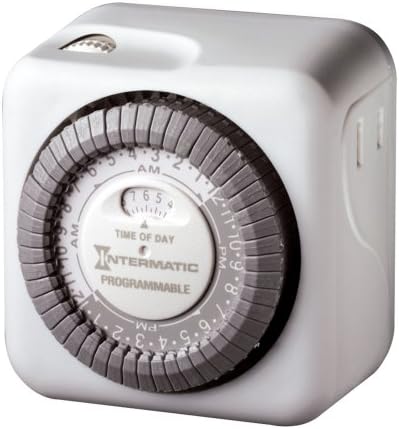
ด้านข้าง view of the Intermatic TN811C timer, illustrating the appliance receptacle.
ส่วนประกอบหลัก:
- หน้าปัดเวลา: The large central dial used to set the current time and program on/off cycles.
- ทริปเปอร์: Small, non-removable pins around the time dial that are pushed in or pulled out to set specific on/off times.
- สวิตช์แทนที่ด้วยตนเอง: A small switch, typically located on the top or side, allowing you to manually turn the connected appliance on or off, overriding the programmed settings.
- เต้ารับเต้าเสียบ: The socket on the timer where you plug in your lamp หรือเครื่องใช้
การตั้งค่า
- ตั้งเวลาปัจจุบัน: Rotate the large central dial clockwise until the current time aligns with the "TIME OF DAY" indicator arrow. The dial is marked with AM and PM hours.
- เวลาเปิด/ปิดโปรแกรม: The dial has small, non-removable trippers around its circumference. Each tripper represents a specific time interval. To set an "ON" time, push the corresponding tripper(s) inward. To set an "OFF" time, pull the corresponding tripper(s) outward. The timer allows for 48 on/off settings per day.
- Plug in Timer: Insert the timer into a standard 120V wall outlet.
- เชื่อมต่ออุปกรณ์: เสียบปลั๊กลamp or appliance you wish to control into the outlet receptacle on the timer.
การดำเนินงาน
การทำงานอัตโนมัติ:
Once the current time is set and the on/off trippers are programmed, the timer will automatically turn the connected appliance on and off according to your settings. The dial will continuously rotate, advancing the time.
การแทนที่ด้วยตนเอง:
The timer is equipped with a manual override switch. This switch allows you to temporarily turn the connected appliance on or off, regardless of the programmed settings. Be aware that on some models, using the manual override switch may advance the internal time setting. If you notice the programmed times shifting, re-verify and reset the current time as needed.
การซ่อมบำรุง
- การทำความสะอาด: Unplug the timer from the wall outlet. Wipe the exterior with a soft, dry cloth. Do not use liquid cleaners or abrasive materials.
- พื้นที่จัดเก็บ: If storing the timer for an extended period, unplug it and keep it in a cool, dry place away from direct sunlight.
- การตรวจสอบ: Periodically inspect the timer and its cord for any signs of damage, such as frayed wires or cracked casinก. หากพบความเสียหายให้หยุดใช้งานและเปลี่ยนเครื่องใหม่
การแก้ไขปัญหา
- เครื่องใช้ไฟฟ้าไม่เปิด/ปิดตามเวลาที่ตั้งโปรแกรมไว้:
- ตรวจสอบให้แน่ใจว่าได้เสียบตัวตั้งเวลาเข้ากับเต้ารับที่มีกระแสไฟฟ้าอย่างแน่นหนาแล้ว
- Verify the appliance is properly plugged into the timer and is in working order.
- Check that the current time is correctly set on the dial.
- Confirm that the ON/OFF trippers are correctly pushed in or pulled out for the desired times.
- Ensure the manual override switch is not in a position that is overriding the programmed settings.
- Timer dial is not moving:
- Ensure the timer is plugged into a live electrical outlet.
- The timer may be faulty and require replacement.
- Appliance turns ON/OFF at incorrect times:
- Re-check the current time setting and adjust if necessary.
- Re-verify the positions of the ON/OFF trippers.
- If the manual override was recently used, it might have advanced the time. Reset the current time.
ข้อมูลจำเพาะ
| คุณสมบัติ | รายละเอียด |
|---|---|
| หมายเลขรุ่น | TN811C |
| ยี่ห้อ | อินเตอร์แมติก |
| สี | สีขาว |
| วัสดุ | พลาสติก |
| น้ำหนักสินค้า | 6.4 ออนซ์ |
| ขนาดสินค้า | 3 x 5 x 7 นิ้ว |
| จำนวนการตั้งค่า | 48 on/off settings per day |
| ระดับไฟฟ้า | 15 Amps; 1750 Watts |
| ยูพีซี | 785577061424, 078275047532 |
การรับประกันและการสนับสนุน
ข้อมูลการรับประกัน:
The Intermatic TN811C Programmable Lamp and Appliance Timer comes with a รับประกันจำกัด 1 ปีการรับประกันนี้ครอบคลุมข้อบกพร่องด้านวัสดุและฝีมือการผลิตภายใต้การใช้งานปกติ โปรดเก็บหลักฐานการซื้อไว้เพื่อขอรับสิทธิ์การรับประกัน
การสนับสนุนลูกค้า:
For technical assistance, troubleshooting beyond this manual, or warranty inquiries, please visit the official Intermatic website or contact their customer service department. You can often find contact information and additional resources on the manufacturer's webเว็บไซต์หรือผ่านทางร้านค้าปลีกที่คุณซื้อผลิตภัณฑ์
เยี่ยมชม Intermatic Store on Amazon สำหรับข้อมูลเพิ่มเติม
Ask a question about this manual
Ask about setup, troubleshooting, compatibility, parts, safety, or missing instructions. Manuals+ will review the question and use this page’s manual context to help answer it.