
1. สินค้าหมดview
The Motorola 53727 Earpiece with Microphone is a compact and comfortable accessory designed for use with compatible Motorola two-way radios. It allows for discreet communication, fitting conveniently in either ear, and features a microphone that clips to your collar or sleeve for easy access.
This unit delivers clear audio, even in noisy environments, and includes a Push-to-Talk (PTT) button for seamless communication without needing to handle your radio directly.
คุณสมบัติหลัก:
- Earpiece for Motorola 2-way radios.
- Compatible with Spirit GT, Spirit GT+, and various TalkAbout series radios.
- Enables communication without holding the radio.
- Comfortable earbud design.
- Tiny push-to-talk microphone clips to collar or sleeve.
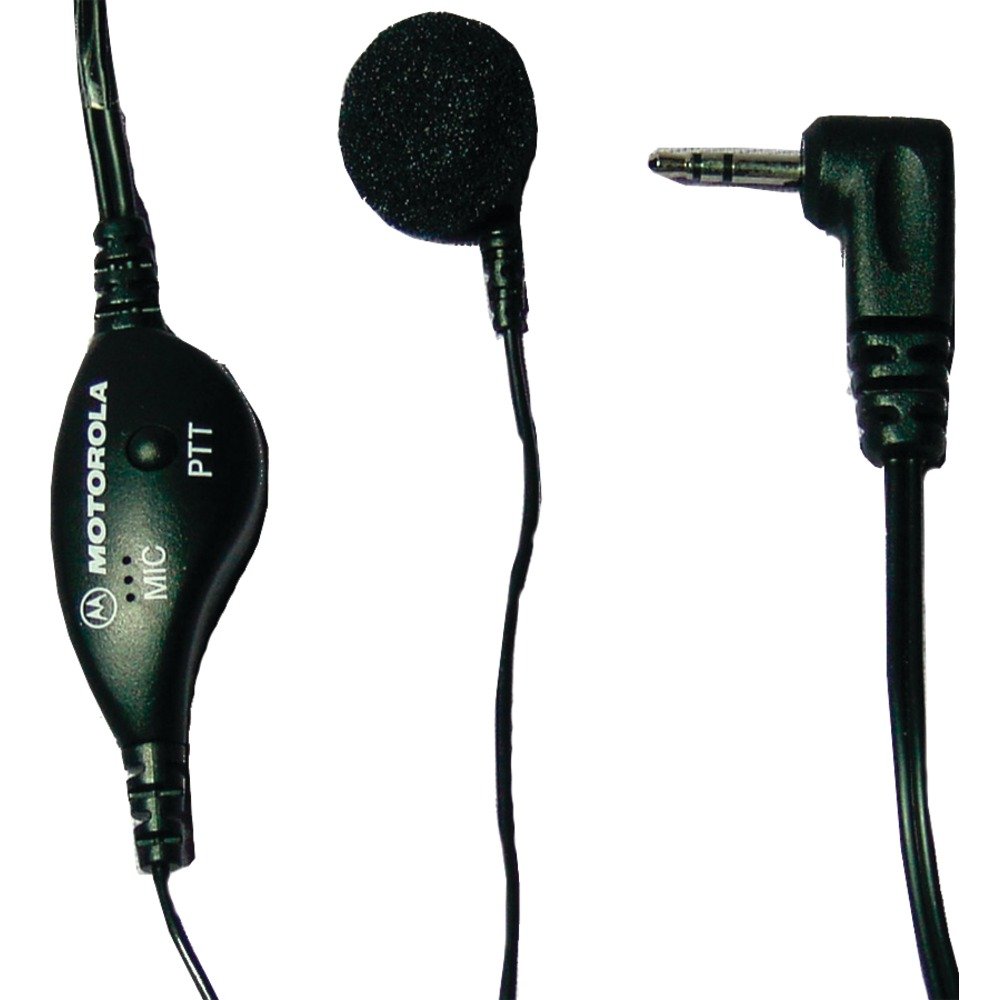
Image 1.1: Motorola 53727 Earpiece with Microphone. This image shows the compact design of the earpiece and its integrated microphone.
2. การตั้งค่าและการติดตั้ง
Follow these steps to properly set up and install your Motorola 53727 Earpiece with Microphone:
- Identify the Radio Port: Locate the single pin accessory port on your compatible Motorola two-way radio. This is typically on the side of the radio.
- เชื่อมต่อหูฟัง: Carefully insert the earpiece's connector into the radio's accessory port. Ensure it is fully seated for a secure connection.
- จัดวางหูฟังให้อยู่ในตำแหน่งที่เหมาะสม: Place the earbud comfortably into either ear. Adjust its position until it feels secure and provides clear audio.
- หนีบไมโครโฟน: Attach the tiny push-to-talk microphone to your collar or sleeve. Position it close to your mouth for optimal voice transmission.
ความเข้ากันได้:
The Motorola 53727 Earpiece is compatible with the following Motorola two-way radio series:
- Spirit GT and Spirit GT+ Series
- Talkabout 270, 280, T289 Series
- Talkabout T5100, T5200, T5300, T5320, T5400, T5410, T5420, T5600, T5620, T5700, T5720, T5800, T5820 Series
- Talkabout T6200, T6210, T6220, T6250, T6300, T6320, T6400 Series
- Talkabout T7200 Series
- FR50, FR60 Radios

Image 2.1: Talkabout Accessory Compatibility Chart. This chart provides a visual guide to compatible radio models for Motorola accessories.

ภาพที่ 2.2: อดีตample of a compatible Motorola two-way radio.

ภาพที่ 2.3: อดีตอีกคนample of a compatible Motorola two-way radio.
3. คู่มือการใช้งาน
Using your Motorola 53727 Earpiece with Microphone is straightforward:
- การฟัง: Once connected, audio from your two-way radio will be directed to the earpiece. Ensure your radio's volume is set to an appropriate level for clear listening.
- การส่งสัญญาณ (กดเพื่อพูด): To speak, press and hold the Push-to-Talk (PTT) button located on the microphone unit. Speak clearly into the microphone. Release the PTT button when you are finished speaking to return to receive mode.
The earpiece allows for hands-free communication, enabling you to talk and listen without needing to remove the radio from your belt or pocket.

Image 3.1: Close-up of the earpiece and microphone unit, highlighting the PTT button.
4. การบำรุงรักษาและการดูแล
To ensure the longevity and optimal performance of your Motorola 53727 Earpiece with Microphone, follow these maintenance guidelines:
- การทำความสะอาด: Gently wipe the earpiece and microphone with a soft, damp cloth. Avoid using harsh chemicals or abrasive cleaners. Ensure the earpiece is dry before connecting it to your radio.
- พื้นที่จัดเก็บ: When not in use, store the earpiece in a clean, dry place, away from extreme temperatures and direct sunlight. Avoid tangling the cable.
- การจัดการ: Do not pull on the cable to disconnect the earpiece from the radio. Always grasp the connector itself. Avoid bending or twisting the cable excessively.
5 การแก้ไขปัญหา
If you encounter issues with your earpiece, refer to the following common troubleshooting steps:
- ไม่มีเสียงหรือระดับเสียงต่ำ:
- Ensure the earpiece connector is fully inserted into the radio's port.
- Check the volume level on your two-way radio.
- Test the earpiece with another compatible radio if available, or test the radio with another accessory to isolate the issue.
- ไมโครโฟนไม่ส่งสัญญาณ:
- Confirm the PTT button is being pressed and held firmly while speaking.
- ตรวจสอบให้แน่ใจว่าวางไมโครโฟนในตำแหน่งที่ถูกต้องและไม่มีสิ่งกีดขวาง
- Verify the earpiece is fully connected to the radio.
- การเชื่อมต่อไม่ต่อเนื่อง:
- Check the earpiece cable for any visible damage or kinks.
- ตรวจสอบให้แน่ใจว่าขั้วต่อสะอาดและไม่มีเศษสิ่งสกปรก
If these steps do not resolve the issue, please refer to the "Support and Warranty" section for further assistance.
6. ข้อมูลจำเพาะ
| คุณสมบัติ | รายละเอียด |
|---|---|
| ยี่ห้อ | บริษัท โมโตโรล่า โซลูชั่นส์ |
| หมายเลขรุ่น | 53727 |
| สี | สีดำ |
| การวางตำแหน่งหู | ในหู |
| ฟอร์มแฟกเตอร์ | ในหู |
| การควบคุมเสียงรบกวน | ไม่มี |
| น้ำหนักสินค้า | 0.5 ออนซ์ |
| เทคโนโลยีการเชื่อมต่อ | มีสาย |
| แจ็คหูฟัง | แจ็ค 2.5 มม. |
| คุณสมบัติของสายเคเบิล | Push to Talk Microphone |
| ระดับความต้านทานต่อน้ำ | ทนน้ำ |
| ประเภทการควบคุม | Push To Talk ไมโครโฟน |
| อุปกรณ์ที่รองรับ | Spirit GT, Spirit GT+, Talkabout 270, 280, T289, T5100, T5200, T5300, T5320, T5400, T5420, T6200, T6300, T6400, T7200 Series, FR50, FR60 |
7. การรับประกันและการสนับสนุน
ข้อมูลการรับประกัน:
This Motorola 53727 Earpiece with Microphone comes with a รับประกัน 90 วัน ตั้งแต่วันที่ซื้อสินค้า
หมายเหตุสำคัญ: The warranty does not cover misuse of the product. Please ensure proper handling and care as outlined in this manual.
การสนับสนุนลูกค้า:
For technical assistance, warranty claims, or further inquiries, please contact Motorola Solutions customer support. Refer to your product packaging or the official Motorola Solutions webเว็บไซต์สำหรับข้อมูลการติดต่อล่าสุด
คุณยังสามารถเยี่ยมชม ร้านจำหน่ายผลิตภัณฑ์ Motorola บน Amazon สำหรับข้อมูลผลิตภัณฑ์และทรัพยากรเพิ่มเติม